Contents
If you’re running Facebook Lead Ads, your cost per lead is definitely one of the most important metrics to keep an eye on.
Facebook charges based on impressions or views. Therefore, when you run lead ads, your goal is to get as many relevant people as possible to engage with your ad and fill out your lead form.
If only a small number of people respond, your cost per lead goes up, making lead acquisition expensive. If it gets too high, generating leads that way can be pointless.
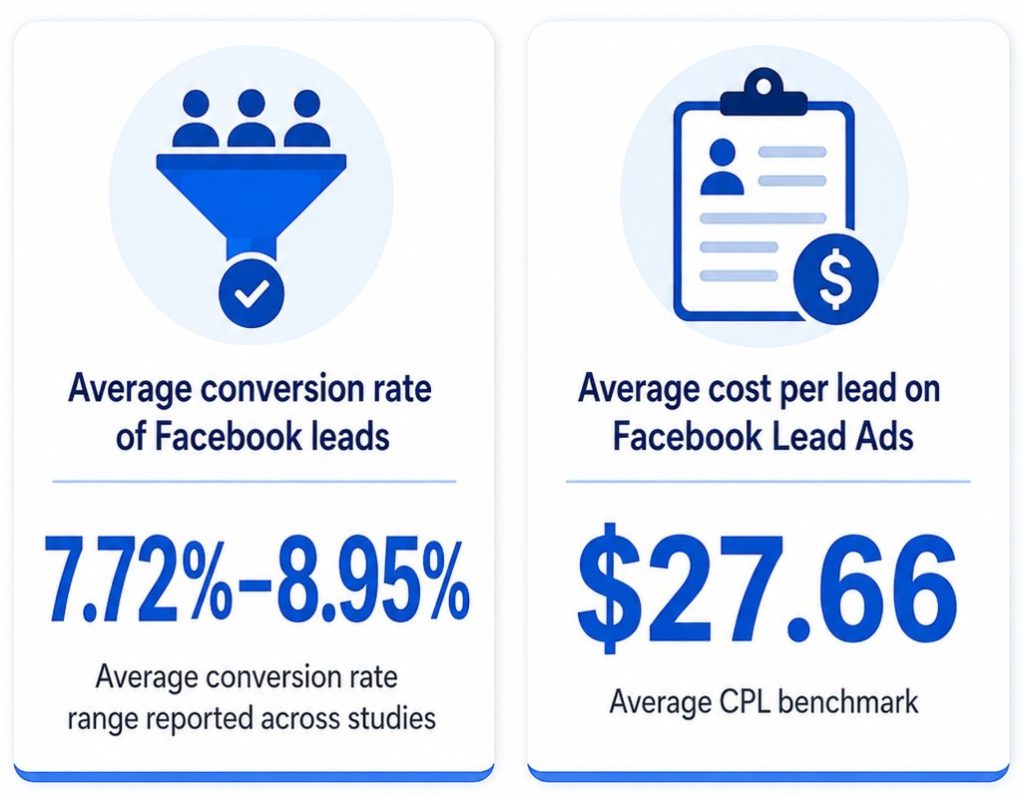
That’s because not every lead who fills out your form will become a customer. According to studies, the average conversion rate of Facebook leads sits at 7.72% to 8.95%.
And bear in mind that the average cost per lead on Facebook lead Ads is around $27.66.
The good news is that you can improve your Cost Per Leads with the right strategy.
So, how do you avoid draining your ad budget just to generate a handful of leads?
In this article, we’ll cover everything you need to know about Cost Per Lead in Facebook Lead Ads and how to make your campaigns efficient.
Let’s first understand Cost Per Lead and how to calculate it.
What is Cost Per Lead (CPL) and how to calculate it
Cost Per Lead measures exactly how much it costs you to acquire a single lead through a paid marketing campaign – in this case, Facebook Lead Ads.
When you run lead ads on Facebook, the platform typically charges you based on impressions, or the number of people who see your ad. For example, if 100 people view your ad and only one person fills out your form, your cost per lead is the total amount Facebook charged you for those 100 impressions.
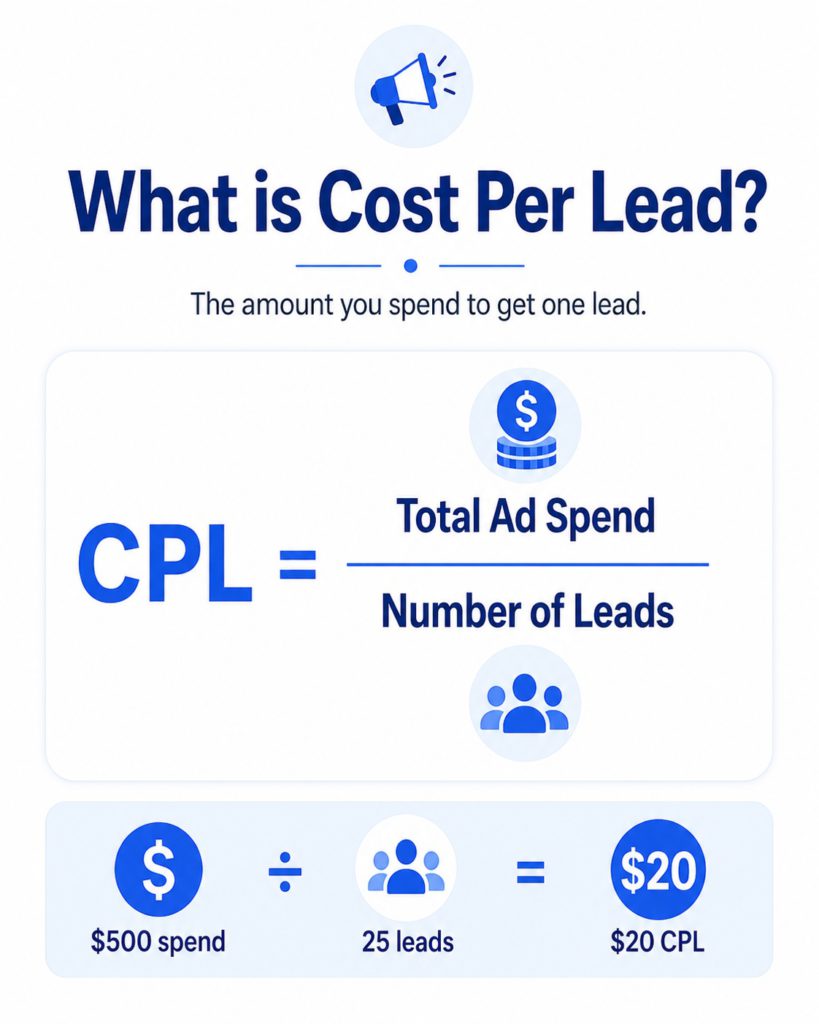
The formula to calculate CPL is straightforward. Just divide your total ad spend by the total number of leads generated during that period.
Cost Per Lead (CPL) = Total Ad Spend/Total Number of Leads Generated
Let’s suppose, you spent $1,000 on Facebook Ads this month and it resulted in 50 people filling out your lead form. Your CPL is $20.
What is a lead
A lead is someone who has shown interest in your offer and shared their contact information, such as their phone number or email address. A lead is not a paying customer yet.
With Facebook Lead Ads, a lead is captured when someone fills out and submits the Instant Form attached to your ad.
Now that we know what CPL is and how to calculate it, let’s discuss ways to minimise it.
Your real CPL problem isn’t always strictly tied to Meta Ads Manager. A $10 lead can become expensive if your team takes too long to respond, misses the enquiry, or fails to follow up. Your goal is to not just track cost per lead, but also cost per contacted lead, cost per qualified lead, and cost per customer.
Improving the lead journey is a tried and tested way to lower your Facebook Lead Ads CPL is to improve the full lead journey. You’ll want to focus on who sees your ad, what message they see, what creative gets their attention, how easy the form is to complete, and how quickly you respond after they submit it.
With that said, here are five ways to minimise your Facebook Ads Cost Per Lead.
1. Reach the right audience instead of focusing on cheap leads
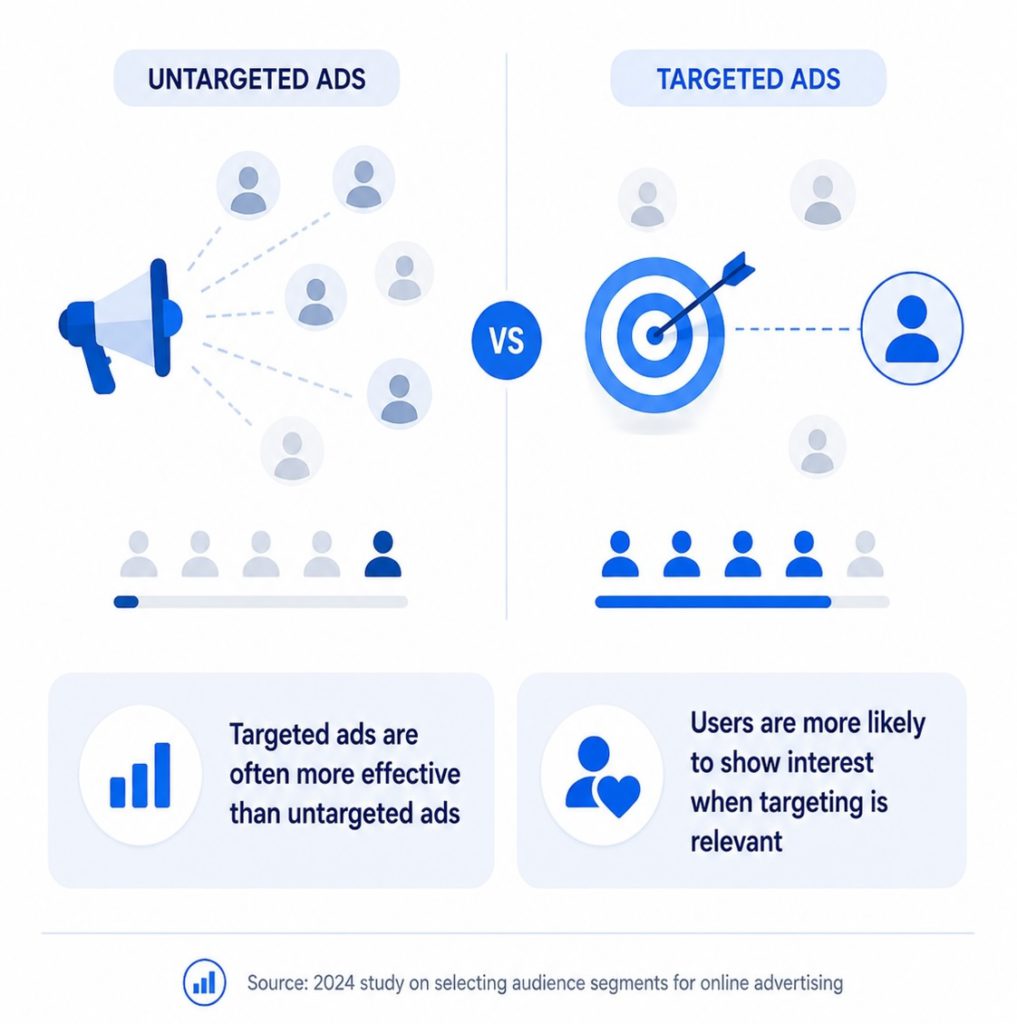
Getting your targeting right is much more than creating a buyer persona and choosing the right demographics, interests, or locations. Today, this also includes helping Meta understand who your actual customers are and giving it the right signals to find more people like them.
Smart targeting also includes device targeting. Since more than 98% of users use Facebook from their mobile phone, it’s important that your ad is optimised for mobile devices as well.
Here’s how you build effective targeting:
Build a clear ideal customer profile (ICP)
Before launching your campaign, it’s very important that you define your Ideal Customer Profile (ICP). You must understand who you want to reach and who you want to avoid.
Your ICP should include details such as:
- Who your best customers are
- Where they are located
- What problems they have
- What services they need
- How urgent their need is
- What budget range they may have
- What makes them likely to convert
For example, if you are running lead ads for your real estate listings, your audience could include first-time buyers, property investors, homeowners looking to sell, or tenants looking to upgrade. Each of these groups needs a different message.
A first-time buyer may care about affordability and guidance. A property investor may worry more about returns. A homeowner looking to sell may want to focus on valuation and speed. If you target all of them with the same message, your results may suffer.
Understanding your ICP clearly lets you use Meta’s targeting options more effectively. This may include:
- Location targeting
- Demographic targeting
- Interest-based targeting
- Behaviour-based targeting
- Custom audiences
- Lookalike audiences
- Retargeting audiences
Use Meta Conversions API
Even if you already have customers, building an ICP often starts with educated guesswork. You may have a rough idea of who needs your service. However, when you test those assumptions in real campaigns, the results can be very different from what you expected. This is where Meta Conversions API comes in.
With Meta Conversions API, you can send better data back to Meta and help it understand which leads actually convert, not just which people fill out your form.
If Meta only sees that someone filled out a form, it may optimise your campaign for more form submissions. But if you send stronger signals, such as qualified leads, booked calls, purchases, or closed deals, Meta has a better chance of finding people similar to your best customers.
With Meta Conversions API synced to your system (or CRM), you can send Facebook data beyond what happened inside Facebook.
This helps Meta understand which leads actually matter to your business and allows it to find more people who are likely to convert, not just submit a form.
Test and refine your audience
Even with a strong tracking, targeting is not something you set once and forget. Different audiences can respond very differently to the same ad. What works for one group may not work for another. Therefore, always test your audience, adjust your ICP and feed Meta updated information through Conversions API.
2. Make your offer clear before people click
Once you have your targeting right, the next important part is designing messaging that makes your target audience stop, pay attention, and decide.
The average click-through rate of (CTR) of Facebook lead Ads sits at only 2.50% to 2.53%. You must ensure when your ads target the right audience, it also encourage them to engage.
The messaging part includes your:
- Ad copy
- Headline
- Offer
- Call-to-action
- Landing message or lead form intro
The mistake many businesses make is talking too much about themselves. They describe their service, features, or company instead of speaking directly to the customer’s problem.
For example, instead of saying:
“We provide plumbing services in your area.”
A stronger message would be:
“Fix leaks before they turn into expensive repairs?”
To get your messaging right, first understand what resonates with your audience. Ask questions like:
- What problem are they trying to solve?
- What outcome do they want?
- What are they worried about?
- What would make them trust your business?
- What offer would make them feel it is worth sharing their details?
Optimise your landing page
If you are sending people to your site instead of using Facebook Instant Forms, your landing page plays a major role in your CPL. Your landing page is where interested people decide whether to submit their details.
Even if a lot of people click your ad, only a handful can fill out your form if your landing page isn’t designed correctly. As a result, your cost per lead goes up.
To improve your landing page, make sure the headline matches the promise in your ad, the offer is clear within the first few seconds, the page loads quickly, and the form is easy to find and submit.
3. Design scroll-stopping ads that make the right people click
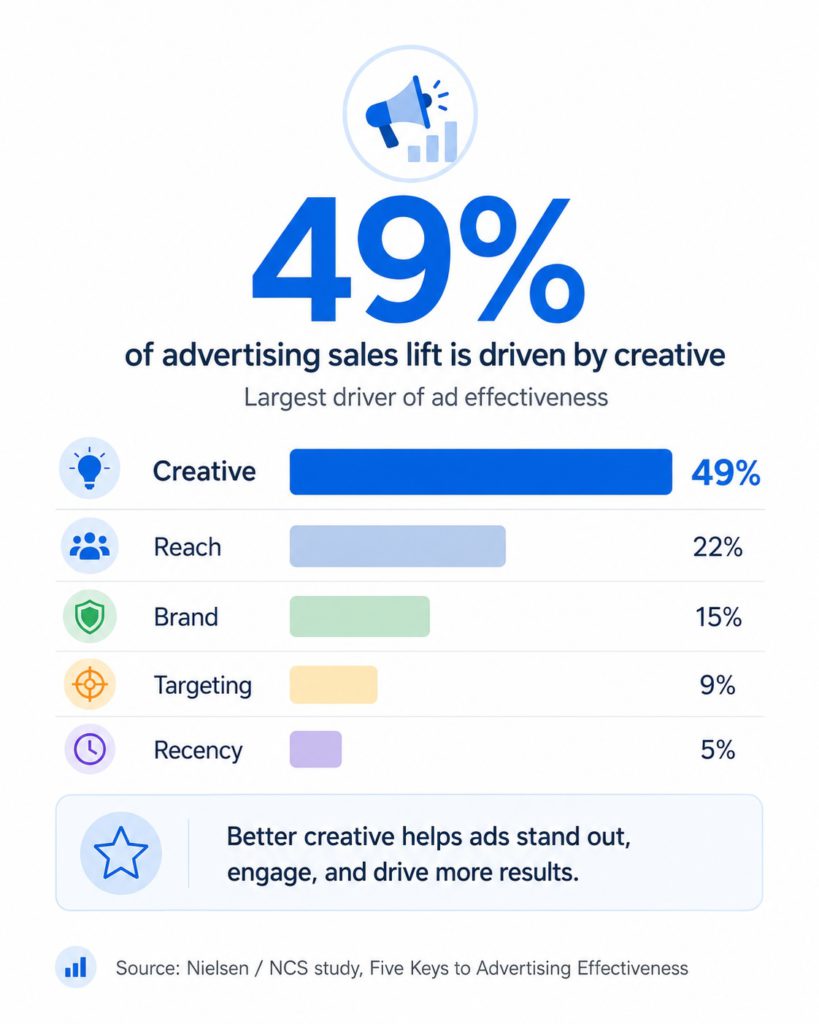
Sometimes, even with the right audience and a clear message, your CPL can still rise if your creative does not make people stop scrolling.
When you’ve composed the right message for the right people, the next important thing is to design creative that supports the message. The image, video, headline, and copy should all work together to communicate one clear idea.
For example, if your offer is a free quote, free consultation, discount, demo, or guide, that value should be easy to understand within the first few seconds when a lead sees your ad. Good creative plays a huge role in making that happen.
How to optimise your creative
Good creative should quickly answer who the ad is for, what problem it solves, and why should the prospect act now.
To optimise your creative, test different angles such as:
- Pain-point-based creatives
- Before-and-after creatives
- Customer testimonial creatives
- Offer-led creatives
- Problem-solution creatives
- Short video explainers
- Simple image ads with clear text
Keep in mind, you’re not just testing random designs here. Your goal is to learn which angle makes the right people stop, click, and submit your form.
Watch your creative before creative fatigue increases your CPL
Creative fatigue happens when the people see the same type of ad too many times. When it happens, people stop paying attention to ads. As a result, your click-through rate drops, engagement declines, and CPL increases.
You can usually detect creative fatigue by watching for signs like:
- CPL increasing over time
- Click-through rate dropping
- Frequency going up
- Engagement going down
- Cost per click increasing
- The same ad performing worse than before
For example, if your ad was generating leads at $8 each and now it is generating leads at $18 each, but your targeting and budget have not changed much, creative fatigue could be one reason.
How to deal with creative fatigue
To fix creative fatigue, consider refreshing the image or video, changing the opening line or hook, rotating multiple creatives instead of relying on one ad, and pausing weak or generic creatives and keep testing new ones.
Do not refresh creatives randomly in panic. Watch the numbers first. If CPL is rising, CTR is falling, and frequency is increasing, then it may be time to consider new creative variations.
More importantly, don’t wait until your ad completely stops working. Monitor creative performance regularly and refresh your ads before fatigue wastes your budget.
4. Choose ad settings that balance volume and quality
Even if your messaging and targeting are strong, the wrong ad settings can come with friction, causing people to leave without filling out your form. However, at the same time, you have to be mindful about not bringing low quality leads which will eventually end up wasting your resources.
The goal is to find the right balance.
You want your form to be simple enough that people complete it, but intentional enough that your team does not waste effort on low-quality leads.
Here are the main ad settings that can help.
Use Instant Forms
Instant Forms allow people to submit their details directly inside Facebook without leaving the app.
You can set this up in your Meta Ads Manager when creating a lead campaign. Choose Leads as your campaign objective, then select Instant Forms as the place where you want to collect leads.
This can help lower CPL because it removes extra steps. The target audience does not need to visit a website, wait for a page to load, or manually type in all their details. In many cases, basic information such as name, email, or phone number may already be filled in.
The setback is that easy forms can also attract low-intent leads. Some people may submit the form without thinking too much.
To minimise this, keep the form simple, but add one or two useful questions that help you understand whether the lead is relevant.
Choose the right form type
When creating an Instant Form, Meta gives you different form type options. The two most useful ones for most lead ads are usually More Volume and Higher Intent.
You can choose this inside the Instant Form editor at the ad level.
More Volume is designed to make the form easier to complete. This can help lower CPL because more people are likely to submit the form.
Higher Intent adds an extra review step before the person submits their details. This may reduce the number of submissions, but it can improve the quality of leads because people have to confirm their information before sending it.
The trade-off with More Volume is that you may get more weak leads, while Higher Intent may cause your CPL to rise because fewer people complete the form. To minimise this, test both form types and compare response rate, appointment rate, and customer conversion rate.
Use Lead Filters or Conditional Logic
Lead Filters, also known as Conditional Logic, help you filter people based on their answers. You can usually set this up inside the Instant Form editor while adding custom questions.
For example, if you only serve customers in a specific city, you can ask people to choose their location. If someone selects an area you do not serve, you can filter them out.
You can use filters for things like:
- Location
- Budget
- Service needed
- Timeline
- Customer type
- Level of interest
This helps reduce poor-quality leads because people who clearly do not match your criteria are less likely to enter your sales process.
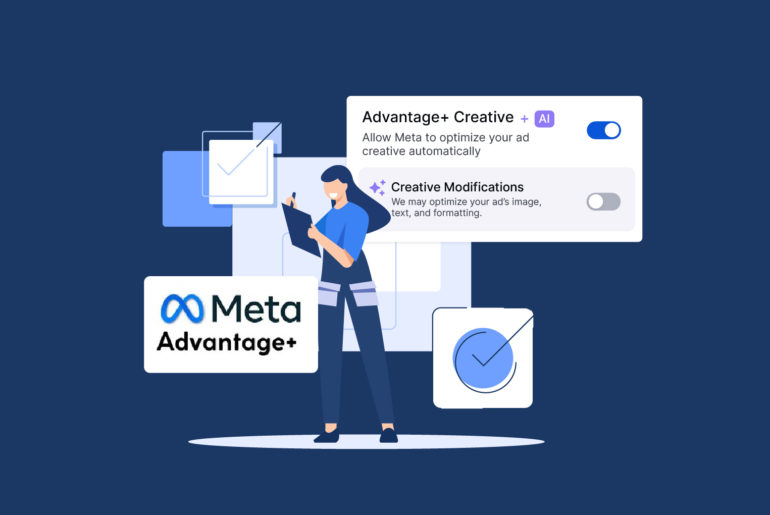
Use Advantage+ Campaign Budget
Meta’s automated Advantage+ campaigns can help reduce overall ad costs by 15% to 25%. If you are running multiple ad sets, Advantage+ campaign budget allows Meta to distribute your budget across them automatically.
You can set this at the campaign level in the budget section.
Instead of giving each ad set a fixed budget, this setting allows you to set one overall campaign budget. Meta then moves more spend toward the ad sets that are producing better results.
This can help lower CPL because your budget is not stuck in weaker ad sets. If one audience is generating leads at a lower cost, Meta can allocate more budget there.
Meta may sometimes favour the ad set producing the cheapest leads, even if those leads are not the highest quality. To minimise this, monitor lead quality, contact rate, booked appointments, and actual conversions.
Choose the right Performance Goal
Your performance goal tells Meta what kind of result you want.
You can usually set this at the ad set level, depending on your campaign setup and available options.
If you choose a goal focused on getting more leads, Meta will try to find people who are likely to submit your form. This lowers CPL because the system is optimising for form submissions.
However, Optimising for form submissions risks bringing in people who fill out the form but do not become real customers.
That’s why you should also consider lead-quality optimisation when possible. This helps Meta understand that you care about better leads, not just more leads.
In simple terms:
- Optimising for more leads can lower your general CPL.
- Optimising for qualified leads can lower your cost per quality lead.
4. Contact new leads quickly before they go cold
Speed to lead is crucial to your sales and should be treated as part of your Facebook Lead Ads strategy.
When a lead fills out your Facebook Lead Form, they are usually interested at that moment. They may have seen your offer, compared it with other options, and decided to share their details. But that intent can fade quickly, especially if they are contacting multiple businesses or looking for an urgent solution.
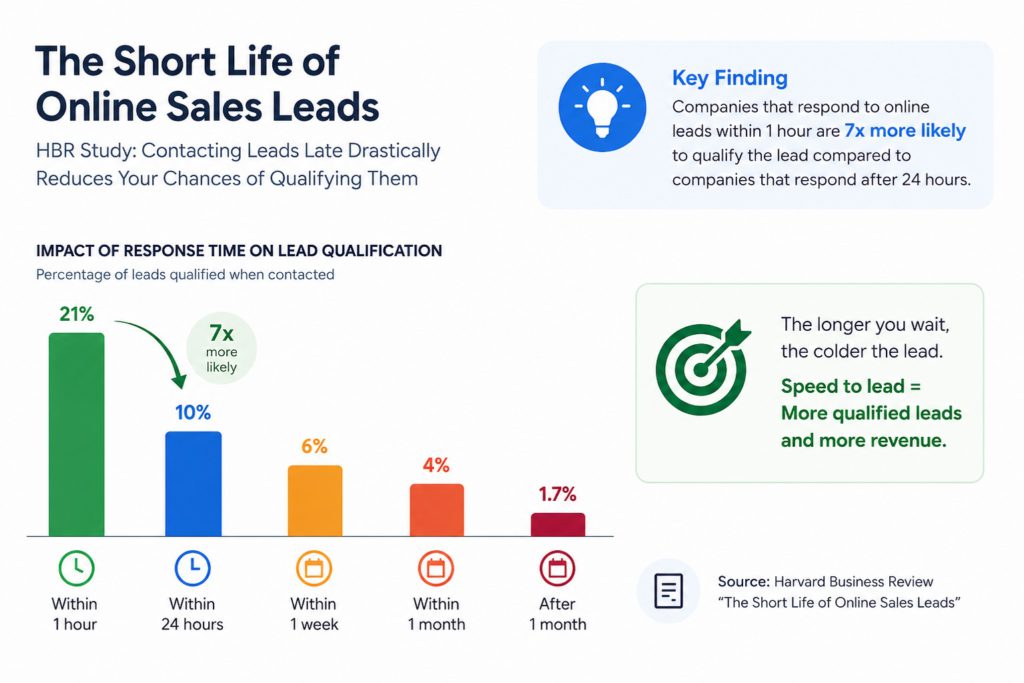
For many businesses, bad Facebook Leads aren’t the issue. It’s the devastating result of contacting leads too late, assigning them to the wrong rep, and not following up properly.
That means slow response can make your CPL look worse in practice, even if your Ads Manager numbers look fine.
Let’s suppose you spend $500 and generate 50 leads. Your CPL is $10. But if only 10 of those leads respond, your cost per responsive lead is actually $50.
Now imagine you follow up quickly and 25 leads respond. Your CPL in Ads Manager is still $10, but your cost per responsive lead drops to $20.
This is why speed to lead directly affects your real lead acquisition cost.
Your Meta Ads Manager may still show the same CPL, but your business gets more value from the same ad spend when more leads reply, book, and convert.
To improve speed to lead, make sure you have a simple process for:
- Receiving new Facebook leads instantly
- Notifying the right sales rep immediately
- Sending a quick first response on WhatsApp
- Assigning leads based on location, service, budget, or team availability
- Following up if the lead does not reply
- Tracking which leads have been contacted, qualified, booked, or lost
Even a small delay can create unnecessary waste. If your team only checks Facebook leads once or twice a day, you may already be reaching people after their interest has dropped.
At Privyr, businesses have reported increasing their lead response rates by over 50% after they started contacting leads within 5 minutes.
Minimise your CPL with Privyr
Want to minimise your CPL and boost your conversion rate? Look no further than Privyr!
Instead of only helping you collect leads, Privyr helps you act on them quickly. You can receive new Facebook leads instantly, contact them on WhatsApp, assign them to the right person, and schedule follow-ups so no enquiry is forgotten.
This is especially useful if your sales process depends on quick conversations rather than long CRM workflows. For example, if you sell real estate, insurance, home services, courses, events, or high-ticket services, your leads often expect a fast and personal response.
With Privyr, you can move faster without forcing your team into a complicated CRM setup.
Privyr is a Meta-approved mobile-first CRM that allows you to
- Automatically receive Facebook leads on your phone
- Automatically distribute leads among your team members
- Use automated WhatsApp or email responses when you’re not around
- Create and remind an excellent follow-up schedule so no lead falls through the cracks
- Segment leads based on their answers, and
- Prioritise high-intent leads early
Privyr also syncs easily with Meta Conversions API. You can connect it with Meta Conversion API in minutes without technical difficulties.
With Privyr, you’re not just converting more leads, you’re helping Meta identify and optimise for higher-quality leads.