Contents
A WhatsApp AI agent is an autonomous AI-powered software that can automatically perform WhatsApp tasks on your behalf.
WhatsApp is allowing users to set up AI agents to handle WhatsApp conversations. This means you can now add your preferred AI agent on your WhatsApp Business to reply to inbound enquiries, qualify leads, and even follow up without you needing to remember all your conversations.
Short on time? Here are the key takeaways from this guide:
- A WhatsApp AI agent is an autonomous assistant that can take care of WhatsApp tasks on your behalf, from replying to enquiries and qualifying leads to updating your CRM, booking appointments, and monitoring processes from the background.
- Unlike a basic chatbot or automation, an AI agent can understand the context, decide what to do next, and use connected tools to complete tasks without needing your supervision at every step.
- AI agents can take on different roles, including sales, customer support, marketing, booking, and operations, and agents from different providers may behave very differently even when they serve the same role.
- Agents normally operate inside a CRM, sales/marketing tool, or other connected system, while WhatsApp acts as the communication channel.
- To set up a WhatsApp AI agent, you do not necessarily need to worry about the technical aspects if you use a tool like Privyr that supports WhatsApp Coexistence.
- Effective WhatsApp AI agents are designed to prioritise accuracy, low usage risk, controlled autonomy, and reliable human handover rather than simply automating as much as possible.
- To monitor the impact of your WhatsApp agent correctly, measure the agent by the value it creates, including response time, qualification completion, answer accuracy, failed actions, cost per completed task, data accuracy, human correction rate, and human time saved.
- WhatsApp AI agents are not just smarter auto-reply tools. They are complex systems that can work in the background, initiate conversations with external leads, and operate through controlled workflows rather than just generating every reply with a large language model.
- The right agent depends on how much autonomy you need. Workflow-based agents offer more control and predictability, while more generative agents provide greater flexibility but require stronger testing, guardrails, and monitoring.
Adobe’s latest digital trends report highlights that 67% of business executives believe generative AI helps them personalise customer experiences and recommendations that drive sales. Agentic AI systems can extend these benefits by engaging leads and helping move conversations forward.
If you aren’t aware yet, many different tools and platforms already offer WhatsApp AI agents. But the question is: Which one suits your business the best and how to set it up the way you want?
This guide will explain everything you need to know about WhatsApp AI agents, how to choose the best for your business and how to set one up.
What is a WhatsApp AI agent?
Imagine having a 24/7 assistant that handles WhatsApp tasks accurately and consistently based on your instructions, without you needing to monitor it constantly.
A WhatsApp Agent is like your personal assistant. Instead of telling it exactly what to do at every step, you assign it a job, such as handling inbound enquiries, qualifying leads, or managing customer support. It understands what needs to be done, figures out the steps and completes the job using the information and tools you’ve given it access to. It can work around the clock, make decisions within your instructions, and involve you when human attention is needed.
You can set up a WhatsApp AI agent to automatically handle different WhatsApp tasks across different roles such as sales, customer support, booking, marketing, lead management, and more.
At a standard level, a WhatsApp AI agent is used for responding to inbound enquiries on WhatsApp and initiating conversations for external leads to support sales and CS teams that reply on WhatsApp.
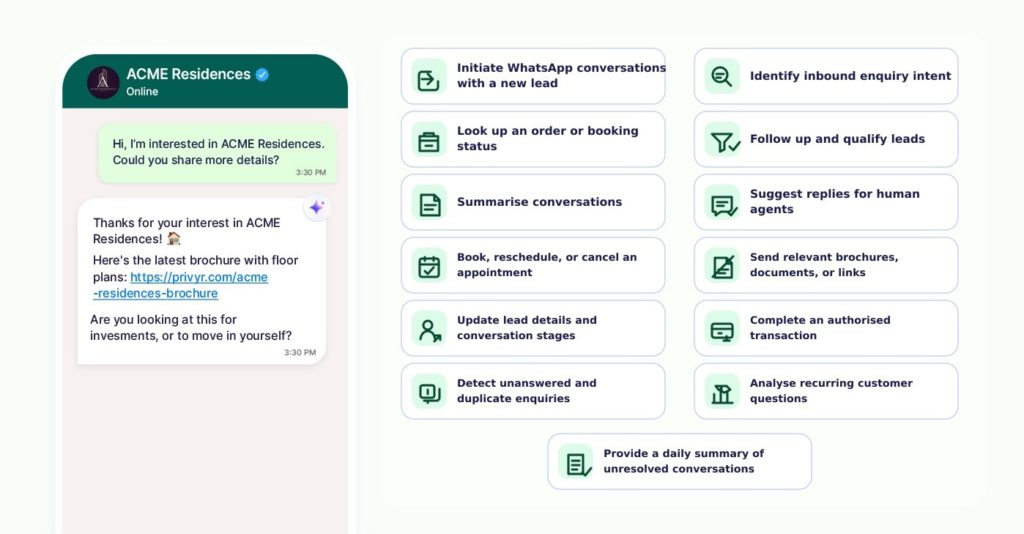
Sophisticated agents can:
- initiate WhatsApp conversations with a new lead,
- identify inbound enquiry intent,
- extract details such as budget, location, or preferred product from inbound messages,
- answer questions using approved knowledge base,
- look up an order or booking status,
- follow up and qualify leads,
- summarise conversations for sales reps,
- suggest replies for human agents to review and send,
- recommend the next step to leads such as booking an apartment visit,
- check and suggest appointment availability times,
- book, reschedule, or cancel an appointment,
- send relevant brochures, documents, or links,
- update lead details and conversation stages in a CRM,
- hand a conversation over to the right team member with a summarised information of the conversation,
- complete an authorised transaction or service request,
- detect unanswered enquiries and alert the team,
- detect duplicate enquiries from the same customer across conversations,
- analyse recurring customer questions,
- provide a daily summary of unresolved conversations and issues for the team,
- and much more.
An AI agent adds a decision-making layer on top of standard automations.
Let’s say you’re running a property campaign and you receive a new enquiry:
“Do you have any property near the city centre? My budget is around $600k”
A normal automation will respond with an acknowledgement of the message and explain when the lead can expect a proper reply.
A WhatsApp AI agent could interpret that message and determine that the best next action is to ask further. It could reply automatically with:
“Thanks for asking. I can give you a more accurate answer if you tell me what kind of property you’re looking for. Are you looking for a one, two, or three-bedroom property?”
Once the prospect replies, the agent reassess the conversation and decide what to do next. If the customer wants to book a visit, it can check the calendar, offer available times, and confirm the booking.
With further access to advanced tools, the agent can then update your CRM record, hand the conversation over to the right team member, and reschedule or cancel the booking if requested.
What differentiates a WhatsApp AI agent from a traditional chatbot?
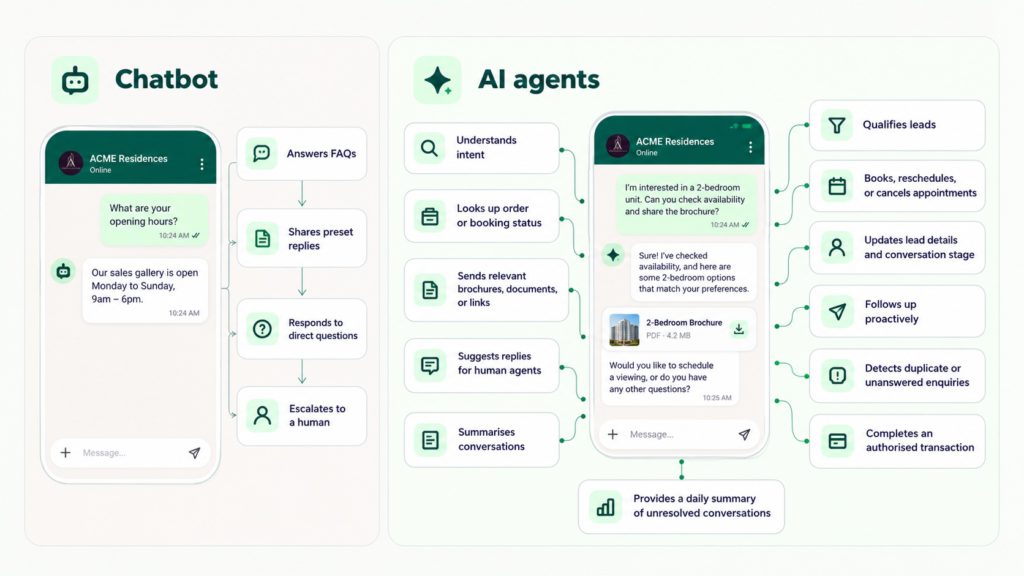
A traditional chatbot answers inbound enquiries based on a predefined rule. Newer AI-powered chatbots can understand natural language more accurately, but their main purpose is still specifically following a predefined flow, for instance, to answer questions within the conversation.
A WhatsApp AI agent, on the other hand, doesn’t just answer questions, it initiates conversations, updates lead information in connected systems, book an appointment, and even process payment, depending on its instructions, supported languages, integrations, and level of access.
Chatbots can be AI-powered, but agents come with the ability to use connected tools, update data, and perform advanced tasks without constant human surveillance.
Types of WhatsApp AI agents
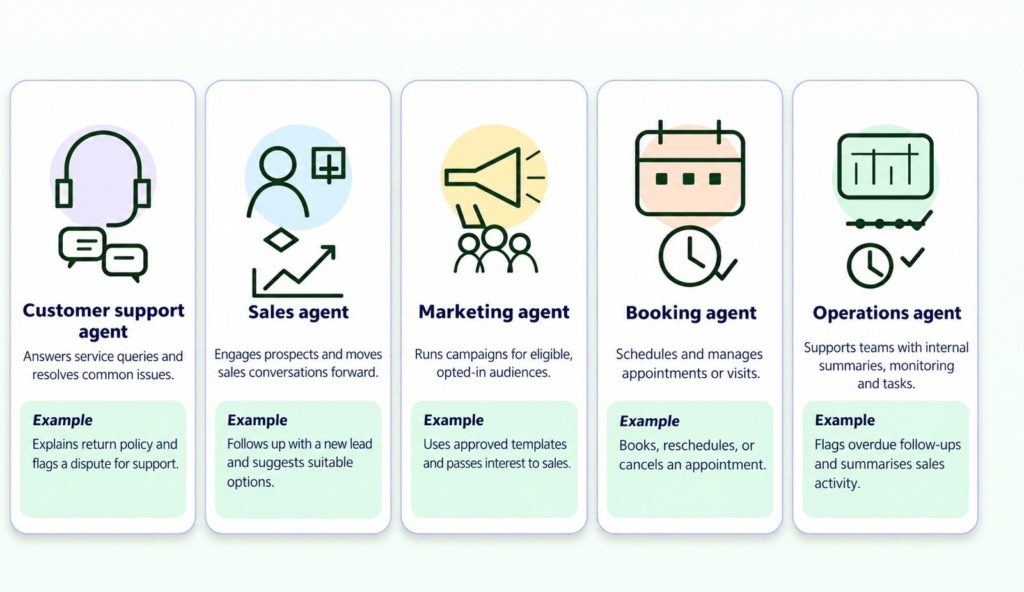
WhatsApp AI agents can be classified based on what job they are responsible for. This boils down to what type of tasks you want to automate on WhatsApp.
WhatsApp AI agents are typically offered by third-party providers like CRMs and sales tools. Therefore, each agent is built differently and may have its own capabilities, limitations, and characteristics.
For example, a WhatsApp sales AI agent offered by Privyr may perform differently from a SleekFlow sales agent because each platform is designed to support their specific workflows and functionality. Privyr focuses more on speed to lead, while SleekFlow specialises in unifying messaging channels.
In practice, this means two agents serving a similar use case can still differ significantly in how they operate.
That being said, while their features and behaviour may vary, their underlying purpose can still be the same. Two WhatsApp AI agents, for instance, may both be designed to support sales conversations even if the way they respond to leads or integrate with other tools is different.
1. Customer support WhatsApp agent
Imagine a customer messages your business at 9 pm asking how to return a product. Your support team has finished for the day, but the customer expects an answer.
A customer support agent is set up to handle these types of service enquiries automatically. It can understand the customer’s question, search your approved business information, provide an answer, and ask follow-up questions when more information is needed.
A customer support agent generally can:
- answer FAQs,
- explain policies,
- provide product or service information,
- troubleshoot common problems,
- retrieve information from a knowledge base,
- identify the customer’s issue,
- create or update a support case,
- hand complicated enquiries to a human.
When a customer asks about your cancellation policy, the agent can retrieve the relevant information from your knowledge base and explain it through WhatsApp. If the customer then says they want to dispute a charge, the agent may recognise that the conversation requires human attention and transfer it to your support team or create a support token for human agents to take care of when they’re available.
Customer support agents are commonly set up inside customer-service platforms, WhatsApp AI platforms, shared inbox tools, or CRMs with support functionality. They are generally connected to FAQs, help-centre articles, customer records, etc.
2. Sales WhatsApp agent
A sales AI agent can handle early conversations, ask qualifying questions, follow up, and hand over the conversation to human agents. Sales agents can be incredibly useful to handle inbound queries when your sales team is unavailable or when they’re overwhelmed with incoming messages.
A sales agent may perform multiple sales tasks, including:
- answering sales enquiries,
- initiating conversations for new leads,
- providing pricing information,
- recommending relevant products or options,
- sending brochures, catalogues, or links,
- identifying sales opportunities,
- creating follow up sequences and following up,
- updating information in the CRM,
- suggesting a viewing, consultation, or sales call,
- handing the prospect to the assigned salesperson.
Let’s suppose you’re a property agent and you set up a sales agent on WhatsApp. The agent could identify prospect’s questions, ask about their preferred location and budget, then recommend suitable options before handing the conversation to your team members.
Sales agents can also be set up to contact new leads generated outside WhatsApp, such as through Facebook Lead Ads, Google Ads, or other lead-generation platforms.
Imagine you are running a Facebook Lead Ad campaign for your HVAC service. A prospect submits their details through the ad. Instead of waiting for the lead to appear in your CRM and contacting them later when you are available, a sales agent can immediately send a WhatsApp message and start the conversation.
It then creates subsequent follow up sequences for your team to review and approve, making sure the lead is followed up until they respond back.
Sales agents are usually set up within a CRM, sales platform, WhatsApp conversation platform, or dedicated AI-agent platform. To set up advanced agents, you need to provide access to your CRM, product information, pricing, inventory, and sales materials.
3. Marketing WhatsApp agent
A marketing WhatsApp agent can be useful in planning and monitoring marketing activities in WhatsApp. It can help you automatically reach the right audience, generate interest, and pass leads to sales.
Marketing works slightly differently on WhatsApp as most interactions begin after a lead sends you a message. But WhatsApp allows you to send promotional messages to customers who have provided the required opt-in, using approved marketing message templates. This means marketing agents can support both outbound campaigns and incoming conversations.
A WhatsApp marketing agent may:
- identify the audience by analysing your CRM data,
- prepare marketing campaigns by selecting suitable approved marketing templates,
- initiate contact through the WhatsApp Business Platform by sending messages to eligible, opted-in contacts,
- monitor engagement, respond to interested customers, and pass opportunities to sales.
WhatsApp marketing agents may come with some limitations compared to sales and CS agents because of the platform’s constraints and strict Terms of Service. They are commonly set up inside marketing automation platforms, CRMs, or WhatsApp campaign tools.
4. Booking WhatsApp agent
A booking agent can automate the process of reserving appointments and visits.
Imagine one of your prospects has already decided they want to schedule an appointment. Instead of a salesperson manually checking the calendar, exchanging several messages, and finally booking an appointment, a booking agent can manage the whole process without spending human hours.
Booking agents can generally understand that the customer wants an appointment, check available dates and times, suggest suitable slots, create the booking, reschedule or cancel an existing appointment, send confirmations, and send appointment reminders.
If you give them write access, they can update the booking information in your CRM.
These agents generally need to be connected to a calendar or booking system, which may sit inside your CRM, scheduling software, or another business platform.
5. Operations WhatsApp agent
Not all WhatsApp AI agents need to communicate with customers. Some work behind the scenes to help keep processes organised. An operations agent can use information from WhatsApp and connected systems to carry out administrative or operational tasks that employees would otherwise handle manually.
For example, an operations agent could be used to prepare internal summaries and reports based on sales conversations for a certain period. It could also be used to automatically monitor overdue follow ups or flag conversations that need attention.
An operations agent can also analyse WhatsApp conversations handled by your team or other AI agents. Let’s suppose Sam receives 200 new enquiries while he is busy following up with qualified leads, and a sales agent handles those conversations.
An operations agent could review the activity and summarise how many enquiries were handled, what happened in those conversations, and which leads may need Sam’s attention.
This type of agents usually have read-only access and are usually set up within a CRM, sales platform, conversation-intelligence system, customer-service platform, or AI layer connected to your WhatsApp conversations.
What do you need to set up a WhatsApp AI agent?
You normally need a couple of tools to set up a WhatsApp AI agent:
- A WhatsApp Business number connected to the WhatsApp Business Platform (WhatsApp API) (a tool that supports WhatsApp coexistence can help you achieve this without technical difficulties).
- A system where the agent operates, such as a CRM, chatbot platform, or custom backend.
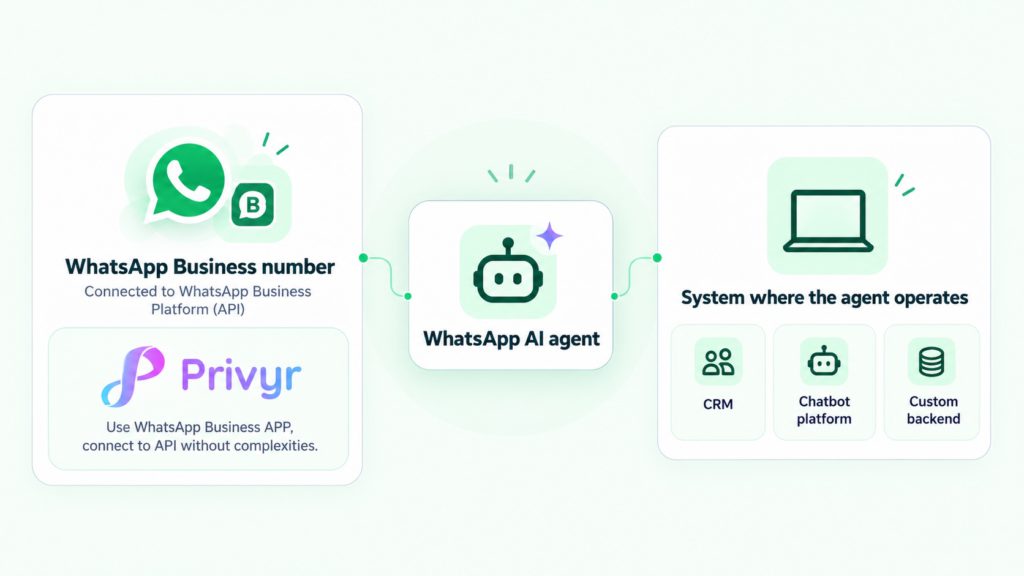
If you want to avoid the technical hurdles of setting up the WhatsApp Business Platform, APIs, webhooks, and other integrations yourself, use a CRM like Privyr that supports WhatsApp Coexistence. You can connect your existing WhatsApp Business number and set up automations through the CRM while continuing to use your WhatsApp Business app normally.
Where does WhatsApp AI agent operate from?
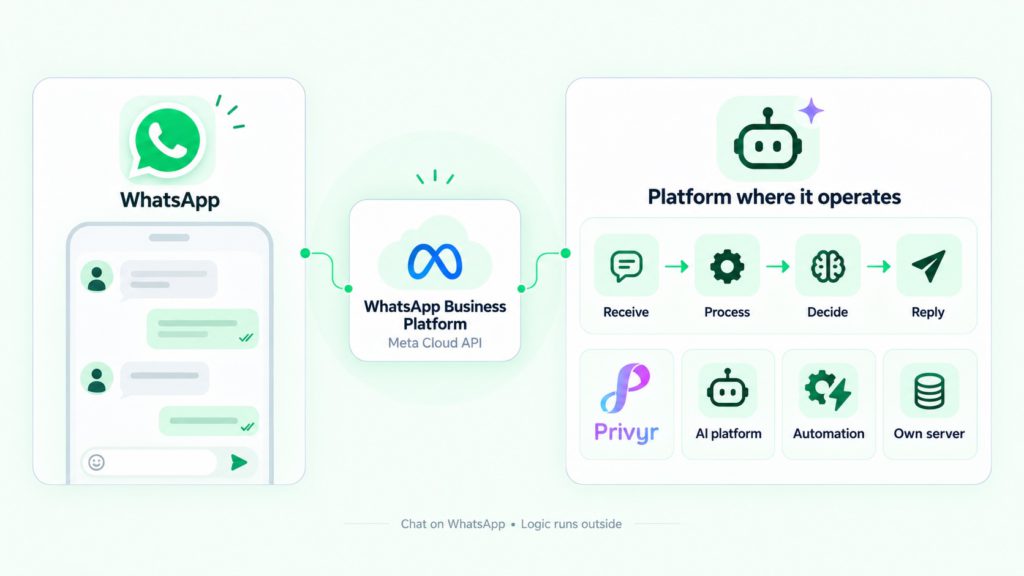
A WhatsApp AI agent normally operates from outside of WhatsApp. The agent may run inside an AI platform, a CRM or sales tool, an automation platform, or your own server infrastructure.
WhatsApp acts as the communication channel between the customer and the agent. To receive and send messages, the agent connects to the WhatsApp Business Platform through Meta’s Cloud API. Once connected, the agent receives incoming WhatsApp messages, processes them, decides what should happen next, and sends the resulting response back to the customer through WhatsApp.
So, in simple terms, the conversation happens on WhatsApp, but the intelligence and automation usually run in a connected external system.
What can a WhatsApp AI agent do for sales?
A WhatsApp AI agent can support several parts of your sales process, from responding to the first enquiry to qualifying the lead and handing over the conversation to human agents.
The exact capabilities depend on how your agent is configured and what systems it can access, but most sales use cases fall into five main categories.
1. Respond to enquiries
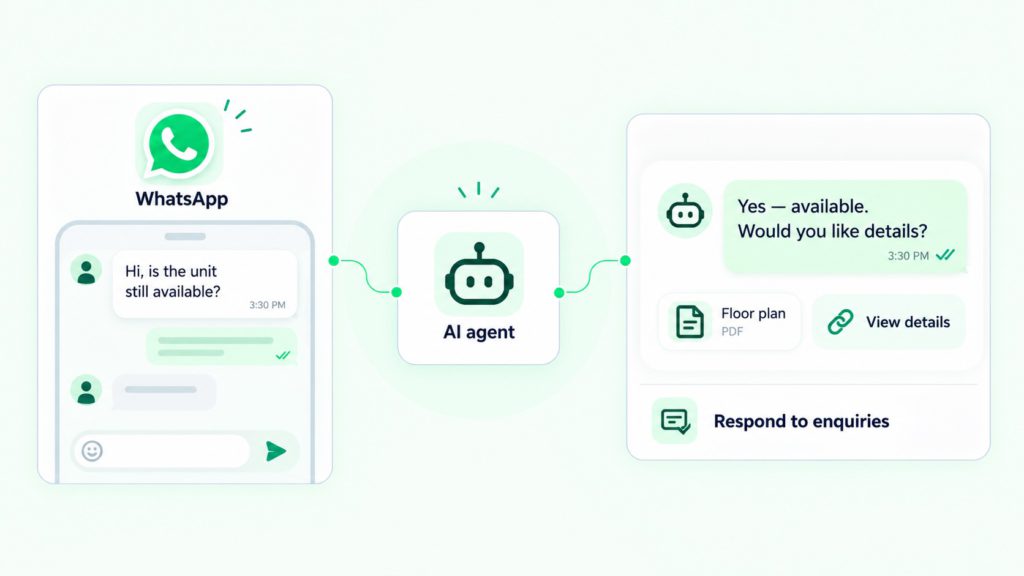
The most immediate use of a WhatsApp AI agent is responding to incoming questions. Instead of sending the same auto-reply to every prospect, the agent can interpret the context and respond accordingly.
Let’s suppose, you’re a real estate agent and you receive an inbound enquiry:
“I would like to know more about the lakeside property you advertised?”
The agent can identify which property the lead is referring to, send the correct brochure, and then follow up with a relevant question.
The same idea can apply to other industries. An insurance prospect may ask about a specific policy, while an HVAC customer may ask whether you service their area. The agent can respond based on the information available to it.
Your leads receive a useful first response even when no salesperson is immediately available.
2. Qualify leads
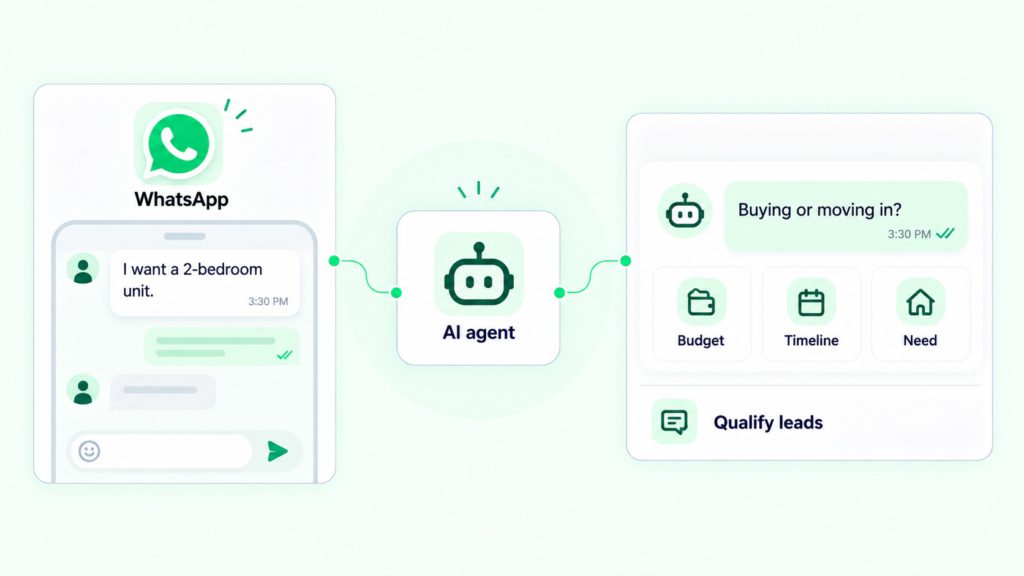
A WhatsApp AI agent can also collect important information about leads before your sales team takes over the conversation.
Instead of presenting a form or asking several questions at once, the agent can progressively gather information as part of a normal conversation.
For a property enquiry, this might include asking about the prospect’s budget, property type, buying timeline, etc.
A WhatsApp AI agent for an HVAC company might collect the information regarding the immediate problem that needs to be solved, the customer’s postcode, and when they would like a technician to visit.
By the time a salesperson takes over, they can already know who the lead is and what they want.
3. Update information in connected systems
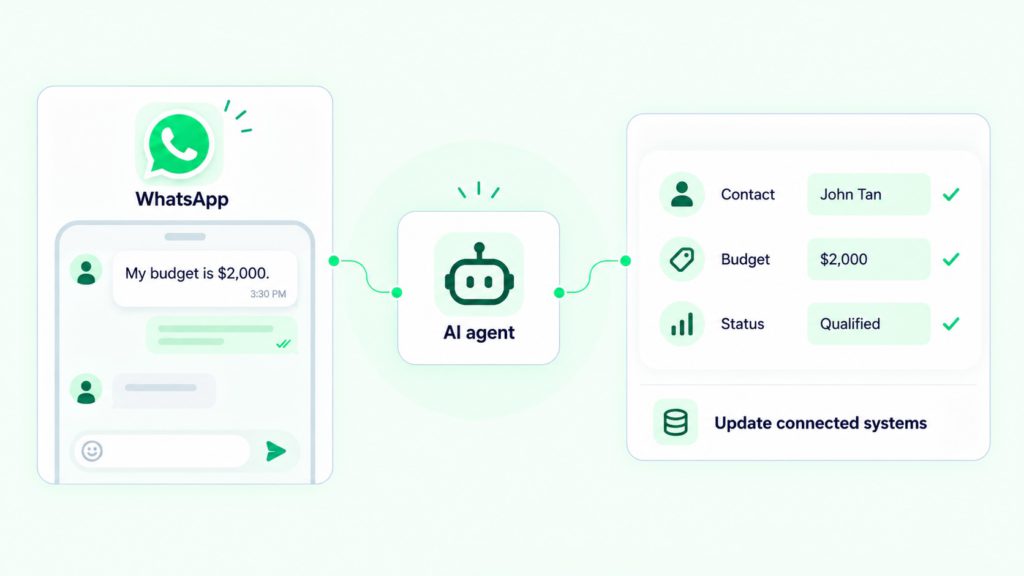
WhatsApp AI agents can also update information like lead stage data in your connected systems like a CRM.
When you handle incoming enquiries at scale, it can be difficult for your team to monitor every conversation, record lead details, and determine which leads need attention.
With the right permissions and integrations, a WhatsApp AI agent can automatically update each lead’s information, including their interests, conversation stage, qualification status, and booking requests.
The sales team can then act on these structured updates instead of reading through every conversation from the beginning.
4. Run tasks in connected systems
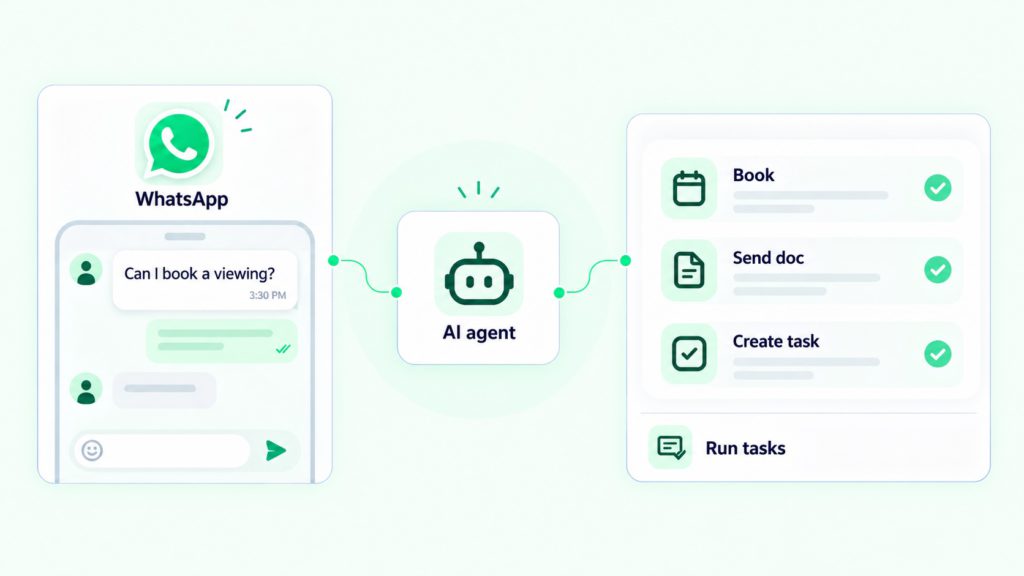
More advanced WhatsApp AI agents can also perform actions in connected systems. They may be able to schedule an appointment or viewing, assign the lead to a salesperson, update information in the CRM, create a follow-up task or sequences, and change the lead’s sales stage.
For example, after qualifying a property buyer, the agent could arrange a viewing and update the CRM from New Lead to Viewing Scheduled without requiring a salesperson to enter that information manually.
WhatsApp AI agents can help move the lead through the process rather than simply answering questions.
5. Route enquiries
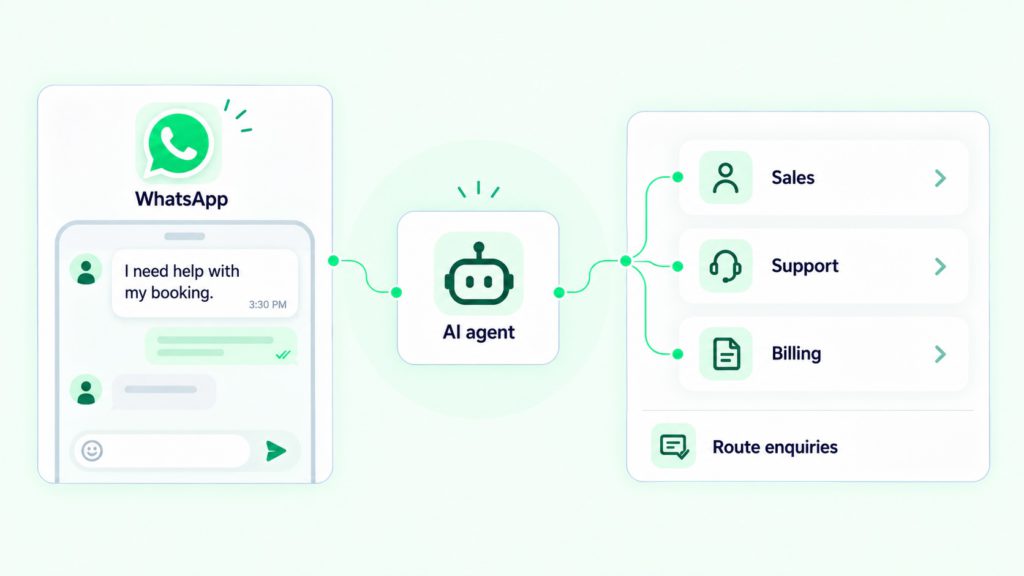
A WhatsApp AI agent can decide where the lead should go next.
For example, a commercial property enquiry could be routed to the commercial team, a residential enquiry could go to a residential agent, or a high-value opportunity could be assigned to a senior salesperson.
This reduces the amount of manual lead distribution your team needs to manage and help prospects reach the right rep quickly.
6. Hand over conversations to human agents
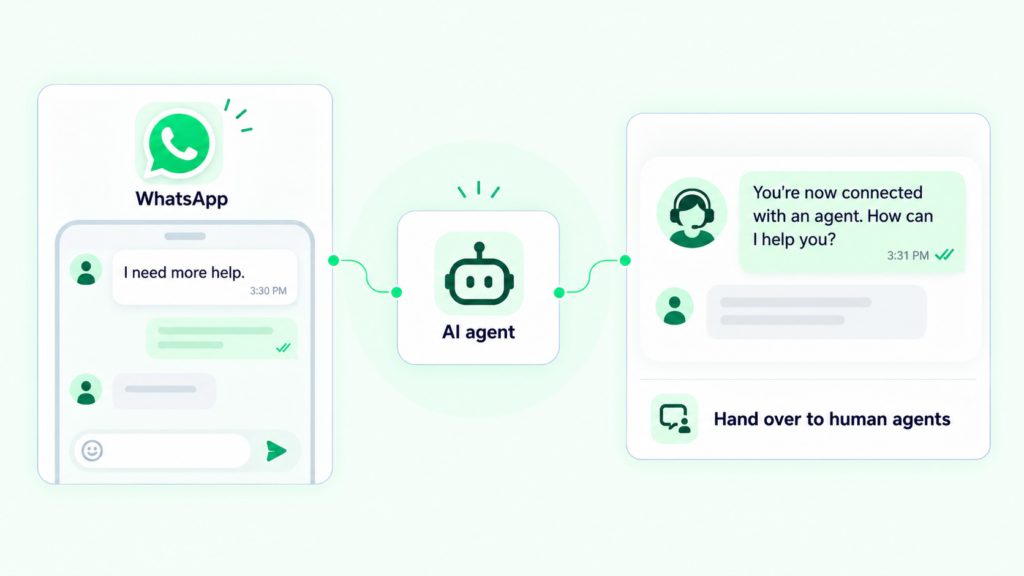
AI can be useful for repetitive questions, qualification, and routine actions, but not every conversation should remain automated.
A human agent may need to take over when the customer specifically asks to speak to someone or when a high-value negotiation begins.
The goal of a WhatsApp AI agent for sales is not to remove salespeople from the process. It is to handle the repetitive work around the conversation so your sales team can spend more time on the interactions where human judgement and trust matter more.
If you’ve set up Privyr’s WhatsApp AI agent, new leads are automatically distributed to the right sales rep. The assigned rep can monitor the AI agent conversation from their phone, approve follow-up sequences, and take over the conversation at any time when a personal response is needed.
How to set up a WhatsApp AI agent
Depending on what you prefer, there are three practical ways to set up a WhatsApp AI agent.
Option 1: Set up a WhatsApp AI agent with a CRM
Setting up a WhatsApp AI agent with a CRM is generally the easiest option if you don’t want to manage the complexities of APIs, servers, prompts, vector databases and webhook infrastructure yourself.
For this, you can use a WhatsApp coexistence compatible CRM to set up a WhatsApp AI agent from your existing WhatsApp Business number. Here’s how to do it with Privyr:
- Open Privyr Web.
- Go to Automations.
- Select WhatsApp.
- Open Inbound Inquiry Auto-Responder.
- Connect your existing WhatsApp Business number.
- Choose the type of enquiry that should trigger the rule.
- Define the response.
- Create additional rules for your other common enquiries.
- Test the enquiry types.
- Activate your rules.
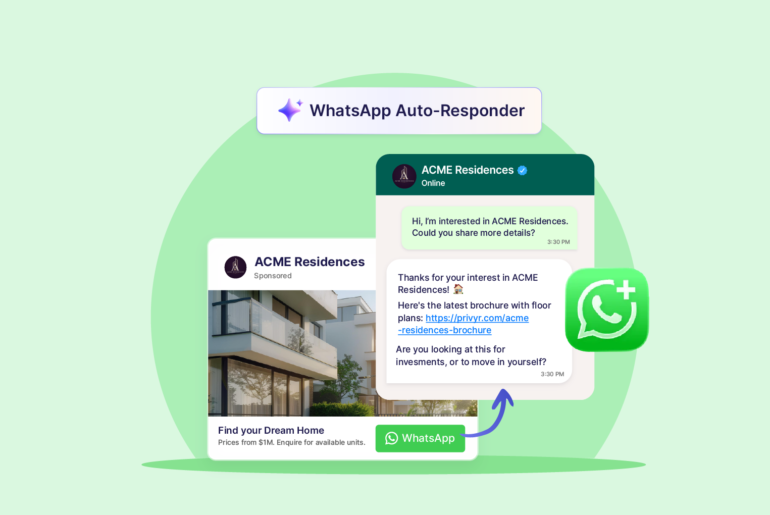
Privyr’s AI agent supports triggers including new conversations, Meta Click-to-WhatsApp Ads, and message-text matching.
You can create rules for each trigger depending on your campaigns and set up your agent to answer each enquiry appropriately. You can also add WhatsApp sequences for automatic follow ups to ensure every lead is followed up on time.
Additionally, you can also set up your new lead agent to automatically message new leads generated on external sources like Facebook Lead Ads or Google Ads. For this, you’ll need additional integration with lead sources.
Option 2: Set up Meta Business Agent in your WhatsApp Business app
Eligible businesses can now set up Meta Business Agent directly in their WhatsApp Business app. The agent can answer common questions, share product information, and gather lead details. You can choose who it responds to and when a conversation should be handed over to you. Its availability and features may vary by market.
Here’s how to set it up:
- On your WhatsApp Business app, open Tools, then select Meta Business Agent.
- Complete the account setup. Authenticate and link your account if prompted, then tap Confirm.
- Add information about your business for the agent to learn.
- Add instructions for how the agent should respond and when it should be active.
- Set up human handover.
- Test the agent
Option 3: Build your own WhatsApp AI agent
If you have development resources, you can build the architecture yourself. A simplified stack might contain:
- Messaging layer
- WhatsApp Cloud API
- Event layer
- Webhook endpoint
- Application server
- Database
- AI model
- Retrieval system
- Tool layer
- Policy layer
What makes a good WhatsApp AI agent
A good WhatsApp AI agent should do more than automate conversations. It should respond accurately, operate safely, know its limits, and make it easier for your sales team to handle more leads without losing control of the customer experience.
Here are a few things to look for:
Accuracy
Can your agent give the right answer in the right situation?
Accuracy matters much more than how the response sounds in sales conversations. A well-written answer is still a bad answer if the price, availability, policy, or product information is wrong.
This is crucial when your agent handles information that changes frequently. Ideally, it should always retrieve the latest information from your system before responding.
You do not want to rely on an AI model to remember or guess the answer. You’d rather pick the AI correct information from your business data and provide a response.
Low usage risk
If WhatsApp is one of your main channels for managing your sales process, your AI agent should never create unnecessary operational or compliance risks.
A good WhatsApp AI agent should work through official WhatsApp integrations and support the requirements that come with business messaging, such as customer opt-ins, message templates, and human escalation.
It should also behave predictably. You should know what types of messages it can send, when it can send them, and what happens if the automation fails.
You may want to look for the following before setting up a WhatsApp agent:
- Official WhatsApp Business Platform integration.
- Support for WhatsApp messaging policies.
- Proper opt-in handling.
- Message template support.
- predictable automation rules.
- Human takeover.
- Conversation and activity logs.
Controlled autonomy
Another important factor is how much freedom the AI agent gets to make decisions on its own. The exact boundaries will depend on your business, but the important thing is that those boundaries are clear.
A good agent should have enough autonomy to save your team time without being given unnecessary control over sensitive decisions.
Reliable human handover
Human handover is crucial in sales where conversations can quickly move from simple questions to negotiation, objections, or situations that require judgement.
When a conversation is handed over, the salesperson should ideally receive the context the AI has already collected.
Human handover should be part of the normal workflow, not something that only happens when the AI fails.
How to measure performance of your WhatsApp AI agent
If you’re using a WhatsApp AI agent to automate your tasks, it should complete the job with efficiency and speed. Therefore, you’ll want to measure its performance to find out if it’s actually benefiting you. The right metrics will depend on what you use the agent for, but here are some of the most useful ones to monitor:
Response time and qualification completion rate
If you’re setting up a WhatsApp agent for sales or customer support, you expect an immediate response from your agent. If response times are slow, there may be an issue with your automation, integrations, or workflow.
If your AI agent qualifies leads, measure how many prospects it qualifies. For example, if you’ve set up your agent to collect a lead’s budget, location, and buying timeline, track how many conversations successfully reach the point where all of that information is collected.
A low completion rate may indicate that the agent is asking too many irrelevant questions or asking them in the wrong order. It could also mean the agent might be sending unnatural-sounding messages.
Answer accuracy and failed action rate
You should regularly check whether your customer facing agent is replying with the correct information. Providing correct information is crucial when it comes to pricing, availability, product specifications, or appointment times.
An agent that responds instantly but gives incorrect answers can create more problems than it solves. Accuracy should be one of your most important measures of performance.
If you’ve set your agent to schedule appointments, update your data, or send documents, track how often those actions fail.
For instance, your agent may understand that a prospect wants to book an appointment, but the calendar integration could still fail to create the booking.
You want to distinguish between problems with the AI agent itself and problems with the systems it connects to.
Cost per completed task
Running multiple AI agents can sometimes be expensive, so measure how much it costs to get your work done through each agent.
Track your AI-model usage costs and additional costs from third-party tools the agent relies on. From 1 October 2026, WhatsApp will also begin charging for service messages, which can add another layer of cost to your AI usage. Sales agents may be configured to send multiple messages in an effort to move a lead forward, but excessive messaging without a meaningful outcome can quickly waste your budget.
For example, if an agent handles 5,000 conversations but only 100 messages help move leads to the next stage, calculate the cost per successful qualification rather than the cost per message.
The goal is to make sure your agent remains commercially worthwhile as usage increases.
Write accuracy
If your agent has access to automatically record and update information in your systems like CRM, regularly check whether that information is accurate and complete.
For example, if a prospect says they have a £500,000 budget and want to buy within three months, the agent should record those details correctly and in the right CRM fields.
Incorrect or incomplete records can create confusions later even after a positive conversation.
Data extraction accuracy
If you’ve set up an agent to convert information into structured data, you want it to be accurate. Data extraction accuracy measures how often that information is captured correctly.
This is more important for background monitoring agents because their work may not be visible to all your team members. An agent can appear to be working smoothly while quietly recording incorrect information in your systems.
Human correction rate
A high correction rate can reduce the value of automation. If you have to constantly check and repair the agent’s work, you may simply be replacing one type of manual work with another.
This might include correcting a CRM field, changing a lead stage, fixing an incorrect summary, cancelling a duplicate appointment, or replacing an inaccurate response.
Track not only how much work the agent completes, but how much of that work can be trusted without revision.
Human time saved
One of the main reasons to use a WhatsApp AI agent is to take repetitive work off your sales team’s plate.
If your AI agent can answer common questions, send brochures, collect lead information, qualify leads, and manage initial follow-ups, your sales reps should spend less time on repetitive conversations and more time speaking with sales-ready leads.
One of the most practical ways to judge whether your WhatsApp AI agent is delivering real value is to see whether your team can handle more leads with less manual work.
Common misconceptions about WhatsApp AI agents
Because WhatsApp AI agents are still relatively new, many online guides describe them as a more advanced version of a chatbot. That is only one of the common misconceptions. Here are some common misconceptions you’ll want to clear up:
1. A WhatsApp AI agent is just a smarter chatbot or auto-reply tool
AiSensy describes a WhatsApp AI agent as an “AI-powered chatbot” and defines it primarily as a virtual assistant that chats with users, understands context, and generates more relevant replies. Its comparison with basic chatbots also focuses heavily on how the two produce responses.
That description fits conversational agents, but it is too narrow for WhatsApp AI agents as a whole.
An agent may also update your CRM, qualify a lead, schedule an appointment, analyse conversations, trigger another workflow, or complete tasks in the background without generating a customer reply at all.
Think of all the tasks you need to complete on WhatsApp beyond customer replies. It could be summarising your sales conversations, generating reports, or identifying winning patterns. You can set up a WhatsApp AI agent to do all these tasks on your behalf.
2. Every WhatsApp AI agent has to talk to customers
It does not.
Several online guides limit the definition of AI agents to customer-facing agents. AiSensy’s discussion of agents revolves around automatically chatting with users while CodeWords introduces an agent as something that only handles a WhatsApp conversation without a person typing every reply.
But agents can also operate entirely in the background.
A background monitoring agent could read a salesperson’s WhatsApp conversation, identify important details, summarise the discussion, and update the CRM without ever sending a message to the customer. Similarly, some lead management agents could quietly monitor and chase silent leads or schedule internal follow-up reminders without sending automated messages to a customer.
3. WhatsApp AI agents are generative agents that dynamically write every response
Not necessarily!
Charles AI article about WhatsApp agents states that WhatsApp AI agents are built on LLMs. Several other articles characterise AI agents around LLM-powered contextual reasoning and dynamically generated responses.
That only describes one important type of agent and can give the impression that an agent must have complete generative freedom.
In practice, businesses can also use workflow-guided agentic systems, where AI interprets the situation but operates within predefined paths, approved responses, and permitted actions.
For example, an agent might use AI to recognise that a prospect is asking about pricing but still be restricted to sending approved pricing information rather than composing an unrestricted answer.
4. WhatsApp AI agents only work with inbound enquiries
Some WhatsApp AI-agent products are built mainly for inbound conversations, but this is not a limitation of WhatsApp AI agents themselves.
A WhatsApp agent like Privr’s New Lead Auto-Responder can also initiate an approved conversation with a lead generated elsewhere.
Suppose you’re running a Facebook Lead Ad campaign and a prospect submits their details. Your connected CRM detects the new lead and passes the information to your AI sales agent, which can then automatically send a WhatsApp message and start the conversation. That’s how proactive lead agents work.
WhatsApp’s Business Messaging Policy allows businesses to initiate conversations with people who have provided the required opt-in.
Before setting up an AI agent, distinguish between inbound agents, proactive lead agents, and event-triggered agents.
5. You have to stop using the WhatsApp Business app to use an AI agent
Respond.io’s September 2026 guide says that you need WhatsApp Business API access to set up an AI agent and cannot use the basic WhatsApp Business app. As a general statement, that is now outdated.
WhatsApp Coexistence now allows you to use the WhatsApp Business App and WhatsApp Business API simultaneously on the same phone number. If your CRM or sales platform supports Coexistence, you’ll be easily able to set up a WhatsApp AI agent without giving up the WhatsApp Business app your team already uses.
Final words
Choosing the right WhatsApp AI agent boils down to how much automation and flexibility you actually need. If your main goal is to respond faster, qualify leads, and reduce repetitive work without giving AI too much control, a workflow-based AI agent built into a CRM can be the right choice. It gives you more predictable behaviour, easier setup, and tighter control over what prospects receive.
If you need an agent that can manage longer conversations, retrieve information from multiple systems, and decide between different actions on its own, a generative AI agent may be a better fit. It offers more flexibility, but it also requires more careful setup, testing, guardrails, and monitoring.
In either case, choose the level of automation that matches your sales process rather than simply opting for the most advanced AI agent.
Frequently asked questions
WhatsApp AI Agent costs vary based on the agent type may include a software subscription, and WhatsApp’s per-message charges. Some basic agents like Privyr’s WhatsApp auto-responder are free.
Meta WhatsApp AI Agent refers to WhatsApp’s native Meta Business Agent. The AI agent is currently available for eligible businesses to support sales and service conversations on WhatsApp.
Meta AI is available without a separate subscription, but other advanced business AI agents may involve provider subscriptions, AI usage fees, integrations, and WhatsApp messaging charges.
Yes, WhatsApp AI can automatically reply to your inbound messages and manage broader conversations based on the information and permissions you provide.