WhatsApp Autoresponder
A rule based WhatsApp autoresponder so you can send right response in every situation. Its free to use!
WORKS WITH
Existing WhatsApp Business Number
Official Meta Integration
Safe & Secure
100% FREE
Signup Required
Inbound Inquiry Automation Rules
Define how Privyr should automatically reply when leads contact your WhatsApp Business number.
No autoresponder rules created yet
Create rules to automatically reply to product brochure inquiries, price checks, Click-to-WhatsApp ads, or new contacts.
Configured Rules ([[ rules.length ]])
[[ rule.name ]]
Add Autoresponder Rule
Do you have WhatsApp Business App?
Only WhatsApp Business accounts are supportedPrivyr's WhatsApp Auto-Responder is built on official Meta APIs to ensure maximum deliverability, 99.9% uptime, and zero account ban risks.
WhatsApp Business (Official)
100% Meta compliant & safe
Instant, reliable high-speed replies
Rule automation, sequences, & AI
Continuous 24/7 cloud reliability
WhatsApp Personal (High Risk)
Automating personal numbers is banned
Strictly prohibited by WhatsApp policies
No rules, AI, or sequences
Frequent crashes & missed leads
Frequently Asked Questions
- What is WhatsApp Auto-Responder?
- Can WhatsApp autoresponder send tailored responses?
- What is the difference between WhatsApp auto reply and WhatsApp autoresponder?
- How to create the best auto reply message for WhatsApp?
- Does WhatsApp Auto-Responder work with Personal whatsapp?
- How to set up an auto responder for WhatsApp?
- Can WhatsApp automatically reply based on keywords?
- Can I auto reply on WhatsApp to Click-to-WhatsApp leads?
- Is WhatsApp Autoresponder a WhatsApp auto reply bot?
- Can I automatically message leads from Facebook Lead Ads with privyr?
- Do I need a new WhatsApp number to use WhatsApp autoresponder?
- Does Privyr use the official WhatsApp integration for WhatsApp autoresponder?
- Can you set an auto-reply on WhatsApp?
- Can I set up a WhatsApp automatic reply bot?
- Can you set WhatsApp to auto answer?
- How to use an autoresponder for WhatsApp?
- Can you set WhatsApp to automatically send messages?
- How to set AI reply in WhatsApp?
- Can you set WhatsApp to auto-reply?
- Is there an AI responder for WhatsApp?
- Can you set your text to auto-reply?
- Do auto replies only send once?
- How to set auto-reply in mobile?
- How do I automate my WhatsApp messages?
- Is WhatsApp automated messaging free?
- How to schedule an automated message on WhatsApp?
- How to set auto text on WhatsApp?
- Can you schedule a message in WhatsApp?
- How do I set up an automated message?
What is WhatsApp Auto-Responder?
WhatsApp Auto-Responder is a system that automatically replies to inbound business enquiries on WhatsApp with the right response based on the type of enquiry.
Autoresponder goes beyond basic WhatsApp auto-replies like “Thanks for contacting us! We'll get back to you shortly” and helps you set up custom replies that address the actual query.
For instance, someone might ask you pricing, someone might ask your opening hours, or someone may simply ask for your product brochure. With WhatsApp Auto-Responder, you get to set up specific rules to automatically reply to each query based on enquiry type, campaign, keywords, and more.
Can WhatsApp autoresponder send tailored responses?
Yes. A good WhatsApp responder can send tailored messages according to each incoming enquiry, so the response doesn’t sound like a generic acknowledgement and the lead remains warm.
What is the difference between WhatsApp auto reply and WhatsApp autoresponder?
With WhatsApp Business auto reply, you can only automatically send general acknowledgement messages to people contacting you. WhatsApp Auto-Responder allows you to automatically respond to different enquiries with different responses.
| Feature | WhatsApp Business Auto-Reply | Privyr’s WhatsApp Auto-Responder |
|---|---|---|
| Automatically respond to enquiries | Yes | Yes |
| General greeting or away message | Yes | Yes |
| Create multiple responses | Limited | Yes |
| Respond differently based on enquiry | No | Yes |
| Match keywords or message text | No | Yes |
| Automatically respond to Click-to-WhatsApp queries | Greetings or Away messages only | Custom replies based on campaign, keywords, or enquiry type |
| Use your existing WhatsApp Business number | Yes | Yes |
How to create the best auto reply message for WhatsApp?
The best auto reply message shouldn't be a generic acknowledgement or the same greeting for every enquiry. It should address what the enquiry is actually about and provide the most relevant response. Privyr WhatsApp Auto-responder lets you create multiple Inbound Enquiry Automation Rules, each with its own trigger and response to help you create the perfect auto reply messages. Here’s how to do it:
Let’s suppose you’re a real estate agent, you can create different auto-replies for different situations:
Property brochure enquiry
Inbound enquiry:
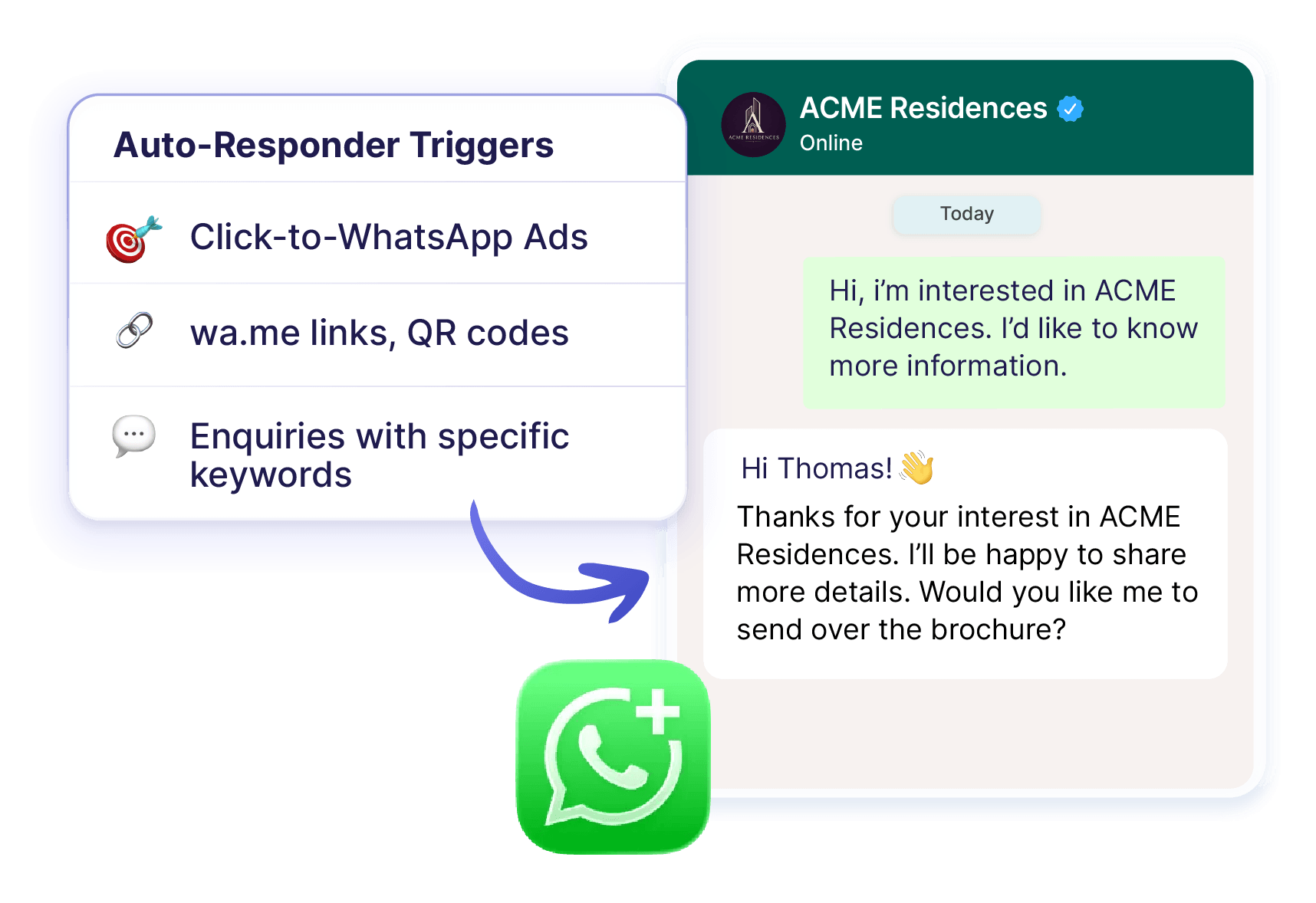
“Hi, I saw your ACME Residences ad. Can I get more information?”
Privyr’s WhatsApp Autoresponder automatically sends your business brochure plus a question asking the intent (whether they're buying for investment or their own stay).
Price enquiry
Inbound enquiry:
“How much is the 3 bedroom apartment listed on your ad”
Privyr’s WhatsApp Autoresponder automatically sends the latest price list.
Floor plan enquiry
Inbound enquiry:
“Can you send over the floor plan for ACME Residences?”
Privyr’s WhatsApp Autoresponder automatically sends the relevant floor plan.
General property enquiry
Inbound enquiry:
“Hi, I’m looking to buy an apartment in Queens”
Privyr’s WhatsApp Autoresponder automatically sends a reply asking their budget and requirements.
You can create as many rules as you need for the enquiries your business commonly receives.
Does WhatsApp Auto-Responder work with Personal whatsapp?
No. WhatsApp’s official guidelines only allow automation for Business accounts. Therefore, WhatsApp Auto-Responder doesn’t work with personal WhatsApp. If you want to add WhatsApp Auto-Responder to your toolkit, you’ll need to switch from regular WhatsApp to WhatsApp Business. Switching is quick and easy.
How to set up an auto responder for WhatsApp?
On Privyr web, you can create tailored auto response messages for your Inbound WhatsApp enquiries. Here’s how to do it:
Step 1. Signup for Privyr WhatsApp Auto-responder
Step 2. Connect your WhatsApp Business number
Connect your existing WhatsApp Business number if you haven't already.
Step 3. Create a rule
Choose Create Rule.
Step 4. Choose your trigger
Decide which enquiry, message, ad, or conversation should activate your rule.
Step 5. Create the response
Write exactly what Privyr should automatically send.
Step 6. Add more rules
Create additional rules for the other enquiries you receive regularly.
Start with your most repetitive enquiries and add new rules whenever you spot another response worth automating.
Can WhatsApp automatically reply based on keywords?
With Privyr WhatsApp Auto-responder, yes. You can trigger automated responses according to message text using conditions such as matches, contains, starts with, and ends with.
Can I auto reply on WhatsApp to Click-to-WhatsApp leads?
Yes. Auto responder for WhatsApp on Privyr can trigger automatic responses for enquiries generated through Meta Click-to-WhatsApp Ads.
Is WhatsApp Autoresponder a WhatsApp auto reply bot?
No. The Privyr’s WhatsApp Auto-Responder is rule-based. You define the triggers and the responses yourself, so you control exactly what is sent to your leads.
Can I automatically message leads from Facebook Lead Ads with privyr?
Yes, Privyr's Lead Automation Rules can automatically add new leads from connected sources to WhatsApp Sequences.
Do I need a new WhatsApp number to use WhatsApp autoresponder?
No. Privyr's WhatsApp Automations are designed to work with your existing WhatsApp Business number.
Does Privyr use the official WhatsApp integration for WhatsApp autoresponder?
Yes. Privyr is a verified Meta Business Partner and its WhatsApp Automations use official WhatsApp APIs.
Can you set an auto-reply on WhatsApp?
Yes. You can set automated Greeting and Away Messages for basic auto-replies on WhatsApp Business. If you need different automatic replies for different enquiries, Privyr WhatsApp Auto-responder lets you create tailored auto replies through rules based on the message, enquiry type, Click-to-WhatsApp Ad, or new conversation with WhatsApp Auto-Responder.
Can I set up a WhatsApp automatic reply bot?
Yes. You can use WhatsApp Business for simple automatic greetings and away messages. Privyr WhatsApp Auto-responder lets you automatically respond to different WhatsApp enquiries with different answers, with or without AI chatbot.
Can you set WhatsApp to auto answer?
If by “auto answer” you mean automatically reply to incoming WhatsApp messages, yes. WhatsApp Business provides basic automated replies, while Privyr WhatsApp Auto-responder helps you send different responses depending on each enquiry with WhatsApp Auto-Responder.
How to use an autoresponder for WhatsApp?
For a basic auto-reply, use the Greeting or Away Message features in WhatsApp Business. For tailored automatic responses, connect your WhatsApp Business number to Privyr, go to Automations > WhatsApp Automations > Inbound Enquiry Auto-Responder, create a rule, choose what should trigger it, and write the response you want Privyr WhatsApp Auto-responder to send automatically.
Can you set WhatsApp to automatically send messages?
Yes, you can set WhatsApp Business to automatically send basic Greeting and Away Messages. If you want to send automatic enquiry-based responses, use Privyr.
How to set AI reply in WhatsApp?
WhatsApp Business’s built-in auto-replies are not AI-generated. You may be able to set AI reply with an external AI tool but it can go against WhatsApp’s Terms of Service. For tailored replies to each message with greater control, use WhatsApp Autoresponder from Privyr. It’s a rule-based auto response system that gives you control over exactly what responses prospects receive.
Can you set WhatsApp to auto-reply?
Yes. WhatsApp Business supports automated Greeting and Away Messages. If one generic response isn’t enough, Privyr WhatsApp Auto-responder lets you create multiple auto-reply rules so enquiries about different products, services, prices, brochures, or campaigns can receive different responses automatically.
Is there an AI responder for WhatsApp?
There are third-party AI tools that can respond to WhatsApp messages, but unauthorised integrations can go against WhatsApp’s Terms of Service and get your account banned. Use official tools like Privyr’s WhatsApp Auto-Responder to run rule-based, auto reply to inbound enquiries on WhatsApp. It uses AI to understand the context of each message, while giving you control over how the response is handled.
Can you set your text to auto-reply?
Yes. you can set your text to auto-reply on Privyr WhatsApp Auto-responder with rule-based configuration on its WhatsApp Autoresponder
Do auto replies only send once?
Not necessarily. How often an auto-reply is sent depends on the type of automation and the rules you've configured. If you’re using Privyr, you can create rules for different inbound enquiries and use Automated WhatsApp Sequences when you want multiple follow-up messages to be sent over time.
How to set auto-reply in mobile?
You can set basic auto-replies in the WhatsApp Business mobile app using Greeting Messages and Away Messages features. If you want different automated responses for different enquiries, configure Privyr’s Auto-Responder on Privyr Web.
How do I automate my WhatsApp messages?
For basic greetings or out-of-office replies, use WhatsApp Business’ built-in tools. If you want to send an automatic response to address each enquiry separately, use Privyr’s WhatsApp Autoresponder.
Is WhatsApp automated messaging free?
Basic Greeting and Away Messages are included with the WhatsApp Business app. More advanced WhatsApp automation can involve additional platform, provider, subscription, and/or messaging costs.
How to schedule an automated message on WhatsApp?
You can schedule an automated message on WhatsApp by setting up an Away Message and choosing when it should be active. But that isn’t the same as scheduling tailored replies for each query. Use Privyr’s WhatsApp Auto-Responder for that.
How to set auto text on WhatsApp?
For a basic automatic message, use the Greeting or Away Message tools in WhatsApp Business. If you want your automatic message to address each query, use Privyr’s WhatsApp Auto-Response.
Can you schedule a message in WhatsApp?
Yes, you can schedule general replies on WhatsApp Business. For advanced rule-based message scheduling, use Privyr.
How do I set up an automated message?
For a simple automated WhatsApp message, open WhatsApp Business and configure a Greeting or Away Message under Business Tools. If you want more control, use Privyr WhatsApp Auto-responder to connect your existing WhatsApp Business number, create an Inbound Enquiry Automation Rule, select what should trigger it, and set the exact response you want sent automatically.
Brought to you by Team Privyr
Need help? Chat with us