Contents
WhatsApp essentially offers two major ways to bulk message multiple recipients:
- Through the WhatsApp Business App, or
- Through WhatsApp Business API.
They both operate differently and choosing the right method depends on the volume of your bulk message and your follow-up and sales strategy.
This article will explain WhatsApp messaging at scale and compare the messaging limits of WhatsApp Business versus WhatsApp API.
Understanding messaging at scale on WhatsApp
WhatsApp allows you to message multiple customers the same message in one click, saving you a significant amount of time and effort. Many businesses schedule messages for multiple recipients and run WhatsApp Campaigns regularly.
The free and simple way to message multiple people in one go via WhatsApp is through Broadcast Lists. This method only requires the regular WhatsApp Business App and it’s great for routine announcements and casual updates.
WhatsApp Broadcast Lists are not ideal if you have a big list of clients to message and many of them may not have your number saved. If you want automated campaigns and follow ups, WhatsApp Business API is great for handling such activities.
With WhatsApp API, you can run large-scale campaigns and streamline your client management processes. Similar to Broadcast Lists, there are messaging limits in place, but WhatsApp API uses tier-based limits that can grow significantly higher as your account quality and verification improve. However, this method will incur charges per message sent. In order to bulk message via API, you typically need additional tools like a CRM or a lead management platform that are authorised by WhatsApp.
What does “Bulk Messaging” mean?

Bulk messaging simply means sending a single message to many recipients in one go. This generally saves you a lot of time and effort when you do not need to search for recipients, compose or copy-and-paste a message, and then send them one by one. If you have hundreds or thousands of recipients, the manual sending process can become super tedious. Proper bulk messaging also includes personalisation so the recipient feels the message is meant only for them.
Bulk messaging is often used for promotions, updates, or general reminders. However, bulk messaging using unauthorised tools, or blasting messages to recipients who haven’t opted in or don’t know you, is against WhatsApp’s Terms of Service and your account could get in trouble if you continue to do so.
You can send bulk messages through the regular WhatsApp Business by using Broadcast Lists. This feature offers limited recipients (up to 256 contacts) and little to no automation in terms of personalising the message, tracking replies, and following up with the clients.
Bulk messaging at scale is possible and permissible through the WhatsApp Business API. You can safely blast WhatsApp campaigns for thousands of recipients with a single click. WhatsApp API is typically activated through a WhatsApp-approved CRM or platform. Therefore, you might need an extra tool for this level of bulk messaging and track each campaign’s performance efficiently.
Broadcast Lists on WhatsApp Business App
Broadcast Lists is a built-in feature in the WhatsApp Business App that allows you to broadcast a single message to multiple recipients in one tap. When you send a broadcast message, WhatsApp delivers it as individual 1-to-1 chats, so recipients receive the message as if it were sent personally to them.
However, Broadcast Lists isn’t a campaign. It’s meant for simple communication rather than structured outreach and doesn’t offer targeting, automation, or performance tracking. It has a limited scope and works best for basic updates and direct communication.
Broadcast List messaging limits
Broadcast Lists limits massaging capability to 256 contacts, meaning you can’t message more than 256 people from one broadcast list. To reach more people, you must manually create and manage multiple lists.
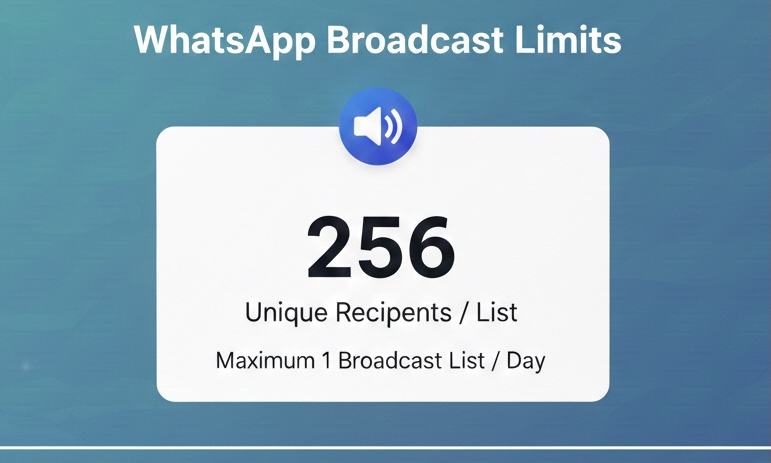
Additionally, WhatsApp enforces several requirements for sending Broadcast Lists. Here are the most important ones:
- Recipients must save your number. Your message will only be delivered to recipients who have saved your business number in their contacts. If your number isn’t saved, the broadcast message will not be received.
- Recipients must not have blocked your business. Any contact that has blocked your number will automatically be excluded from receiving broadcast messages.
- No official daily messaging limit. WhatsApp does not publish a fixed daily limit for broadcast messages. However, sending large volumes or repetitive content can trigger restrictions.
- Behaviour-based restrictions apply. WhatsApp monitors user behaviour such as block rates, message frequency, and user engagement. High block rates, unreplied messages, or spam-like activity can result in temporary or permanent messaging restrictions.
Limitations of Broadcast Lists
WhatsApp Broadcast Lists provide an easy way to message multiple customers at once. You don’t need extra tools or complex settings to be able to send a broadcast. However, it comes with some limitations that might make it unsuitable for some businesses, especially if you’re looking to run large-scale, personalised messaging campaigns.
Here are some limitations of Broadcast Lists:
- No automation or scheduling: You should send the messages manually. Broadcasts can’t be scheduled. Neither can you set follow-ups or automate responses.
- No message personalisation. The content of your broadcast cannot be personalised for each recipient, which might make the message appear generic and spammy.
- No delivery or performance analytics. Broadcast Lists doesn’t offer visibility into delivery rates, open rates, replies, or engagement. You can only see basic read receipts at the individual chat level.
- High risk of restrictions. Broadcasts are manual and behaviour-based rules apply. Because of this, frequent or promotional messaging can quickly lead to account restrictions or bans.
- Manual list management only
You can only add and remove contacts manually and can’t segment based on tags, behaviour, interests, or stage. - It is not scalable. Managing multiple broadcast lists and tracking responses becomes unmanageable as your contact base grows.
When Broadcast Lists make sense
The Broadcast Lists feature offers a simple and easy way to reach multiple recipients on WhatsApp and can be useful in some specific scenarios.
First and foremost, Broadcast List can work well for businesses with a very small customer base. It can be ideal for solopreneurs or small businesses with a few hundred contacts.
Additionally, it’s great for improving existing relationships. It works well when messaging people who already know your business and expect updates from you.
You can use Broadcast Lists for low-frequency updates, such as occasional announcements for holiday closures, one-off reminders, or important service updates.
Campaign Messaging on WhatsApp Business API
Sending WhatsApp Campaigns via WhatsApp Business API involves structured, template-based messages sent at scale to a large number of audiences who have explicitly opted in to receive communication from your business.
API-based campaign messaging on WhatsApp is designed for automation and scale. You use pre-approved templates to send auto-personalised messages which ensures consistency and reduces the risk of spam or account restrictions. To run a WhatsApp Campaign, you’ll need a WhatsApp-approved CRM or platform, which helps you segment audiences, schedule messages, personalise content, and track performance.
WhatsApp Campaign messaging can be suitable for promotions, reminders, follow-ups, re-engagement campaigns, and transactional notifications. The best part is that this is all managed through structured workflows.
WhatsApp API messaging limits explained
The messaging limits for WhatsApp API refer to the number of unique users you can message within a rolling 24-hour period. A “unique user” is counted once per 24 hours, regardless of how many messages they receive during that time.
As of the latest update, you can send your campaign to up to 100,000 unique users in a 24-hour window once you verify your business and maintain a healthy messaging quality. You can eventually level up to unlimited recipients as you maintain high-quality messaging and compliance.
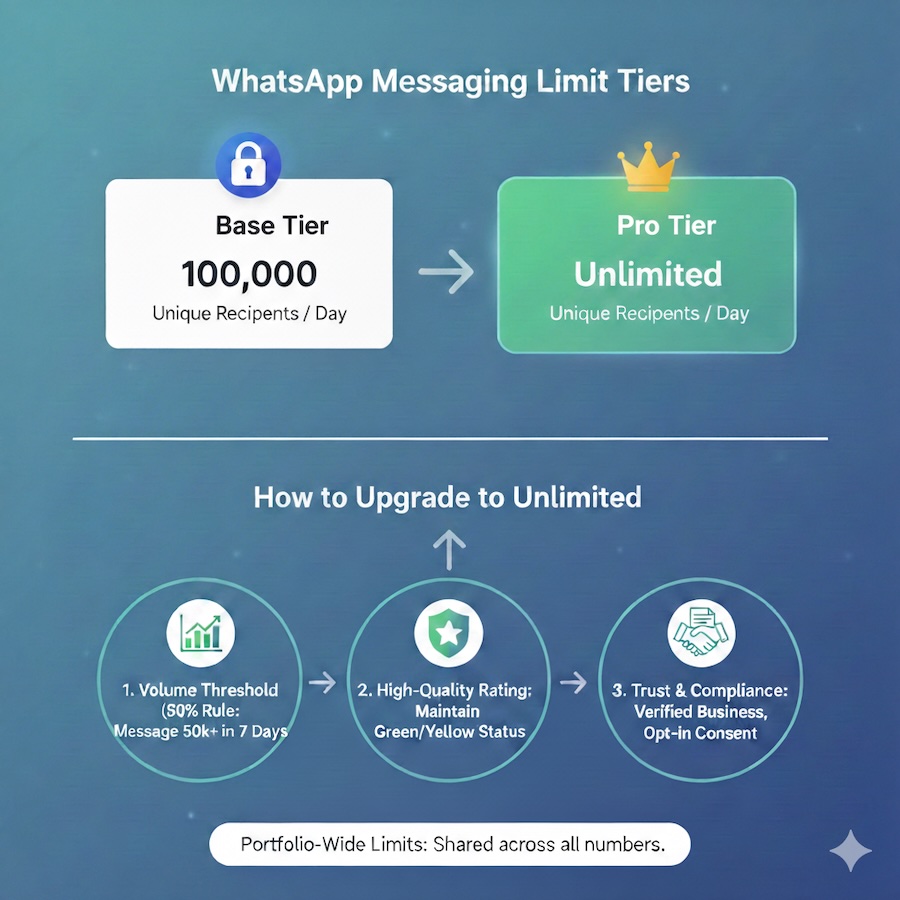
These limits are applied per phone number, not per business account. This means companies using multiple WhatsApp numbers can distribute messaging volume across numbers, but each number is evaluated independently.
Here are some important things to consider if you’re running a WhatsApp Campaign:
- Campaign messages sent via WhatsApp API are considered business-initiated conversations. This means the business starts the conversation rather than responding to an incoming message from the user.
- WhatsApp requires all campaign messages to be approved prior to sending. These templates are reviewed by WhatsApp to ensure they follow content and policy guidelines. Approval can take a few minutes up to 24 hours.
- If a user has not messaged your business in the last 24 hours, any new message you initiate must use a template, and will be charged. Even within the 24-hour customer service window, you may want to base your campaign-style on templates to maintain consistency and compliance.
- All your campaign messages count toward your messaging tier limits, regardless of the user’s replies.
- WhatsApp assigns a quality rating to every WhatsApp Business API phone number, which is influenced by recipient behaviour including how they engage with your messages, how often they block your business, and whether your messages are reported as spam.
- High engagement and low block rates help maintain a good quality score, while poor engagement and/or frequent complaints can lower it.
- A poor quality rating can lead to slower message delivery, reduced messaging limits, or in severe cases, temporary or permanent restrictions.
Broadcast Lists vs WhatsApp API Campaigns (key differences)
Broadcast Lists and WhatsApp API campaigns are built for very different use cases, although they both allow you to send messages to multiple contacts. The difference goes beyond messaging volume to include control, compliance, and long-term sustainability.
Here are some key differences between these two:
Scale and control
Broadcast Lists is designed for small-scale communication. The same message is sent to a smaller broadcast list capped at 256 recipients. To reach more people, you must create and handle multiple lists, which can quickly become unmanageable. You can’t easily segment contacts, personalise messages at scale, or control timing beyond manually pressing “send”.
WhatsApp API campaigns, on the other hand, are built for larger-scale messaging. You can send auto-personalised messages to tens of thousands, or even millions, of recipients who opted in. Campaigns can be automated, scheduled, personalised with dynamic variables, and controlled through rules and workflows.
Risk and compliance
Using Broadcast Lists for frequent or promotional messaging carries a high risk of restrictions. Because there are no formal campaign rules, and you often rely on trial and error. If recipients block or report your messages, WhatsApp may limit or suspend your number without much warning.
WhatsApp Campaigns, on the other hand, operate under clear and well-defined policies. Message templates must be approved, opt-in is required, and messaging limits and account health ratings are transparent. Following these rules make your campaigns significantly safer and more predictable, even at high volumes. Compliance is built into the system.
Automation and tool integration
Broadcast Lists operate entirely inside your WhatsApp Business App and have no integration with external tools. You can’t simply manage your bulk messaging with an external tool like a CRM. This means there is no automation and you can’t trigger messages based on customer actions or lifecycle stages. You must handle everything manually.
WhatsApp API campaigns are designed to work hand-in-hand with CRMs and automation platforms. You can integrate WhatsApp with your CRM, trigger messages based on events (such as form submissions or deal status changes), run multi-step workflows, and track conversations alongside other sales and marketing activities. WhatsApp API Campaigns turn your WhatsApp into a fully integrated communication channel rather than a standalone messaging app.
The following table explains the difference between Broadcast Lists and WhatsApp Campaign in detail:
| Broadcast Lists | WhatsApp Campaign | |
| Tools required | WhatsApp Business App | WhatsApp Business API + CRM |
| Purpose | Regular updates to existing contacts | Large-scale business messaging |
| Messaging type | One-to-many, manual; non-personalised content | One-to-many, automated; auto-personalised content |
| Max recipients | 256 contacts per broadcast list | Tier-based: 100K / Unlimited users per 24h and unlimited |
| How limits are measured | Per Broadcast List + behaviour-based checks | Unique users messaged in 24 hours |
| Daily sending limit | No fixed number (implicit limits apply) | Clearly defined by messaging tier |
| Recipient requirements | Must have saved your number | Must have explicitly opted in |
| Message templates | Not required | Required for business-initiated messages |
| Automation support | ❌ No | ✅ Yes |
| CRM integration | ❌ No | ✅ Yes |
| Analytics and tracking | ❌ Not available | ✅ Delivery, engagement, campaign tracking |
| Risk of restrictions | High | Low, if compliant |
| Best suited for | Small businesses, manual use | Growing teams, B2C salespeople, automation |
| Scalability | ❌ Poor | ✅ Excellent |
Final thoughts
Using the wrong WhatsApp tool for the wrong purpose can lead to inefficiency and unnecessary costs. Therefore, always understand your purpose when deciding how to reach your customers. Additionally, you should always keep in mind that WhatsApp employs strict Terms of Service. Some common mistakes can lead to blocks, reduced delivery, or even permanent bans. Here are some common mistakes you may want to avoid:
- Don’t treat Broadcast Lists like bulk campaign tools,
- Don’t send promotional messages without proper opt-in
- Don’t ignore engagement or quality signals
Use the WhatsApp Business App if you have a small contact base and send occasional, manual messages. Choose the WhatsApp Business API if you plan to run campaigns, automate messaging, or need scale, tracking, and control.
Setting up WhatsApp API can be technical for beginners. But Privyr makes it simple. Privyr is a WhatsApp-approved lead engagement tool that helps you seamlessly run, manage, and scale your campaigns without needing to worry about the technical aspects of the API. It also works with your regular WhatsApp Business App, allowing you to automatically import and manage all your leads on WhatsApp, no matter the source.