Contents
From 1 October 2026, WhatsApp service messages will only remain free within a monthly allowance. If you’re sending more than 1,000 service messages from one number, you’ll be paying for subsequent replies.
This means messaging your customers on WhatsApp will become a little more expensive from October 1. The WhatsApp price increase may affect you more if you’re using tools like WATI, Sleekflow, or Respond.io to automate your messages on WhatsApp.
The question is: How to keep messaging your customers effectively on WhatsApp while keeping your costs low moving forward.
This article will explain everything you need to know about Meta’s pricing changes to the 24-hour messaging window, how it will impact your business, and how to minimise your messaging costs.
WhatsApp price increase: Service messaging cost announcement
Service messages are non-template replies you send to your customers inside the 24-hour customer service window through WhatsApp Business API. The 24-hour window resets every time the customer sends you a new message. Any message you send through WhatsApp Business API by any means, whether manually typed by people or automated by an AI agent or an automation tool, are considered service messages.
These messages have been free of charge on WhatsApp Business API for some time. You can reply to inbound enquiries with as many messages as you can within the 24 hours of receiving an enquiry.
However, from 1 October 2026, Meta will start charging for service messages sent through the WhatsApp Business Platform (WhatsApp API). You’ll still get 1,000 service messages for free each month. Once you’ve used up this allowance, you’ll be charged per message for every additional service message you send.
The 1,000 free service messages allowance will reset every month but unused messages do not roll over. The charges depend on your country and apply per delivered business message, not per lead or conversation. Inbound customer messages will remain free.
Keep in mind that this applies for WhatsApp API messages only. If you’re using WhatsApp Business app and not sending or automating replies through WhatsApp API, you won’t be charged for messages sent.
What is the 24-hour customer-service window?
When a customer messages your business on WhatsApp, a 24-hour customer-service window opens. During that time, you can reply through the WhatsApp Business Platform with free-form messages, without using an approved template. Each new message from the customer resets the 24-hour clock.
Once the window closes, you generally need an approved message template to contact the customer through the Platform. From 1 October 2026, free-form service replies sent through the WhatsApp API will count towards your allowance of 1,000 free service messages per business phone number each month. After that allowance is used, Meta will charge for each additional delivered service reply.
What counts as a service message?
A service message is an ordinary, non-templated reply sent to a lead or customer within the 24 hours of receiving an inbound enquiry/message through WhatsApp API
Answering a product question, sharing prices, responding to a support request, providing appointment availability, or sending a product photo all can be considered service messages. They can be sent by a sales rep, a chatbot, or an automated workflow.
The table below explains how service messages will be charged from the 1st of October, 2026:
| Monthly activity | Service messages |
| 300 leads × 4 replies each | 1,200 |
| Free allowance | 1,000 |
| Potentially chargeable messages | 200 |
How this will affect WATI, respond.io, and SleekFlow users and what is the alternative
WhatsApp-based platforms such as WATI, respond.io, and SleekFlow let your team manage WhatsApp conversations in a shared inbox and send automated replies. Messages sent from those inboxes or automations go through the WhatsApp Business API, whether a salesperson types the reply or a chatbot sends it.
From 1 October 2026, all those service replies will use your allowance of 1,000 free messages per business phone number each month. Once the allowance is used, each additional message will be charged.
For example, if a customer enquires pricing, and your salesperson sends three separate replies from the platform’s inbox, all three count as three API service messages. The same applies if an automation sends the replies. If the monthly allowance has already been used, all these messages can incur a charge.
However, a reply sent directly from the WhatsApp Business app under a Coexistence setup is different. It is not sent through the API and does not incur that API service-message charge.
The new service-message charge comes from Meta, so your total bill could rise even if your provider’s subscription price stays the same. You may also pay for the platform subscription and, depending on your plan, extra users, contacts, automation or AI usage, or possibly platform markups.
What this means for WATI users
From October 1, 2026, WATI will start charging service messages sent within the 24-hour customer service window following the WhatsApp Business Platform (API) pricing changes. If you’re a WATI user, your messaging costs will likely increase.
After you use up the monthly Meta allowance for free service messages, every service reply sent from your WATI Team Inbox or through automation will come with a cost. As WATI charges customers based on its own rate card, you should compare it with Meta’s official rate when calculating your total cost.
WATI does support WhatsApp Coexistence, but the platform is built around a central Team Inbox. Messaging through the WhatsApp Business app to avoid API charges can make your customer conversations harder to manage and minimise the purpose of using the tool altogether.
Best WATI alternatives for WhatsApp price increase
If you are an Android user looking for a free autoresponder, there are many free tools available for basic automatic replies. However, most of these tools use unauthorised methods to automate messages, which can be risky for business use or for managing replies at scale.
Privyr is a good alternative for large-scale business messaging. Through WhatsApp coexistence, it helps you manage your service messages efficiently without additional per message charge. Because the tool is designed around sales conversations, reps can easily track and manage conversations whether they take place in the WhatsApp Business app or are automated through the WhatsApp API.
If you need automation, you can set up WhatsApp AI agents and use them only for messages that require automation. Other conversations can be handled by salespeople directly in the WhatsApp Business app. Privyr is also absorbing Meta messaging costs at the moment. This helps you keep more messages within the free quota and avoiding additional charges.
What this means for Respond.io users
From October 1, 2026, Respond.io will start charging its users for WhatsApp service messages delivered within the customer service window. Once you exceed the free 1000-message Meta allowance, you will be charged per message. If you’re a respond.io user, your messaging costs will likely increase, as the platform says you need sufficient balance in your WhatsApp Business Account for additional messages to be delivered.
Respond.io says it will not add a markup on Meta’s messaging fees, but you’ll still be paying Meta’s charges for replying to inbound enquiries from the WhatsApp Business Platform.
The service-message charge is only one part of the total cost. Respond.io also charges for Monthly Active Contacts. If you exceed your included allowance, additional contacts are billed. AI features come with credits and additional credits are charged once you use up the credits.
Best Respond.ai alternatives for WhatsApp price increase
For Android users looking for a free WhatsApp autoresponder, many free tools allow basic automatic replies. However, most of these tools use unauthorised methods to automate messages, which can be risky for business use.
For sales teams, Privyr offers a good efficient alternative as your team can manage leads, track follow-ups, and organise the sales while continuing personal conversations directly in the WhatsApp Business app. This helps prevent every manual reply from being sent through an API-based inbox.
Currently Privyr absorbs Meta service message costs and doesn’t charge based on Monthly Active Contacts. The tool helps your team manage replies without making every conversation part of a contact-based inbox bill. When automation is useful, you can use WhatsApp AI agents or automated replies for selected situations. You get more control over API usage while avoiding additional WhatsApp messaging costs.
What this means for SleekFlow users
From October 1, 2026 SleekFlow users will be charged for each WhatsApp service message they send through the platform. It will include messages sent by your reps, workflows or AI agents through the platform within the 24-hour window. If you’re a SleekFlow user, your messaging costs will likely increase.
The platform recommends maintaining sufficient WhatsApp balance or enabling automatic top-ups to avoid failed messages.
Your total additional cost can include more than the New per service-message costs. SleekFlow currently lists a monthly fee for each connected WhatsApp number. The subscription charges are based on the plan and Monthly Active Contact limits.
It will charge new WhatsApp messaging prices through its own rate card. You may expect a platform markup on new WhatsApp service message charges.
Best SleekFlow alternatives for WhatsApp price increase
If you want basic automatic replies on Android, there are a few free WhatsApp autoresponder apps. These are suitable for personal use or very simple replies, but are not a reliable option for handling business conversations at scale.
Privyr is a simpler and much more efficient option for sales teams that need to move fast efficiently. Your team can keep ordinary conversations in the WhatsApp Business app and automate important replies through the API, while all are monitored and managed through Privyr’s powerful CRM platform. With this, you have the option to reserve API automation for high-value moments, such as an instant response to a new lead, instead of routing every customer conversation through a paid shared-inbox platform.
The table below shows how different platforms are handling new WhatsApp pricing changes and how Privyr can help lower costs:
| Platform | How the platforms are handling the WhatsApp price increase | Additional costs to consider | Free or lower-cost alternative with Privyr |
| WATI | Your messaging cost will likely increase as WATI will start charging service messages from October 1, 2026. | Subscription, messaging fees and optional add-ons. Current plans also have limits or additional charges for users, automation triggers and AI features. | Use Privyr as a WATI alternative to contact and manage leads through the WhatsApp Business app at low with no cost for human replies. Low subscription fees and no additional service messaging charges. |
| Respond.io | From October 1, WhatsApp service messages will be charged and your messaging costs will increase. | Separate platform subscription cost. Extra contacts and AI usage above the included allowances can produce additional charges. | Privyr provides a more efficient Respond.io alternative for managing and automating WhatsApp replies. Human replies can remain in the WhatsApp Business app instead of passing through an API inbox. No additional add-on or AI charges. |
| SleekFlow | All replies, broadcasts and automated flows WhatsApp made through SleekFlow will be charged from October 1, 2026, causing an increase in your messaging costs. | Subscription charges, and certain usage add-ons. Additionally, a US$15 monthly WhatsApp number-hosting fee applies on some plans. | Use Privyr as a SeekFlow alternative to manage replies and sales. Continue conversations in the WhatsApp Business app without additional charges. Manage autoresponder messages through WhatsApp API only for select replies. Low subscription costs and no additional add-on or AI charges |
AI agents and chatbots may cost more but coexistence can play a crucial role
Automated systems like AI agents and Chatbots can handle your enquiries fast. But they also often send several messages before reaching a useful outcome. When those replies go through WhatsApp Business API, each one counts as a separate service message. Now that Meta will be charging for each service message once they exceed the 1000 monthly message quota, replies from agents and chatbots may cost you more, especially if they send several replies per lead.
One way to manage costs is to use a tool that supports WhatsApp coexistence. You could automate selected messages such as first response to an enquiry, then let a salesperson continue the conversation in WhatsApp Business app. Those app replies do not incur API message charges.
To check whether your automation is delivering enough value, monitor messages per lead, messages per qualified lead, cost per qualification, cost per appointment, cost per resolved enquiry, and conversion value generated by automation
How to reduce your WhatsApp messaging cost if you’re sending messages through WhatsApp Business API
If you’re using WhatsApp Business API to communicate with your customers on WhatsApp, sending fewer unnecessary messages can help your monthly free allowance last longer and reduce charges once it runs out. Here are a few ways you can reduce WhatsApp messaging cost:
- Shorten qualification sequences: Ask only meaningful questions. For example, if location and budget are enough to recommend a service, avoid long questionnaires in chat.
- make the first reply count: Answer the customer’s immediate question and give them a clear next step in the same message. If someone’s asking about the price, you could just send a price card and one relevant follow-up question, instead of a greeting, price, and question sent separately.
- Use existing lead information: Do not ask customers for information already collected through a form or advertisement.
- Review automated acknowledgements: Remove messages that confirm actions without providing useful information.
- Use forms or booking pages when appropriate: Collect details through one structured step instead of a long back-and-forth exchange.
- Review AI response behaviour: If you’re using automated reply tools or AI agents, prevent the system from splitting one answer into several messages.
Alternatives to lower your cost
Even if WhatsApp is your crucial business communication platform, you don’t need to send every reply through WhatsApp Business API. Messages you send directly from the WhatsApp Business app do not incur Meta’s API message charges. If you want to automate your first few responses to a new lead and then continue the conversation manually in the app, WhatsApp Coexistence lets you use both on the same number.
The automated API replies will be charged once you’ve used your monthly free allowance but your replies from the app won’t be.
Here are some alternative ways you can manage your WhatsApp messaging costs:
Stick to WhatsApp Business app
If you’re a small team and can manage WhatsApp enquiries yourself, the WhatsApp Business app may be all you need for conversations. If you need to manage leads more effectively use a mobile-first CRM like Privyr. It can capture leads from your ads, forms, and other sources, alert your team when a new lead arrives, and help you track follow-ups while you continue chatting in the Business app.
As your enquiry volume grows, a CRM that supports WhatsApp Coexistence gives you the option to add API-powered automation on the same number.
Use CRM-assisted WhatsApp communication (such as Privyr)
You don’t need to route every conversation through an API-based shared inbox to respond quickly to sales leads and track them effectively. CRMs like Privyr support WhatsApp Coexistence and can capture leads from ads, forms, and other sources, alert your team when a new lead arrives, and assign each lead to the right salesperson.
Your team can then continue personal conversations in the WhatsApp Business app without incurring Meta’s API message charges for those app replies.
Privyr also helps salespeople prepare personalised responses, track follow-ups, and manage leads through the sales pipeline. This gives your team a clearer view of which prospects need attention.
If you need an automated first response, WhatsApp Coexistence lets you add API-based automation on the same number. You can continue replying manually in the Business app. Keep in mind automated API messages still remain subject to Meta’s pricing once the monthly free allowance is used.
Direct Cloud API
If you have a technical team, you can connect directly to Meta’s WhatsApp Cloud API instead of paying for a third-party WhatsApp platform. This can reduce subscription fees or platform markups
For this you’ll need to build or connect the tools your team uses to manage conversations, such as a shared inbox, lead assignment, automated replies, and reporting. Your technical team will be responsible for maintaining those systems and handling API changes.
Keep in mind that it is unlikely to be the simplest option for a small sales team and Meta’s message charges will still stay.
Use Privyr for the best free alternative to WhatsApp sales tools for per message costs
Many WhatsApp sales platforms rely exclusively on the WhatsApp Business API to send and receive customer messages. This means every reply you send is processed through the WhatsApp Business API and may be subject to Meta’s per-message charges.
These platforms also come with additional charges like recurring platform subscription fees, additional users, AI agents, automation usage, and add-ons. On top of that, the platform may add a markup to Meta’s per-message rates.
Privyr solves this issue while making your WhatsApp communications even more effective.
Privyr offers a simpler, more flexible alternative to moving your entire sales process onto a full WhatsApp API platform.
Privyr supports WhatsApp Coexistence, allowing you to use WhatsApp Business app and API on the same number. You can manage and track leads in Privyr, continue personal conversations in the Business app, and use API automation only where it adds value. This gives you more control over which replies go through the API and may incur service message charges.
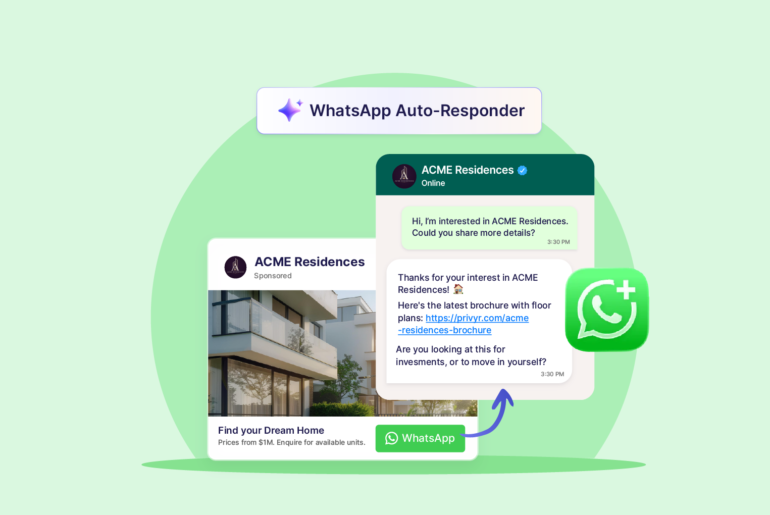
For example, you could use an API-powered autoresponder to acknowledge a new enquiry or collect essential details, then let a salesperson continue the conversation manually through their WhatsApp Business app. These app-based replies are not subject to Meta’s API message charges.
Even better, Privyr is currently absorbing Meta’s service message costs. This means, Privyr users won’t have to pay the new service message charges from Meta.
You can also manage lead assignments and follow-up reminders in Privyr while sending personal replies through the app, instead of paying an API charge for every pricing answer, qualification question, and follow-up message.
Here’s how to set up Privyr on your WhatsApp for an effective and efficient lead management:
- Go to www.privyr.com and sign up.
- Set up your profile and connect lead sources from integration.
- Go to Automations and select WhatsApp.
- Open Inbound Inquiry Auto-Responder.
- Connect your existing WhatsApp Business number.
- Choose the type of enquiry that should trigger the rule.
- Define the response.
- Create additional rules for your other common enquiries.
- Test the enquiry types.
- Activate your rules.
With this you can set up automations for messages that only need automatic responses. Your team can continue subsequent sales conversations on their WhatsApp Business app without paying for each service message.
Keep messaging your customers on WhatsApp at no extra cost. Try Privyr today!
Frequently Asked Questions
Service messages sent through WhatsApp Business API are currently free during the 24-hour customer-service window. From 1 October 2026, each business phone number will get 1,000 free service messages per month. WhatsApp will charge for additional service messages.
Yes. Privyr is currently absorbing Meta’s service message costs for Automated or personal WhatsApp messages sent to the WhatsApp API. This means Privyr users won’t have to pay Meta’s new service message charges when messaging their customers.
Many platforms like WATI, SleekFlow, and respond.io will pass Meta’s service message costs on to their users. Privyr is currently absorbing Meta’s service message costs for its users.
Personal WhatsApp chats are not affected. The new charge applies to service replies sent through the WhatsApp Business API.
On WhatsApp Business Platform, Meta charges per delivered message when a fee applies. The rate depends on the message type and the recipient’s country.
No. Messages you send directly through WhatsApp Business app are not subject to the Business Platform’s per-message charges.
Send fewer unnecessary API replies, and use Coexistence to continue conversations in the WhatsApp Business app. App replies do not incur API message charges, but automated and manual replies through WhatsApp API can be charged after your free allowance is used.