Contents
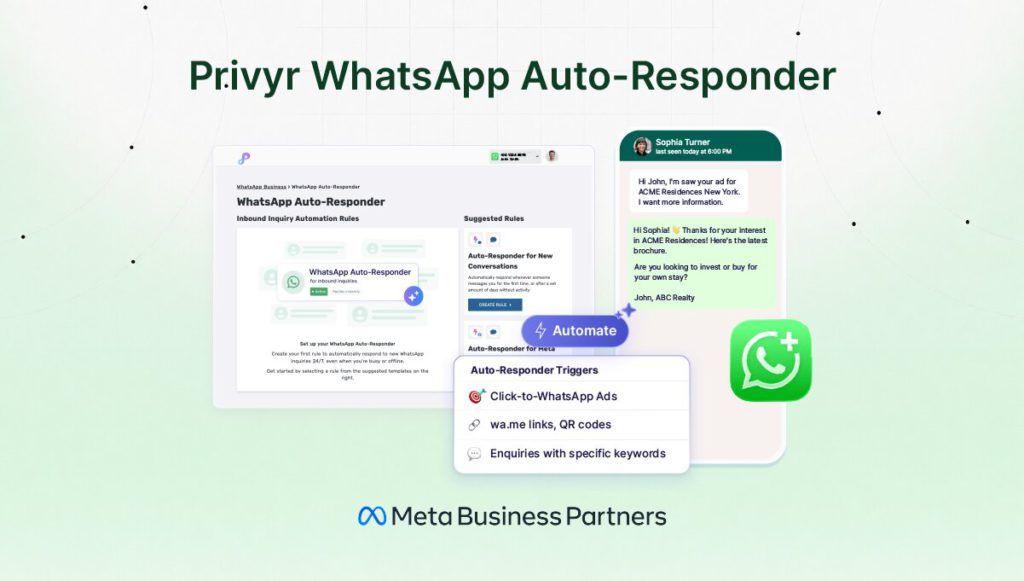
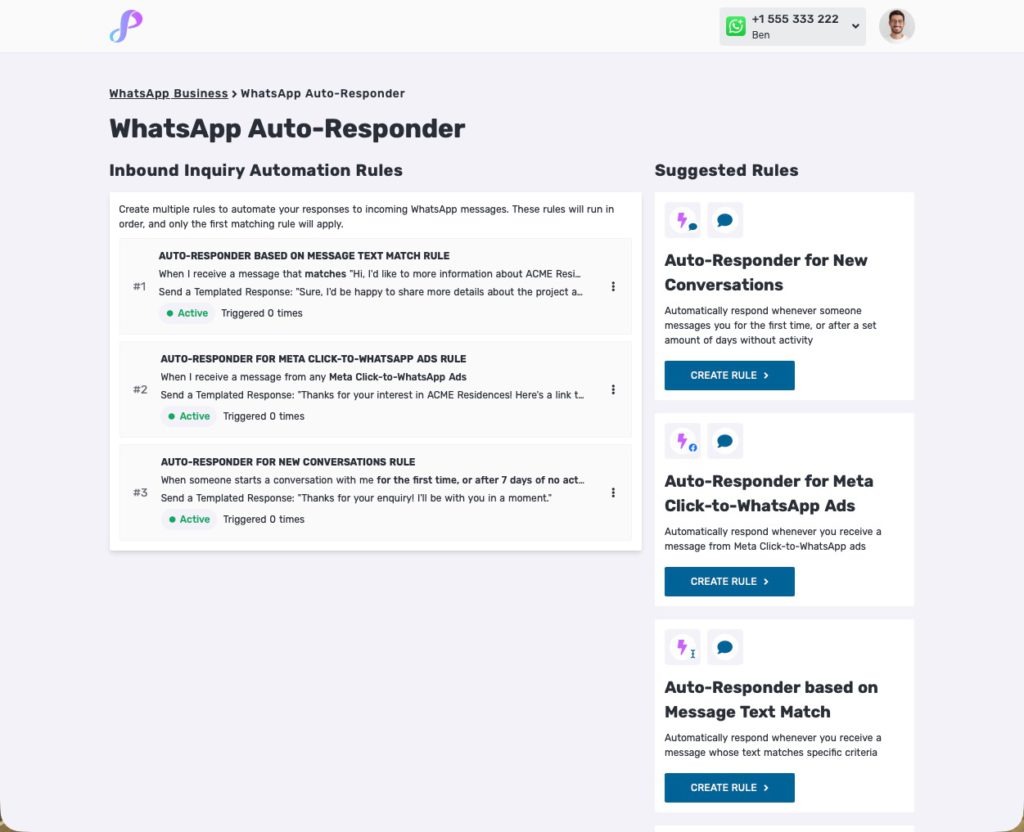
Privyr WhatsApp Auto-Responder lets you automatically respond to different WhatsApp enquiries with specific responses. You can use it to provide further information for specific products, ask qualifying questions, and ensure each enquiry receives a relevant response instantly.
When someone messages your business on WhatsApp, the right response often depends on what they are asking about.
A prospect asking for a property brochure needs a different response from someone asking about pricing. Someone enquiring about one product needs different information from someone enquiring about another.
Setting a generic WhatsApp Auto-Reply won’t help you address these messages in a timely manner.
With the upgraded Privyr WhatsApp Auto-Responder, you can create multiple rules that automatically match different enquiries to different responses.
For example:
When you receive a message that matches: “Hi, I saw your ad for ACME Residences. I’d like more information.”
Automatically send: “Thanks for your interest in ACME Residences! Here’s the link to the latest brochure. Are you looking at this for investment or to move in yourself?”
Or:
When you receive any message that contains: “ACME360 quotation”
Automatically send: “Thanks for your interest in ACME360! May I ask how old you are? This will help me recommend the most suitable plan for you.”
You can create as many automation rules as you need, so you can automatically send relevant responses to different enquiries you frequently receive on WhatsApp.
What is Privyr WhatsApp Auto-Responder?
Privyr WhatsApp Auto-Responder is a WhatsApp automation tool that instantly responds to inbound business enquiries based on rules and templates you set.
You choose:
- What enquiry should trigger the rule
- What message Privyr should send in response
The basic workflow is:
Incoming WhatsApp enquiry → Match a rule → Send the corresponding response
This is useful for businesses receiving enquiries from:
- Click-to-WhatsApp Ads
- wa.me links and QR codes
- Online listings and marketplaces
- Other channels that prompt prospects to start a WhatsApp conversation
If you receive the same types of enquiries repeatedly from these sources, you just need to set your Inbound Inquiry Automation Rules one time. Once activated, Privyr automatically handles the initial response and subsequent follow-ups.
Unlike the built-in Auto-Reply, Privyr’s WhatsApp Auto-Responder supports multiple rules, so you can address different enquiries with custom responses.
You can currently try Privyr WhatsApp Auto-Responder FREE for a limited time, by signing up here.
Choose how to trigger your automated responses
Privyr lets you choose different types of triggers for your automated WhatsApp response:
- Meta Click-to-WhatsApp Ads: Automatically respond to enquiries from your Click-to-WhatsApp Ads.
- Message text match: Automatically respond when an incoming message matches a specific text, or contains certain keywords.
- New conversations: Automatically respond when someone messages you for the first time, or after a set period without activity.
When creating a message text match rule, you can also generate a unique WhatsApp link or QR code directly in Privyr.
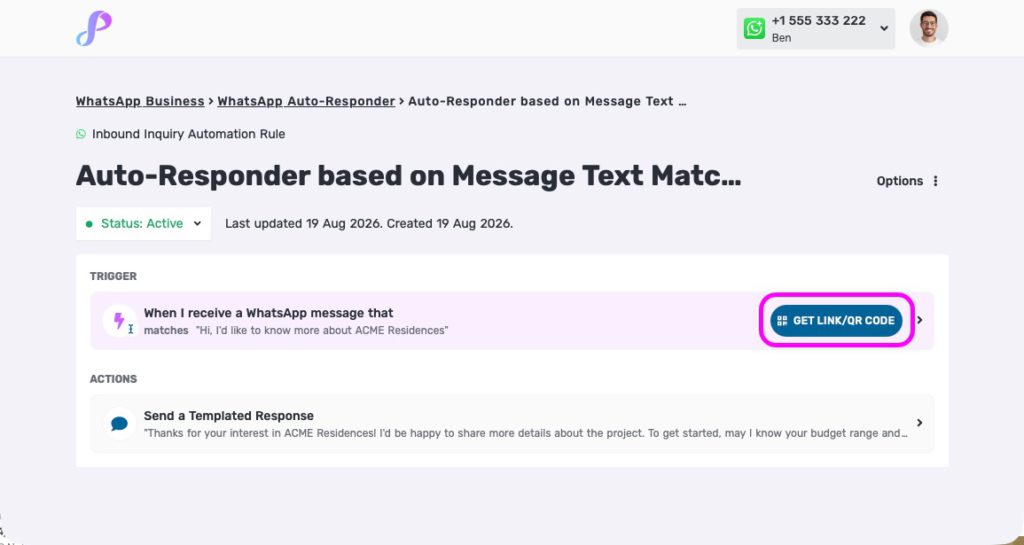
Set the pre-filled message that prospects will send, then share the link or QR code anywhere you want to generate WhatsApp enquiries. Display it on your flyers, business cards, social media profiles, websites, or even in-store.
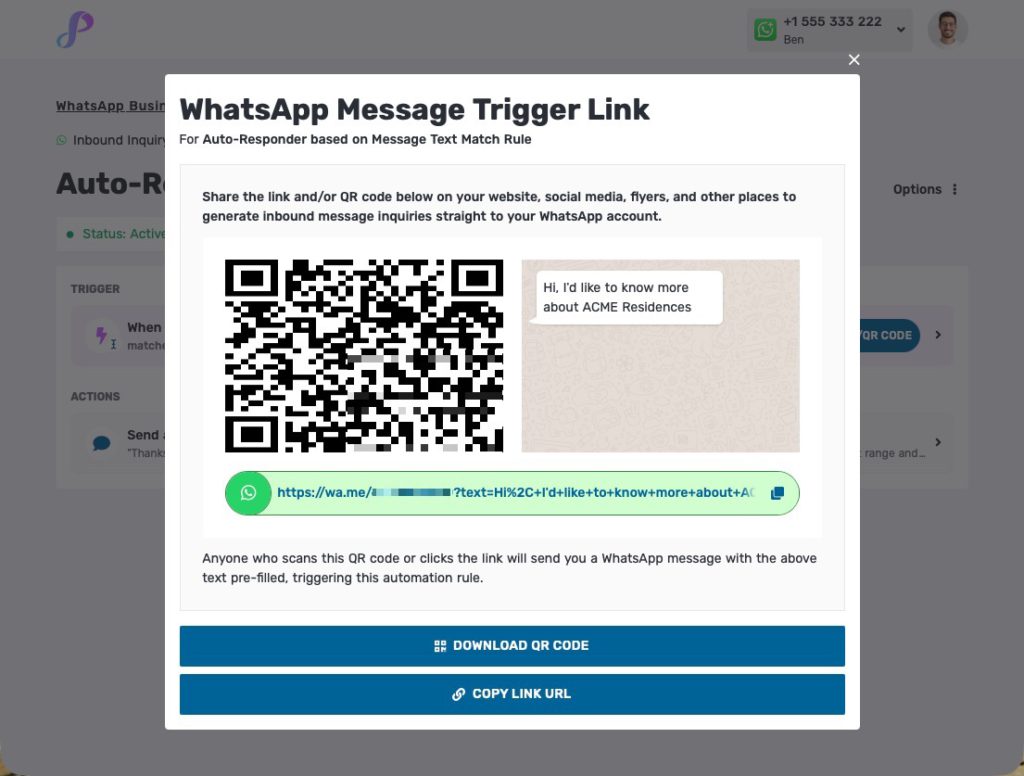
When someone scans the QR code or clicks the link, WhatsApp opens with your pre-filled message. Once they send it, Privyr matches the message to your rule and automatically sends the response you’ve set up.
Why use Privyr instead of WhatsApp’s built-in auto-replies?
The WhatsApp Business app does let users set Greeting Messages and Away Messages, which can automatically respond when someone contacts your business.
These are useful when you want to send a simple, generic message such as: “Thanks for contacting me! I’ll get back to you as soon as possible.”
But businesses often receive different types of WhatsApp enquiries that need different responses.
Someone asking for a price list needs a different reply from someone asking for a brochure. A prospect asking about Product A may need different information from someone asking about Product B.
This is where Privyr WhatsApp Auto-Responder goes further.
WhatsApp’s built-in auto-reply: A general response
WhatsApp Business gives you a straightforward way to automatically acknowledge messages from people contacting your business.
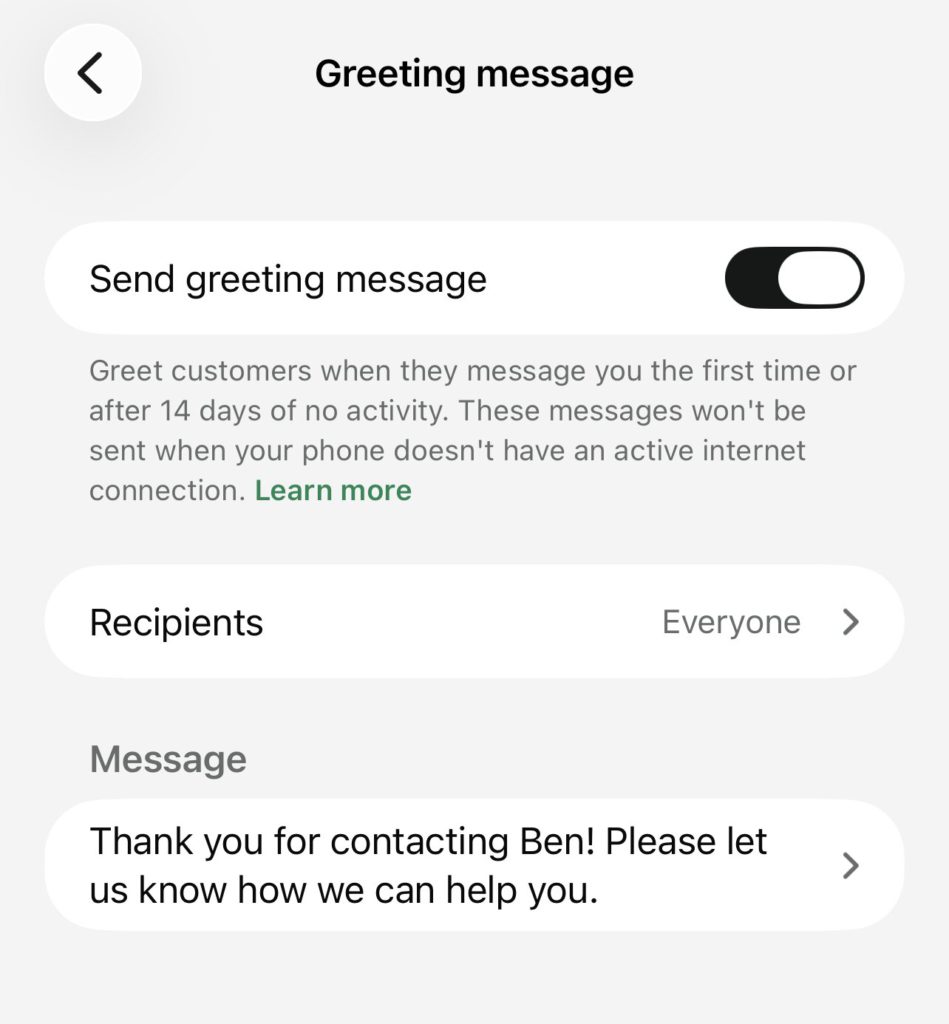
It works when you want everyone to receive the same general greeting or away message. However, if your leads are enquiring about different things, they still have to wait and check back again later for your manual answer.
Privyr: Different responses for different enquiries
Privyr lets you create multiple automated response rules, so different enquiries can trigger different messages. This is the key capability of Privyr’s WhatsApp Auto-Responder.
So instead of: Any enquiry → Same auto-reply
You now can set up:
- Enquiry A → Response A
- Enquiry B → Response B
- Enquiry C → Response C
In particular, the text-match rule lets you control which WhatsApp messages would trigger an automated response based on specific words, phrases, or structures. You can choose from four conditions — Matches, Contains, Starts with, or Ends with — to automatically respond to messages that meet your criteria.
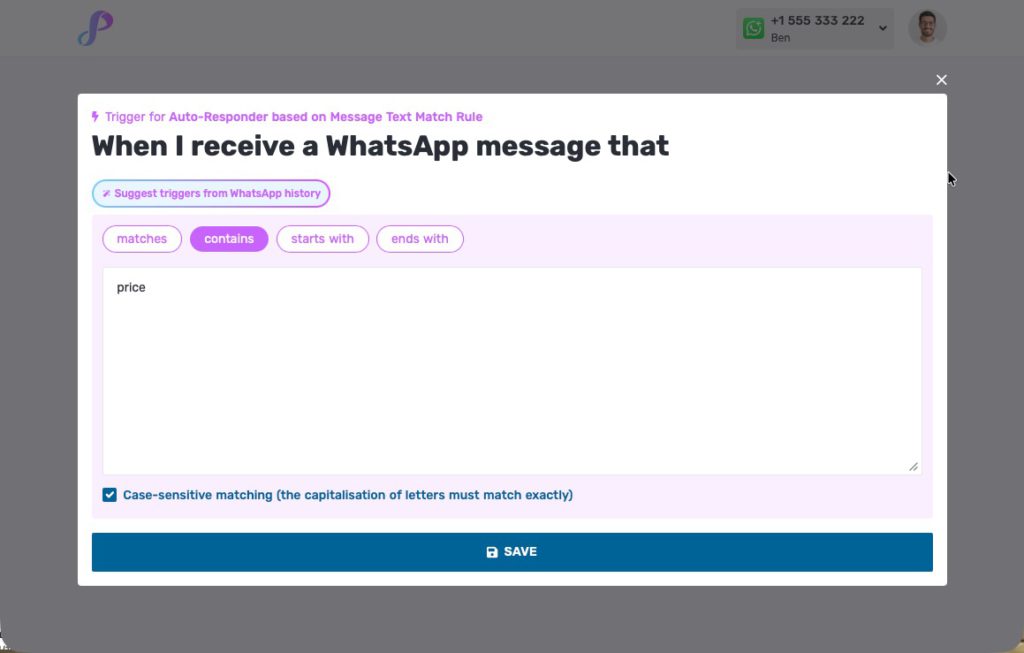
For example, imagine a real estate agent who receives WhatsApp enquiries for several property listings. They could set up their WhatsApp Auto-Responder rules like this:
- Message matches: “Hi, I saw your ACME Residences ad. Can I get more information?”
- Automatically send the ACME Residences brochure and ask whether the prospect is buying for investment or own stay.
- Message contains: “3 bedroom unit price”
- Automatically send the latest price list.
- Message contains: “Floor plan ACME Residences”
- Automatically send the relevant floor plan.
- Message starts with: “Hi, I want to buy property”
- Automatically ask about budget, preferred location, and requirements.
This means your automated responses can be tailored to the specific products, properties, services, campaigns, or questions that your prospects often ask about.
Choose exactly what you want to automate
Not every WhatsApp conversation needs an automated reply.
With Privyr, you can choose which types of lead enquiries you want to automate. This means you can automate repetitive enquiries while making sure personal conversations remain untouched.
Your WhatsApp conversations with friends and family, as well as with VIP clients you prefer to handle personally, don’t need to be part of your lead automation workflow.
More control over your automated responses
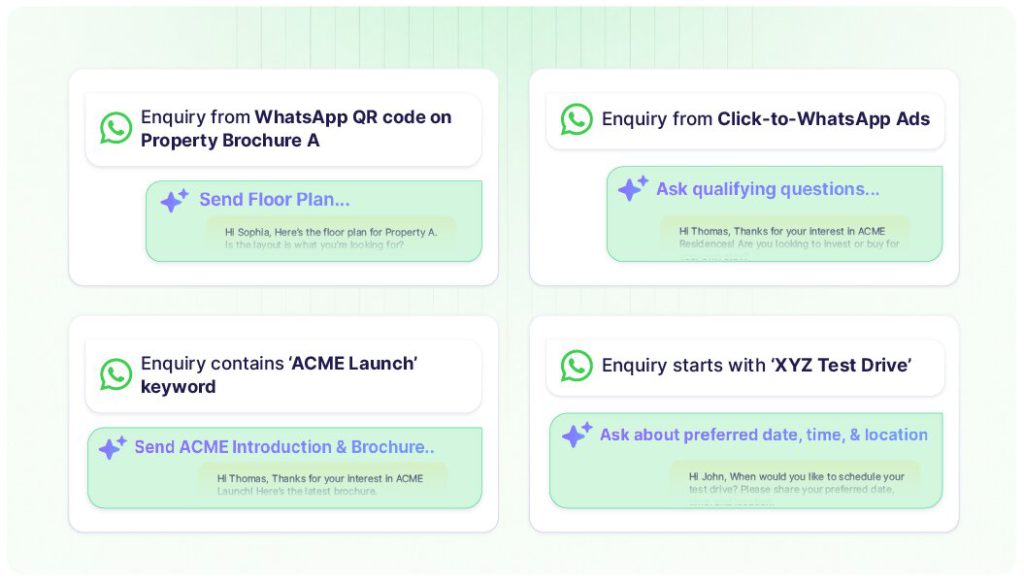
With Privyr’s WhatsApp Auto-Responder, you can:
- Instantly send different responses for different enquiries from your existing WhatsApp number
- Share specific brochures, price lists, floor plans, links, or other information
- Ask qualifying questions to move the conversation ahead
- Set up responses for different products, properties, campaigns, or services
- Respond to common enquiries automatically while you are busy or offline
Privyr doesn’t replace WhatsApp’s built-in auto-replies. It gives businesses a more flexible way to automate responses to different inbound enquiries.
WhatsApp Business provides a simple way to automatically acknowledge messages. Privyr lets you build multiple automated responses around the different enquiries your business receives.
Rule-based, not AI
Privyr WhatsApp Auto-Responder is not an AI chatbot. You set the rules, which tell Privyr what to look for, what information to share, and what follow-up questions to ask.
This gives you direct control over exactly what your prospects receive. No hallucinations. No misleading information. No incorrect quotations.
Your automated responses will always provide accurate and consistent information to anyone who messages you on WhatsApp.
Coming soon: AI-powered lead qualification
While the current WhatsApp Auto-Responder is rule-based, we’re also working on a new AI Lead Qualification Agent that will automatically qualify leads by asking specific questions in a natural, conversational manner.
This part of Privyr’s WhatsApp Automation will be AI-powered, but you’ll still have full control over what the AI can ask, what information it can provide, and how it engages with your leads. You decide how the agent should qualify your leads, while AI handles the conversation naturally.
Built for WhatsApp lead enquiries from any source
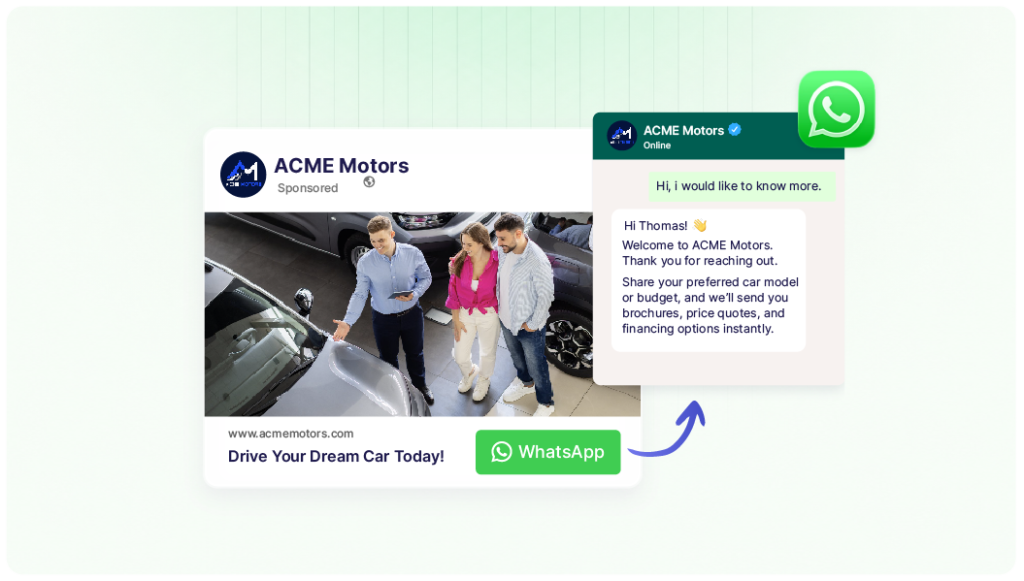
Privyr WhatsApp Auto-Responder is especially useful for businesses that generate leads through digital marketing and sales channels. This includes Click-to-WhatsApp ads, wa.me links, and online marketplaces.
For example, a prospect might:
- See your Click-to-WhatsApp Ad → Send a WhatsApp enquiry → Receive an automated response
- Scan WhatsApp QR code on your brochure → Open WhatsApp with a pre-filled message → Receive the relevant automated response
- Find your listing on an online portal like PropertyGuru or SGcarmart → Click a WhatsApp link → Receive the product brochure automatically
Instead of manually replying to every new WhatsApp conversation, you can create rules around the types of enquiries generated by each channel, product, or campaign.
Common use cases
Real estate
Automatically respond to enquiries about different properties with the relevant brochure, price list, floor plan, or qualifying questions.
For example:
- Property A enquiry → Property A brochure
- Property B enquiry → Property B floor plan
- Price enquiry → Follow-up questions on requirements
Financial services
Respond differently to enquiries about different products, plans, or quotations, and ask questions needed to determine the appropriate next step.
Education
Automatically provide information about different courses, programmes, intakes, or fees based on what a prospective student is asking about.
Automotive
Respond to enquiries about different vehicle models with the relevant specifications, pricing, or booking information.
Other high-ticket B2C businesses
Any business that receives recurring WhatsApp enquiries can create automated rules around its most common questions and requests.
Set up your WhatsApp Auto-Responder in minutes
Getting started is simple.
- On Privyr Web, go to your Automations tab.
- Under WhatsApp Automations, go to Inbound Inquiry Auto-Responder.
- If you haven’t already, connect your existing WhatsApp Business number (this only takes a minute, and your existing contacts and chats won’t be affected).
- Click Create Rule.
- Set your trigger and automated response.
- Create as many rules as you need for the enquiries you commonly receive.
You can start with just a few of your most common enquiries and add more rules over time.
In summary
An automatic response is useful. But for businesses handling enquiries over WhatsApp, the response needs to be relevant to the enquiry.
That’s the core idea behind Privyr WhatsApp Auto-Responder.
Now whenever a prospect messages you on WhatsApp, Privyr can provide a useful first response immediately. You only need to step in when the lead is qualified and you can take the conversation further.
Privyr WhatsApp Auto-Responder is currently available for free for a limited time. Try it today by creating your free Privyr account here.
Frequently asked questions
What is a WhatsApp Auto-Responder?
A WhatsApp Auto-Responder automatically sends a message when a person contacts a business on WhatsApp. Privyr WhatsApp Auto-Responder lets businesses create multiple rules so different enquiries can receive customised automated responses.
Can I create multiple auto-replies in WhatsApp Business?
WhatsApp Business provides built-in Greeting and Away Messages for automatic responses. For businesses that need different responses for different enquiries, Privyr WhatsApp Auto-Responder lets you create multiple rules, with each rule triggering its own response.
Can Privyr automatically respond to different WhatsApp enquiries?
Yes. Privyr WhatsApp Auto-Responder lets you define multiple rules for different inbound enquiries. Each rule can have its own automated response.
Can Privyr send a brochure or price list automatically on WhatsApp?
Yes. You can include links to brochures, price lists, floor plans, and other useful information in your automated responses.
Can Privyr automatically ask qualifying questions on WhatsApp?
Yes. You can create automated responses that ask qualifying questions, such as a prospect’s budget, preferences, or other information relevant to your business.
The upcoming AI Lead Qualification Agent upgrade can even automatically qualify leads with AI by asking specific questions in a conversational manner.
Is Privyr WhatsApp Auto-Responder AI?
No. Privyr WhatsApp Auto-Responder is a rule-based automation feature, not an AI chatbot. You define the triggers and write the responses yourself, giving you control over exactly what gets sent.
Is Privyr WhatsApp Auto-Responder free?
Privyr WhatsApp Auto-Responder is currently available for free for a limited time.
Where can I set up Privyr WhatsApp Auto-Responder?
You can set it up in Privyr Web → Automations → WhatsApp Automations → Inbound Inquiry Auto-Responder.
Will I lose access to my WhatsApp Business app if I connect my number to Privyr?
No. You can continue using your WhatsApp Business app as usual after connecting your number to Privyr. You won’t lose your existing contacts, chats, groups, or other data.
Privyr is a verified Meta Business Partner, and its WhatsApp integration is designed to work alongside your existing WhatsApp Business account. You can keep using your WhatsApp Business app on mobile or web, while Privyr handles your automated lead responses in the background.
You can also verify Privyr’s official WhatsApp Business integration directly in your WhatsApp Business app. Once connected, go to Settings → Account → Business Platform and check that Privyr is listed as an official business platform.
Your existing WhatsApp Business account and data stay with you. Connecting Privyr doesn’t mean moving to a new WhatsApp account or number.
About Privyr
Privyr is a mobile-first CRM and follow-up system for high-ticket B2C salespeople and teams. It helps businesses capture, manage, contact, and follow up with leads from one place.
As a verified Meta Business Partner, Privyr’s WhatsApp automation tools help businesses automate different parts of their lead engagement process. This includes responding to inbound enquiries, sending consistent follow-ups, and bulk re-engaging existing leads via WhatsApp, without getting restricted or banned.