The post How KLOUD MEDIA grew from 5 to 50 clients with Privyr appeared first on Privyr Blog.
]]>
Saxon Borg runs KLOUD MEDIA, a digital marketing agency specializing in lead generation and Meta Ads for home repair and renovation services across Australia.
His clients are primarily high-end renovation specialists—deck builders, bathroom and kitchen remodelers, roofing contractors—who are often out in the field. They need a fast way to view and contact the leads generated by Saxon’s team, before they go to someone else for the fix.
So we sat down with Saxon to find out their story—what that process was like and the challenges they overcame to scale from 5 to 50 clients.
KLOUD MEDIA Fast Facts
- Industry: Digital Marketing Agency
- Market: Australia
- Team Size: 5
The Challenge
“Previously, we only had 5 clients and already felt like we were at capacity. Manual lead management was consuming all our time.”
Before discovering Privyr, Saxon’s agency was drowning in manual processes. Growing the business felt like a pipe dream because the team already had their hands full with 5 clients.
Every time they captured new leads for their clients through Facebook, they’d have to manually export the leads and send them individually to each client through a spreadsheet.
“We didn’t like using Facebook Lead Centre because we couldn’t get instant notifications when new leads came in, and our clients couldn’t see everything in one place,” explains Saxon.
The biggest problem wasn’t just the time consumption—it was the impact on their clients’ businesses. Home service providers operate in a highly competitive market where speed is everything. You wouldn’t want to wait days for your plumber to call your back.
But Saxon’s clients were constantly on the move, visiting job sites, and handling other emergency calls. On top of that, some aren’t tech-savvy. Even if you could instantly deliver new leads to their phones, getting them to act quickly was another challenge.
“Our clients were losing potential customers because they weren’t fast enough to respond,” Saxon recalls. “All these essential features just weren’t there before we found Privyr.”
Their First Aha!
“Privyr is just so simple to use that our clients just can’t NOT use it.”
Saxon discovered Privyr while searching for a solution that could solve two problems at once: streamline his agency’s lead distribution process while being simple and intuitive enough that even his most tech-resistant clients would embrace it.
What immediately caught his attention was Privyr’s mobile-first interface, which was perfect for his clients who are often out and about, moving between job sites.
“Privyr’s app interface on their phone makes it really easy for them to look at their leads, see what they need to do, and navigate around the interface,” says Saxon. This was a stark contrast to other CRM solutions they tried, which only left his clients frustrated because they were “too complex” to use on mobile.
“Clients were refusing to use other software, but Privyr is just so simple to use that our clients just can’t not use it.”
The Solution
“Privyr made our business more scalable. We just send them the link to set up their Privyr accounts and training videos. Less work for us, better results for them.”
By implementing Privyr, KLOUD MEDIA transformed their entire client onboarding experience and lead management process.
“It’s pretty easy to get them to set up their Privyr accounts,” explains Saxon. His team now onboards new clients by sending them a setup link, along with some training videos. “Then, whenever we capture new leads for them, the [contact details] would come through to their phones instantly, and they can get to the leads instantly.”
He even jokes that, “Sometimes this is an even bigger selling point than our own lead generation services.”
Delivering More Value
“We can delve deeper and check when they’re calling the leads. I can see the data and help them improve.”
Beyond distributing leads, Saxon also uses Privyr’s Quick Responses and templates to provide his clients with comprehensive workflows for contacting (and converting) leads.
“We give them the full breakdown and daily workflow of engaging the leads: different scripts for calling, show them how to use quick responses, and let them personalize it themselves.”
This gives his clients the confidence to respond fast and professionally to every lead, without having to think about what to say or how to say it in the moment.
Apart from that, Privyr also automatically logs his clients’ activities whenever they interact with a lead through the app. This gives Saxon valuable insights into how his clients are handling the leads his team generates for them.
“When a lead first comes in, the client will call first. It’s all automatically logged, so we can always jump in to see how fast they called, what they’ve done with the lead, and see if we can help them improve the process.”
This visibility allows KLOUD MEDIA to provide ongoing value beyond just lead generation, helping his clients refine their sales processes and close more deals—which keeps them coming back for more.
The Results
“Previously, we only had 5 clients and already felt like we were at capacity. But now we can handle 40 to 50 clients in one go effortlessly.”
The transformation has been remarkable for both KLOUD MEDIA and their clients. Saxon’s team experienced a 10x increase in capacity. Before they felt stretched with just 5 clients, but now they can handle 40 to 50 clients at a time without feeling overwhelmed.
“We decreased the delay between a new lead coming in and our client actually calling them,” Saxon reports. “In turn, our clients are seeing increased [call] pick-up rates and close rates.”
And of course, when their clients see better results, they stay with the agency longer.
“How simplified and streamlined everything is now makes Privyr a no-brainer,” Saxon concludes. The new process with Privyr has created a win-win situation:
Clients are converting more leads. There’s less manual work. Saxon and his team at KLOUD MEDIA can focus on other activities that grow the business.
Saxon’s story is just one of many customer successes with Privyr
Start writing your own success story today with Privyr. Don’t have a Privyr account? Create one here.
The post How KLOUD MEDIA grew from 5 to 50 clients with Privyr appeared first on Privyr Blog.
]]>The post B2B Syndrome: Big-ticket B2C Sales Teams are suffering from it (How to fix) appeared first on Privyr Blog.
]]>We call it B2B Syndrome — a term we coined to describe a common trap:
The tendency of high-ticket B2C sales teams to adopt tools, processes, and strategies designed for enterprise B2B sales — resulting in slow, clunky workflows that don’t match the fast, personal, high-touch nature of big-ticket consumer sales.
 How B2B Syndrome Happens
It starts with good intentions. You want to streamline your sales process, so you look at the playbooks, tools, and CRMs that dominate the mass market. And most of those are built for top B2B marketing companies and B2B enterprise sales — where:
- Deals take months (or years) to close
- Decisions involve multiple stakeholders
- The sales cycle is long and methodical
- Email heavy, WhatsApp is forbidden
These B2B tools are desktop-heavy, clunky, and complex — designed for boardroom deals, not personal conversations.
But in big-ticket B2C Sales, the reality is different: Your clients want a site visit, a test drive, or a consultation this week, not a proposal next quarter. Your conversations happen over WhatsApp, SMS, phone — not email chains and clunky CRMs buried in laptops. Every deal is personal. Buying a home, a car, a life insurance policy — these aren’t transactional. They’re emotional.
 The Cost of B2B Syndrome
When B2C teams use B2B systems, here’s what happens:
- Reps waste time on admin work, not closing deals
- Follow-ups fall through the cracks
- Pipelines look full (because of cumbersome lead flow), but conversion rates stay low
- Teams burn out chasing activity that doesn’t lead to revenue
In short: you’re doing too much work for too little ROI.
 Breaking Free: Why We Built Privyr
We saw this problem play out again and again, and that’s why we built Privyr — a mobile-first CRM designed specifically for high-ticket B2C sales.
Privyr helps you to:
- Engage leads instantly over WhatsApp, SMS, or phone — no more waiting to get back to your laptop.
- Track content, follow-ups, and meetings without complicated tools.
- Align marketing and sales to optimise for real outcomes — meetings booked, demos given, not just cost per lead.
- Get insights in real time, right from your phone.
There’s no learning curve. No clunky system. Just faster responses, better conversations, and more sales.
 Final Thoughts
If your team is stuck in B2B Syndrome, now’s the time to break free. Focus on relationships, not transactions. Use tools built for your kind of sales.
Ready to see how Privyr is solving this for 500,000+ salespeople? Request a demo today 
The post B2B Syndrome: Big-ticket B2C Sales Teams are suffering from it (How to fix) appeared first on Privyr Blog.
]]>The post 5 ways Privyr gives you full visibility over your sales team appeared first on Privyr Blog.
]]>But the problem is, your salespeople don’t have time to update a spreadsheet with details about what they’ve done today, how each lead is progressing… They just want to sell, usually on their phones while they’re out and about.
Well, here’s a win-win solution. Privyr for Teams is a mobile-first CRM that automatically logs your salespeople’s activities and deals as they happen over WhatsApp, text, calls, and more.
As their manager, you’ll get instant answers into what’s actually happening on the ground. Here are five ways Privyr gives you full control and visibility over what your team is doing, how they’re performing, and what’s preventing them from closing deals. Real dashboards included!
- Live Report of Weekly, Daily, and Hourly Activities
- Detailed Activity Breakdowns
- First Response Time and Lead Engagement Rates
- Complete Sales Pipeline & Funnel Analysis
- True Cost Per Conversion or Campaign
Live Report of Weekly, Daily, and Hourly Activities
This hits the spot if you’ve ever wondered what each of your salespeople were doing at a specific time. 
Privyr gives you a live overview of what each team member is doing, so you can easily see the patterns that drive (or hinder) sales. Here are some examples, along with potential discoveries for sales managers:
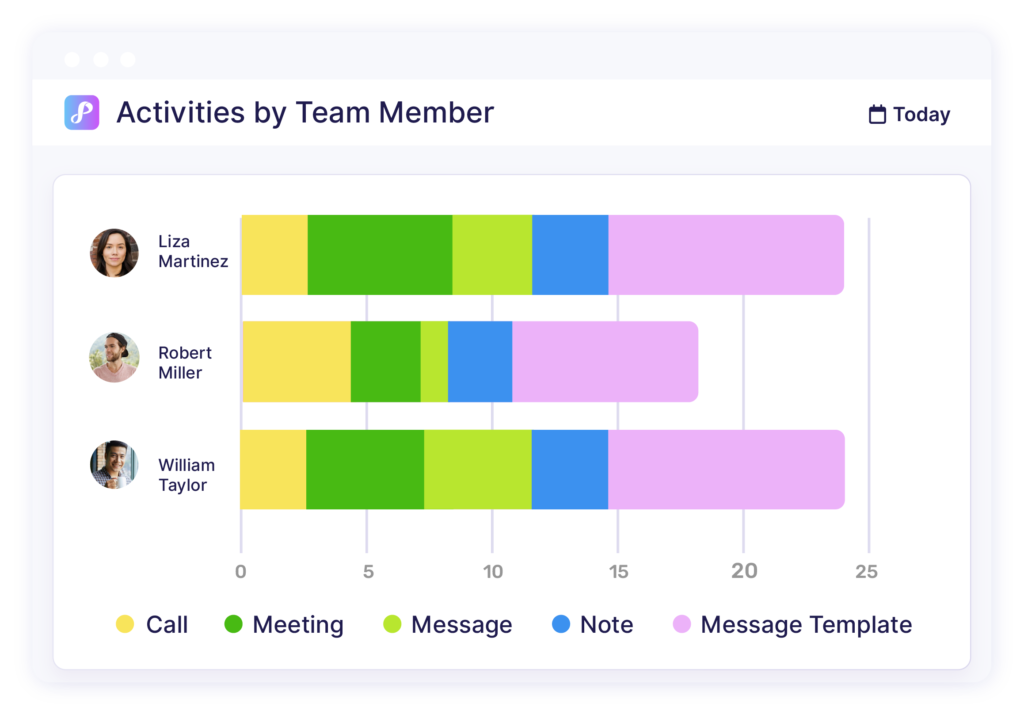
Overall activity volume and breakdown for each team member
- Who logged the most activities? Who logged the least?
- Out of all activities, how many were calls, messages, or files?
- If a salesperson reported they’ve done many calls that day, does their Privyr log reflect that?
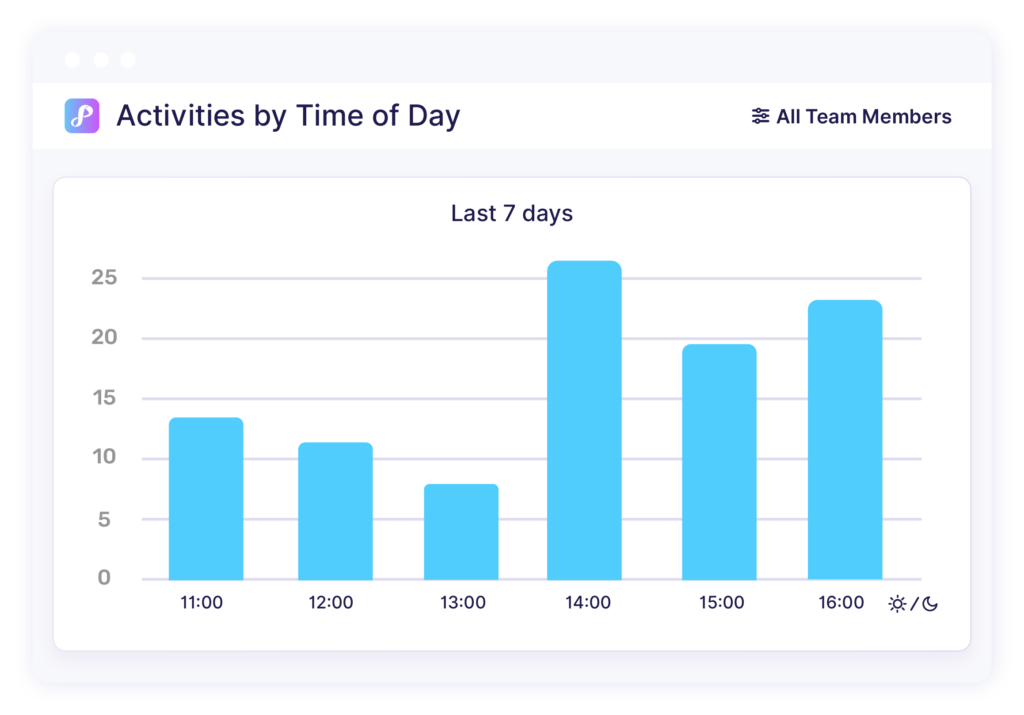
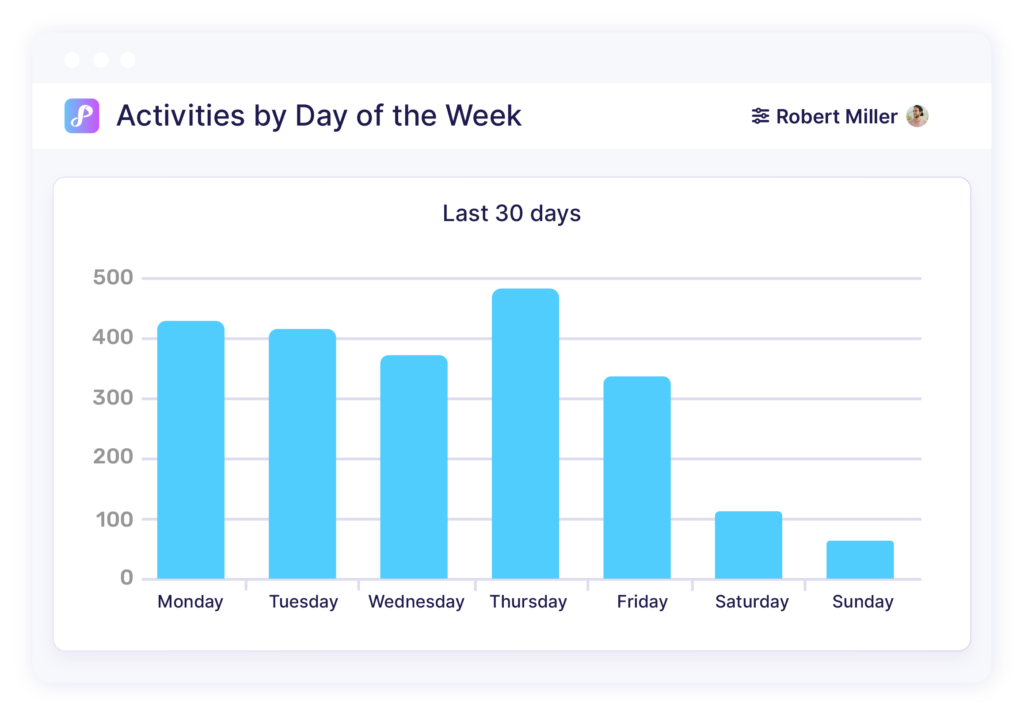
Their activity volume for the week, or even hour
- Do some team members only start contacting clients after lunch?
- Do some stop replying after 6 PM? This may not be good especially if most of your clients are more active after 6 PM.
- Who is working through the weekends?
Detailed Activity Breakdowns
In the Activity Timeline below, you can use Filters to view only specific types of activities, by any or all team members, on a given date or date range. You can even click to view more information about each client or activity.
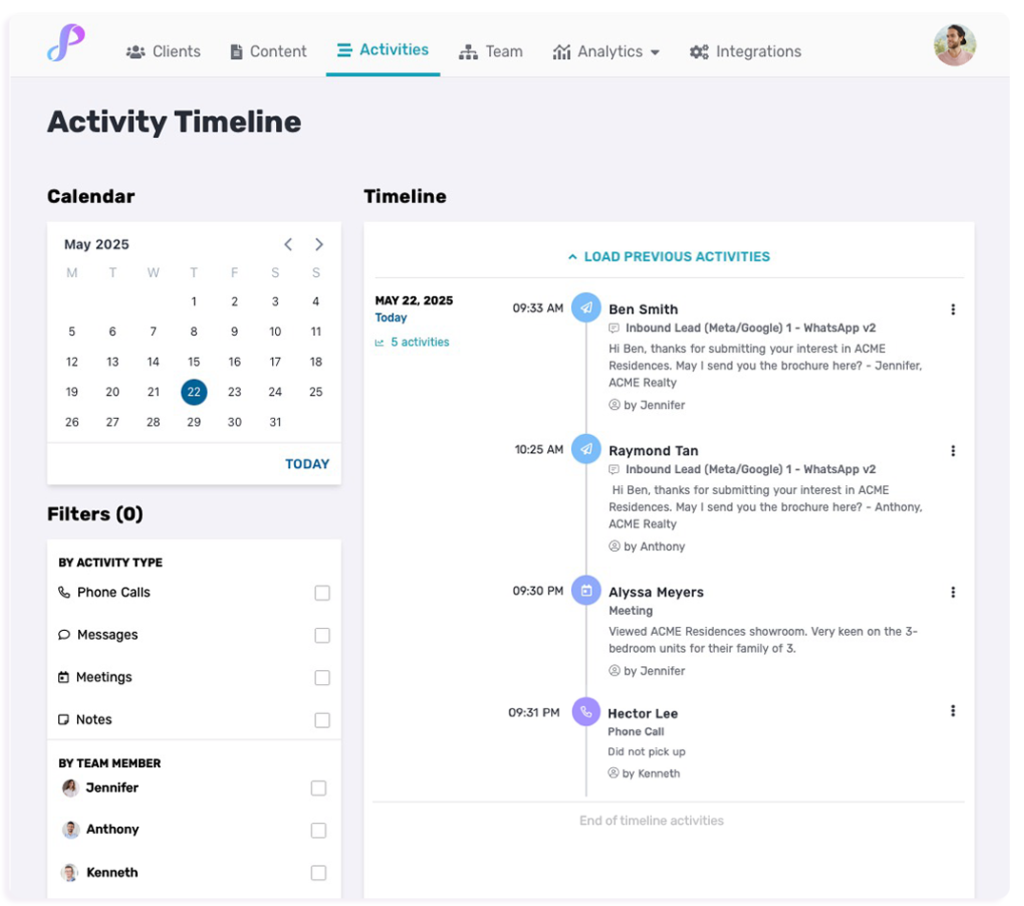
For example, you can see all the calls or meetings that were done yesterday — along with any notes, attachments, or even geolocation logged by your team.
First Response Time and Lead Engagement Rates
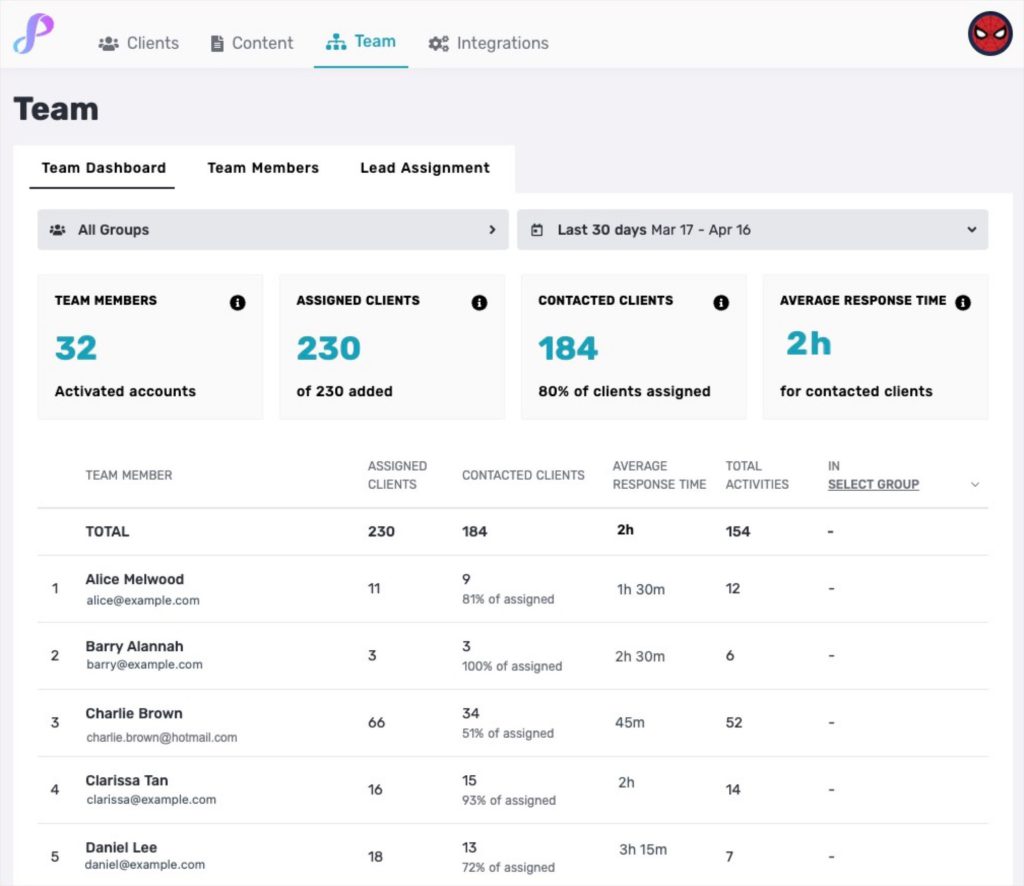
One of the most critical metrics for sales success is how quickly your team responds to new leads. The faster they are, the better their chances. Instead of hoping your team hits the mark, you now have real numbers to dig into.
Use your Team Dashboard to check if your salespeople are actually responding to all the leads you’ve assigned to them.
You can also see each team member’s average first response time, and how long they took to reach out to specific leads in their individual timelines.
Complete Sales Pipeline Analysis
Understanding what happens to your leads after they enter your system helps you refine your sales process and tactics.
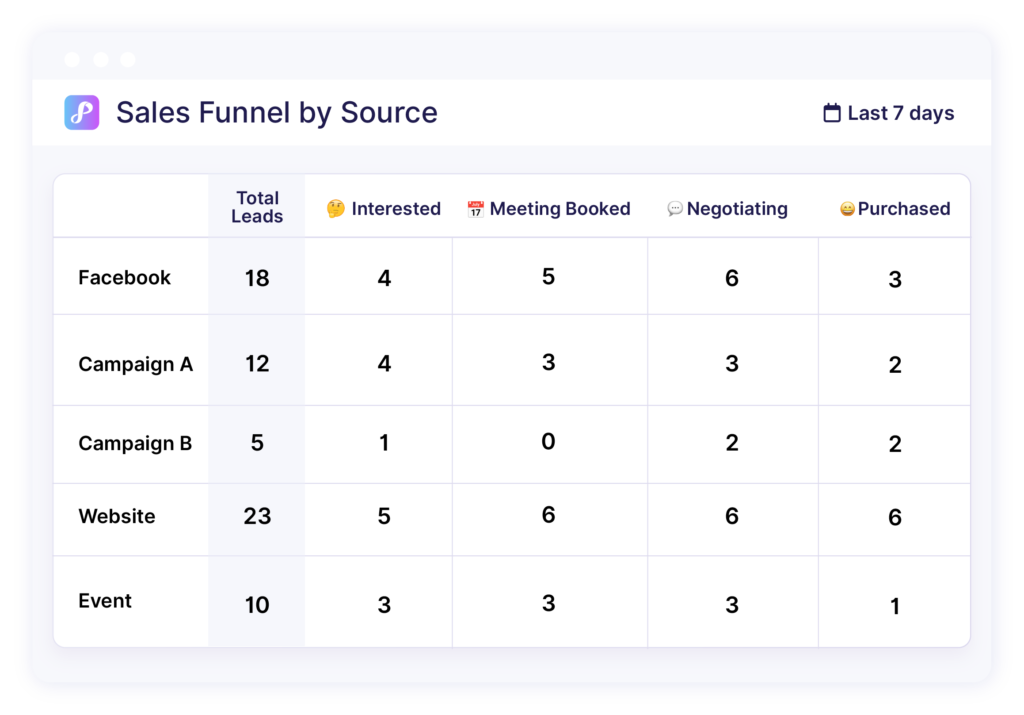
Privyr lets you see your team’s full Sales Pipeline, which you can further categorise by lead source, team member, and more. You’ll be able to get instant answers to questions like:
- What happened to all the Facebook leads you generated last month?
- How many of them are uncontactable, disqualified, booked a meeting, or still in the negotiation stage? Anything else we can do to move them along the funnel?
- In the past month, which lead source generated the most leads who actually booked a meeting?
True Cost Per Conversion or Campaign
In other words, what does it really cost you to get a lead who converts?
While platforms like Meta Ads Manager will show you cost per lead, what you really want to know is your cost per conversion. Here’s how Privyr lets you see and optimise your campaigns based on those leads who actually booked meetings, scheduled test drives, and more.
When you update your lead stages in Privyr, like from “Interested” to “Test Drive Booked”, that data can be automatically sent back to Meta. From there, you’ll be able to create custom columns displaying the number of test drives booked and cost per test drive for each campaign.
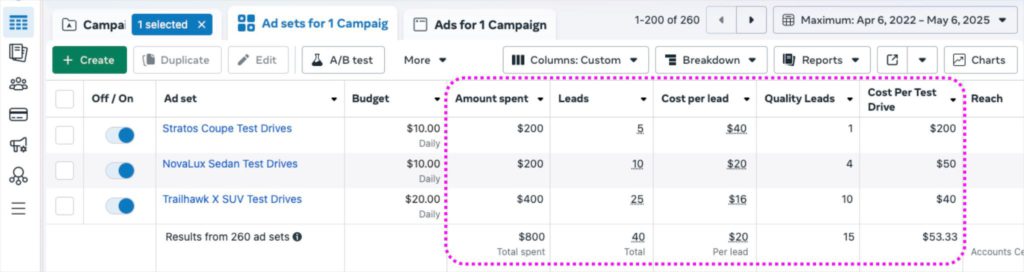
Better yet, you can even use this conversion data to further optimise your campaigns, especially with Meta Conversions API.
Because let’s be real, you probably don’t want Meta to only deliver a high volume of leads — you care about their quality too.
Your Team Dashboards are powered by Automatic Activity Logging 
Unlike traditional desktop CRMs that feel disconnected from where your salespeople actually do sales (their phones), Privyr automatically logs activities as they:
- Send WhatsApp messages or texts
- Make phone calls
- Share files and documents
- Update lead stages
- Book and attend meetings
This means you get accurate, real-time insights without the usual resistance from salespeople who simply don’t have time for admin tasks. Even if you weren’t there when the conversations happened, you’ll feel like you were.
Having a complete picture of your team’s performance and daily activities, you can coach more effectively and make data-driven decisions to improve sales outcomes.
Ready to unlock full team visibility & control with Privyr?
Book a personalised consultation
The post 5 ways Privyr gives you full visibility over your sales team appeared first on Privyr Blog.
]]>The post New: Advanced Lead Assignment Logic appeared first on Privyr Blog.
]]>
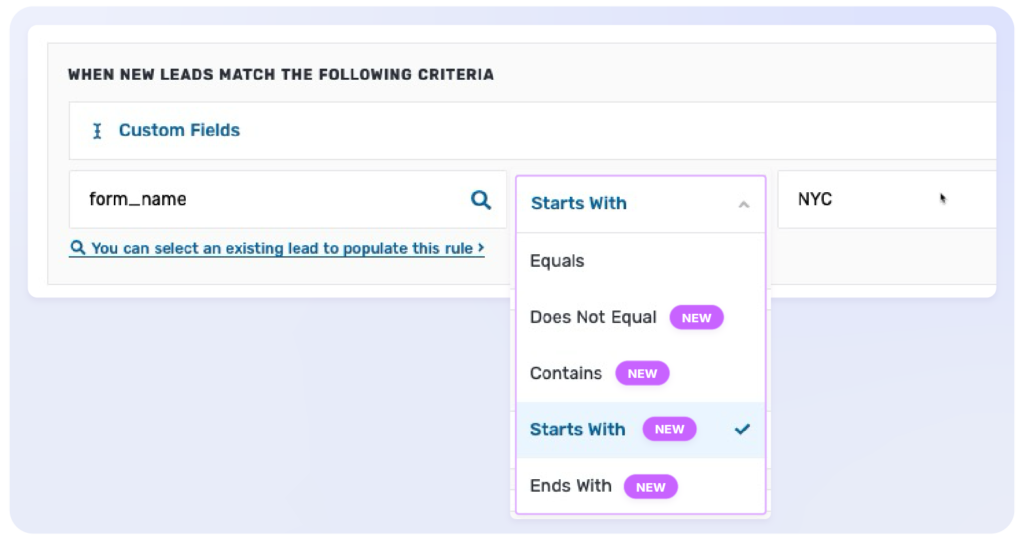
This will save you a lot of time when setting up rules to send new leads to specific people based on the information a lead submits.
It’s super useful when you want to route leads to team members based on the campaign, contact form, or the product a lead is interested in. But instead of creating ten or twenty rules to exactly match every form and campaign name, you now only need to create one rule. 
Why use this?
Previously, only one type of rule was available – EQUALS – which required your lead’s data to be a 100% match with the rule criteria.
So if you wanted to assign new leads from two campaigns with almost the same name, you’d have to create two completely separate rules. Have 10 similar campaigns? That’s 10 rules! 
Advanced Logic to the rescue
With this release, you get much more flexibility because a lead rule can now match with only part of the campaign name, and not its entire name.
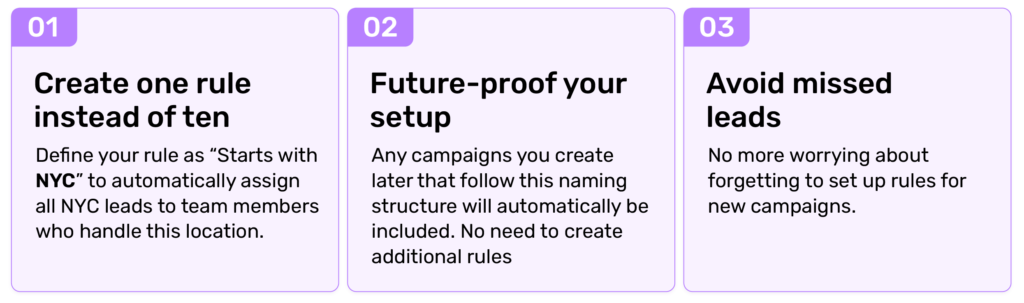
Let’s say you have new leads coming from multiple Facebook campaigns that follow a specific naming convention, such as “NYC_TestDrive_Forrester_May2025” and “NYC_TestDrive_Crosstrek_May2025”. Now you can…
Should you assign or distribute leads?
Advanced Logic works for both!
- Use Lead Assignment if you have a sales team and want to have full visibility into each lead’s status and activities.
- Use Lead Distribution if you only want to forward new leads so others have a copy, or if you’re a marketing agency routing new leads to your clients.
You now also have the option to send new lead alerts via WhatsApp, so recipients who don’t have the Privyr app can immediately receive each lead directly on WhatsApp.
You’ll see the new Advanced Logic options when setting up your lead assignment or distribution rules under your Integrations tab on the mobile app or web version of Privyr.
– Team Privyr
The post New: Advanced Lead Assignment Logic appeared first on Privyr Blog.
]]>The post New Content Permissions for Teams ✨ appeared first on Privyr Blog.
]]>
Collaborating on sales scripts and content just got even easier in Privyr! Enjoy better controls over the privacy of your content within a team so you can keep things clean and organised. Don’t miss these updates 
Reduce content clutter 
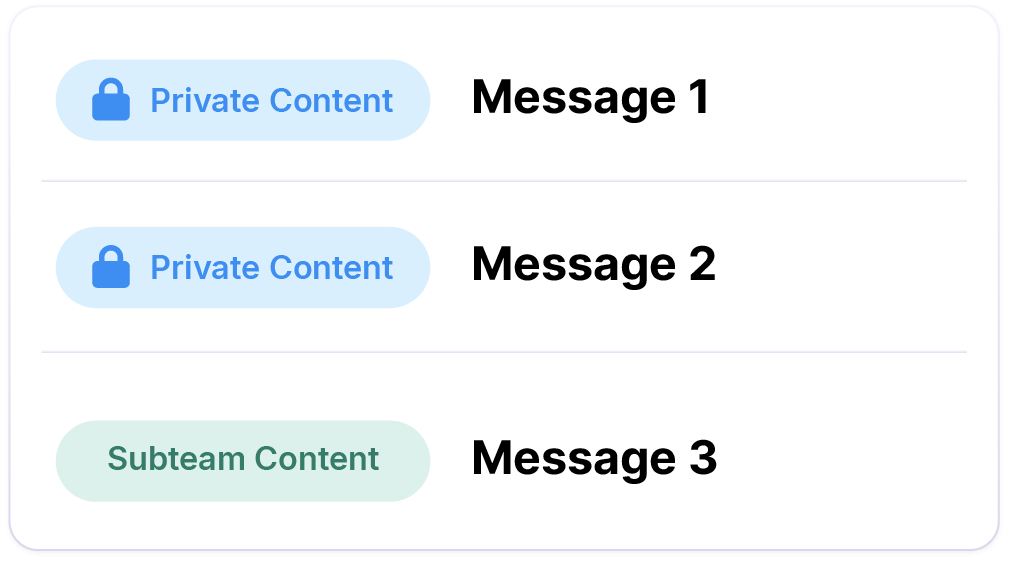
Previously, all content would be visible to all team members, making it hard for people to find the template they want to use. 
Now, you’ll only see content that’s relevant or private to you, keeping your content list clean, while preventing others from editing your personal templates.
New content is private by default 
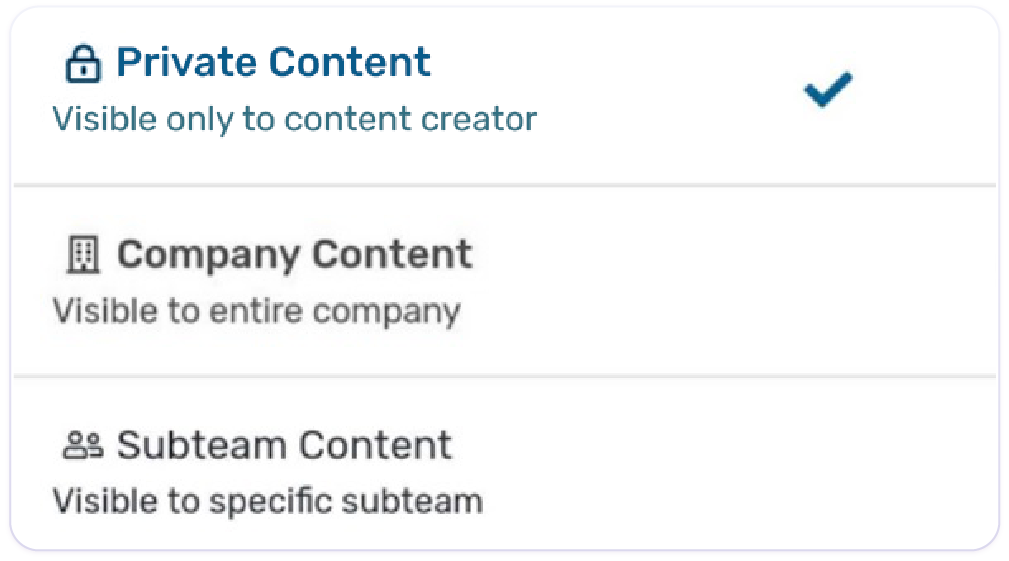
Now everything you create starts as private. Either keep it that way, or treat it like a draft until you’re ready to share with the rest of your team.
Once ready, you can make it available for your entire team, or only visible to specific Subteams to avoid cluttering their list.
Choose who can create, edit, or delete team content 
Admins decide who has access to create and edit content, who can make their content visible to the wider team, and more.
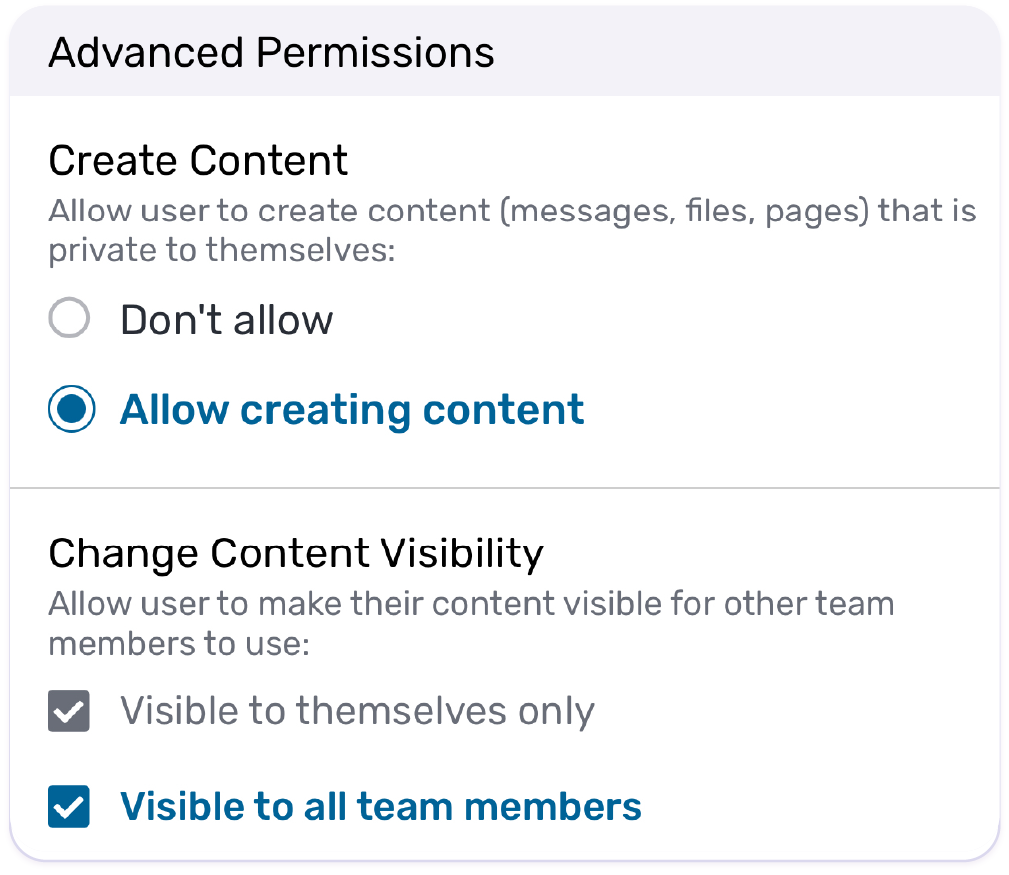
Appoint content admins for your entire organisation or specific Subteams.
With flexible permission settings, it’s so much easier to create and manage separate content for different branches now!

You can view and edit content permissions from the content details screen on mobile or desktop. Try it today!
Want to create Subteams for enhanced control over your team’s client and content visibility across multiple teams or branches? Find out more about Subteams in Privyr with an expert.
We hope you find this update useful for your team!
– Team Privyr
The post New Content Permissions for Teams ✨ appeared first on Privyr Blog.
]]>The post How CarTimes Automobile increased lead conversions by 30% with Privyr for Teams appeared first on Privyr Blog.
]]>
With Privyr, Lenus Choo from CarTimes Automobile Singapore improved their lead conversion and simplified the sales process for over 100 team members

Industry
Automotive
Market
Singapore
Team Size
Over 100
Features Used
Lenus Choo, Head of Marketing at CarTimes Automobile, has spent over a decade in marketing in Singapore.
Founded in 2001, CarTimes Automobile started as a used car dealer in Singapore and has since expanded to provide a suite of auto solutions including retail, financing, insurance, parallel imported new cars, repair, maintenance, and servicing. It was acquired by CARSOME Group in 2022, which gave the business additional digital capabilities.
Today, CarTimes Automobile has facilitated over 350,000 transactions across their business verticals
Challenge
“We used to have a response time of around 10 days.”
How do you take a traditionally face-to-face business online?
This is the question CarTimes Automobile and many businesses had to grapple with during the COVID-19 pandemic, which sent businesses and buyers around the world into isolation for several months, without a clear end to the restrictions.
“Normally, we would meet the customers and the customers would need to see the car, but none of that could happen,” explains Lenus. “As a company, we needed to go digital fast.”
Lenus rose to the challenge and created an array of digital ads that would reach their target audience from the safety of their homes. With multiple ads running from various lead sources, her hard work paid off. She received hundreds, even thousands of leads, which was promising but also brought its own set of challenges.
“Then I had a problem because back then, the team was me alone,” she says.
Every morning, she woke up, sat down in front of her computer, and exported all of her leads from all of her lead sources – by hand. She’d distribute the leads to sales team members in a spreadsheet as fast as she could. Still, she knew they were struggling to achieve the quick outreach that they knew their prospects required.
“We used to have a response time of around 10 days,” she says. “That’s when I thought ‘Maybe I should Google and see if there’s something for me’.”
Discovering Privyr
“Ultimately, the reason why I chose to try this app is because it’s mobile-first.”
In her quest for a solution, Lenus came across Privyr, which offered her the ability to instantly receive leads to her mobile phone and contact them in a few taps – without the time it takes to manually export leads with a spreadsheet.
“I started off with an individual account for myself just to test out its functions,” she says. From the beginning, she loved the way the CRM worked but didn’t know how she would replicate the process for her team. But Privyr for Teams was the game changer for Lenus.
“I realized that with Privyr for Teams, I can actually add people from my team to start receiving the leads instantly,” she says.
Soon, Lenus had half of the sales team testing Privyr, and the feedback was promising. Privyr was easy to use, and they liked that they could use the app to send auto-personalised and customisable sales content like WhatsApp messages.
Solution
“When Privyr for Teams came out, I realised I can actually add people from my team to automatically and instantly receive their leads.”
Getting CarTimes Automobile’s sales team to use Privyr wasn’t difficult for Lenus, because the team experienced the benefits firsthand.
“I think they see the usefulness for themselves: the time that they save, and the convenience they have to manage everything through their own mobile phone,” says Lenus.
Because CarTimes Automobile has a large sales team and such an intricate lead generation process, Lenus also found the Team Dashboard useful. Team Dashboard is a feature exclusive to Privyr for Teams. With it, they could easily keep track of how quickly team members were reaching out to their leads.
“We would notice if there was any discrepancy. Like, if suddenly the response time went up a lot, we could ask what happened, if this person was on leave or something,” she explains.
Privyr’s Team Dashboard also helps Lenus make sure team members are only taking on the leads that they can handle. Otherwise, team managers like Lenus can easily reassign leads, to keep the team operating efficiently.
“It’s a win for the management side because with the app, we can see report statistics and a lot more data about our team and our performance,” she says.
Lenus’ Story
When the pandemic ended, CarTimes Automobile’s sales process kept their mobile-first, digital lead generation methods. Today, Lenus receives the team’s leads from multiple lead sources including Facebook Ads, TikTok Lead Generation, their website, and more.
“The lead generation wasn’t that much of a problem,” she says. “It’s more about how we engage with them after we get them.”
The time after receiving a lead is crucial, and CarTimes knows they must act quickly to engage the prospect while they are most interested. CarTimes’ marketing team sends the leads to the sales team to handle. Their salespeople also provide feedback to the marketers about how qualified the marketers are so they could further optimise the campaigns.
If the lead seems qualified, the CarTimes Automobile’s sales team engages with the lead via WhatsApp, then a phone call. Next, they invite the customer to the showroom for an in-person meeting.
“For new cars, because of the COE bidding which is unique to Singapore, the sales process can take up to three months from the day they inquire until they collect the car,” says Lenus.
Privyr allows CarTimes Automobile to instantly receive and contact leads, while Automatic Lead Assignment makes sure that the right lead gets assigned to the right salespeople – very important as CarTimes’ team has so many members.
Results
“We increased lead conversions by 20 to 30%.”
With Privyr, CarTimes Automobile successfully increased their lead conversion from 20 to 30%. Lenus also noticed massive improvements in the business’ sales processes.
“With Privyr, what we saw was immediate and automatic lead distribution. The lead is directly assigned to the salesperson and they pick it up immediately,” says Lenus. She gained back the time she used to spend manually assigning leads. Meanwhile, she noticed greatly improved response time from the entire team.
As CarTimes Automobile’s success grew, Privyr was able to grow alongside the business.
When asked if Privyr is more of a sales or a marketing tool, Lenus finds it hard to say, because in her mind, the two groups have to work so closely together to be successful. Privyr helps bridge the gap between the two.
“Historically, there is always this divide. Sales is sales, and marketing is marketing,” she says, “but with a tool like this, we can actually connect.”
Lenus’ story is just one of many customer successes with Privyr
Start writing your own success story today with Privyr. Don’t have a Privyr account? Create one here.
For more about how sales teams can use Privyr to boost their success, why not check out this article about 4 ways you can automatically assign leads to your team?
Or, if you’re sending out a lot of messages, files, and brochures to your team, maybe you’ll want to learn about how to manage your sales content for your team effectively?
The post How CarTimes Automobile increased lead conversions by 30% with Privyr for Teams appeared first on Privyr Blog.
]]>The post How to improve Lead Conversion by tracking these Sales Team KPIs appeared first on Privyr Blog.
]]>
As a sales manager leading a team of multiple sales reps, you’re likely already tracking essential metrics like Revenue, Customer Lifetime Value (LTV), and Average Deal Size. But did you know that the most effective killers of sales success lie in the details sales managers are prone to overlook?
In this article, we go through 5 sales team KPIs which are ignored because they just seem too obvious. But when you track them, you’ll know how to optimise your sales team’s performance, stop wasting resources, and empower your sales team to consistently crush their quotas. 
1. Assigned Leads Percentage
This metric ensures every lead is assigned to a sales rep who is ready to engage and close the deal. After all, there is no point in letting both the lead & a salesperson wait until someone on the marketing team, with the lead gen agency, or in sales leadership is free to manually format and distribute those leads. Sounds simple – yet you’d be surprised at how many sales teams are wasting their best leads!
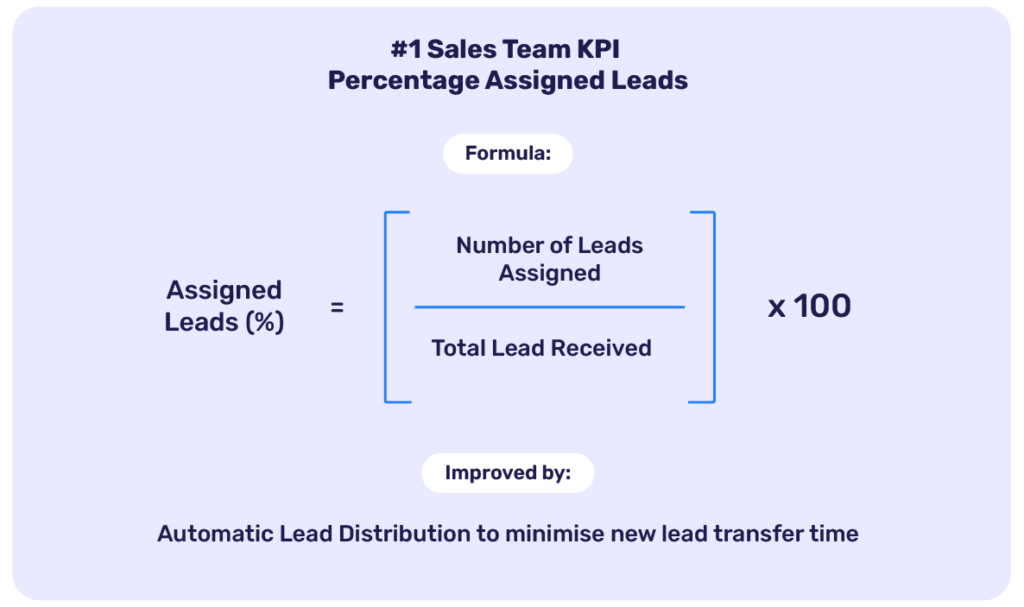
How to Calculate:
Assigned Leads (%) = (Number of Leads Assigned / Total Leads Received) × 100
How to Improve:
- Practice 0-Second Lead Assignment: It should take 0 seconds of manual effort for that new lead to become an assigned lead
- Set rules to Automate Lead Distribution to reduce delays.
- Minimise lead transfer time at the marketing team or lead-gen agency level
How Privyr Helps:
Privyr automatically assigns leads to the right salesperson the moment they’re submitted, based on customisable rules for team members, territory, lead sources, and subteam branches. This eliminates manual intervention and ensures no lead is left unattended.
2. Average Response Time
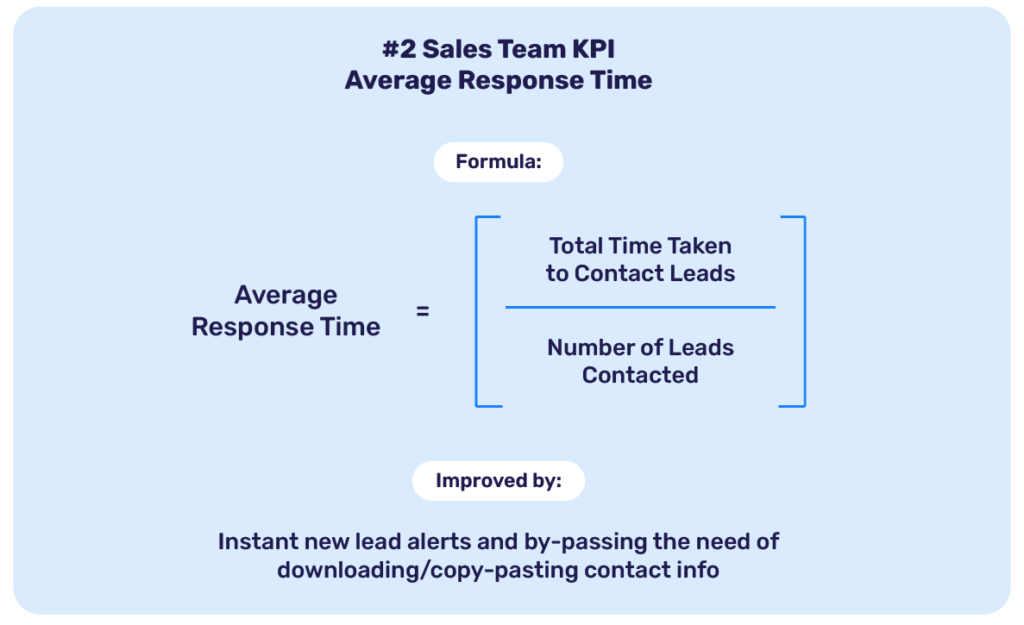
This is the time taken to contact a lead for the first time. Faster response times significantly improve your conversion chances. Further, studies show that reaching out to leads during the five minutes after they submit their interest increases conversion rates by up to 400%.
How to Calculate:
Average Response Time = Total Time Taken to Contact Leads / Number of Leads Contacted
How to Improve:
- Configure instant alerts to notify reps of new leads on mobile.
- Equip reps with tools for one-click contact via preferred channels.
- Re-assign leads based on rep availability and bandwidth.
How Privyr Helps:
Privyr’s instant lead alerts and one-click communication options—like WhatsApp, SMS, phone Call, and email—enable your team to reach out within seconds, ensuring no lead loses interest due to delays.
3. Lead Response Rate
Lead Response Rate is the percentage of leads that respond to your outreach efforts. This reflects the effectiveness of your team’s engagement strategy. A low response rate means your team’s messaging may not be resonating, or leads aren’t being reached effectively. For higher engagement and better conversion opportunities, improve your lead response rate!

How to Calculate:
Lead Response Rate (%) = (Number of Leads Responded / Total Leads Contacted) × 100
How to Improve:
- First Response Speed: Responding quickly increases the likelihood of engagement.
- 10-Second Messaging Rule: Messages that are concise enough to read and reply to within 10 seconds are more likely to get responses.
- Multichannel Follow-Ups: Diversify your outreach via WhatsApp, texts, phone calls, and emails to suit your leads’ preferences.
How Privyr Helps:
Privyr streamlines multichannel follow-ups and equips your team with templates designed for Quick Responses, ensuring they engage more frequently and effectively with their leads.
4. Sales Activities Performed
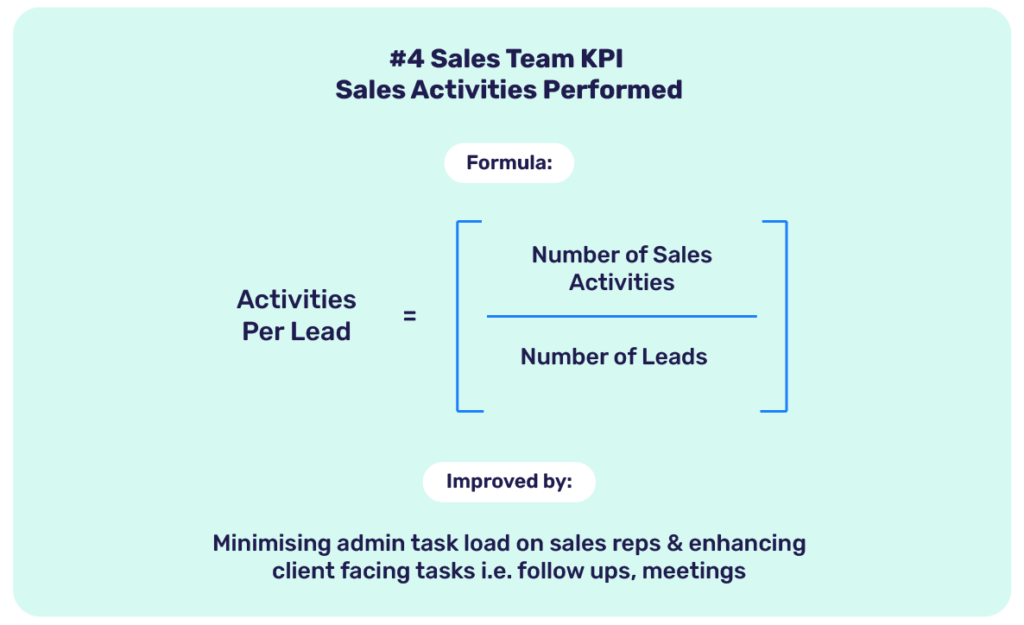
This metric tracks how much time your sales team spends on client-facing, revenue-generating activities like calls, demos, and follow-ups. Research shows that sales reps are only able to spend 34% of their time on actual selling, with the rest consumed by avoidable administrative tasks that can be automated. By tracking this KPI, you can ensure your team focuses on activities that directly impact revenue.
How to Calculate:
Activities Per Lead = (Number of Sales Activities / Number of Leads)
How to Improve:
- Minimise administrative tasks like the downloading of lead details, formatting, and copy-pasting through automation.
- Regularly analyze and optimize rep activities to focus on high-impact tasks.
How Privyr Helps:
Privyr’s Team Dashboard provides real-time insights into how your sales reps spend their time. Then, you can identify and address productivity gaps while ensuring the team stays focused on selling.
5. Lead Conversion Rate (Win Rate)
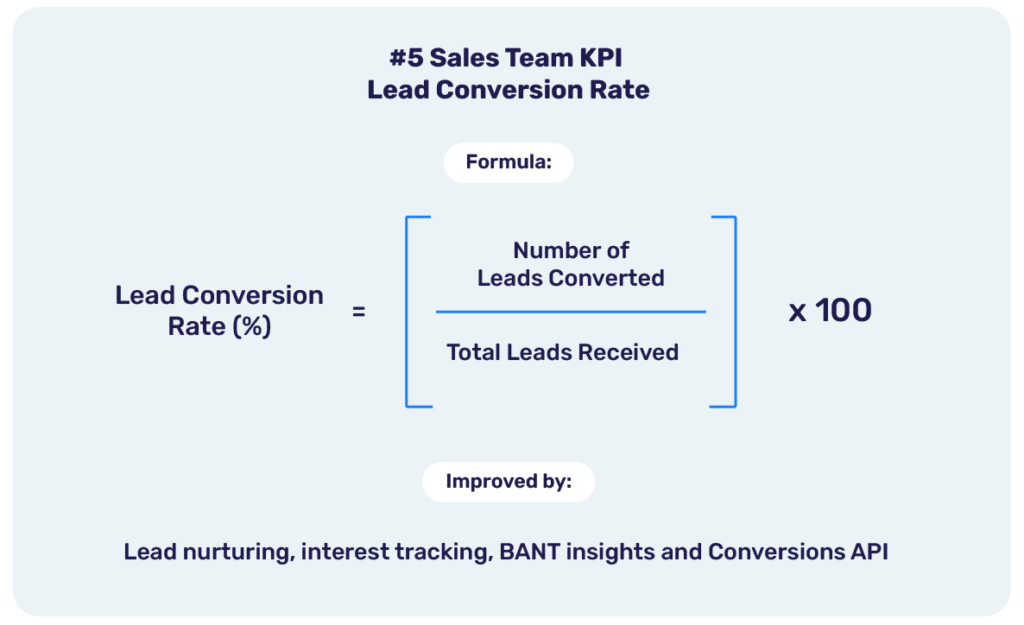
With this metric, you get the percentage of leads converted into paying customers, indicating the effectiveness of your sales process. A low conversion rate often indicates gaps in the sales process, such as insufficient follow-ups, poor qualification, or inadequate engagement.
How to Calculate:
Lead Conversion Rate (%) = (Number of Leads Converted / Total Leads Received) × 100
How to Improve:
- Encourage follow-ups & interest tracking for harder-to-close leads.
- Get insights from leads & prioritise via Budget, Authority, Need & Timeline (BANT) framework.
- Focus on high-value leads while maintaining a consistent approach to nurture others.
- Use Meta Integrated CRM to attract more quality leads.
How Privyr Helps:
Privyr simplifies lead tracking and ensures your sales team focuses on leads needing more attention, fostering a culture of persistence and improving conversion rates across the board.
What’s more, Privyr is arguably the most affordable mobile-first CRM that natively supports Meta Conversions API (CAPI) and helps your lead generation campaigns to land more quality leads based on your own sales & conversion data.
Take control of your sales process today
The hustle of managing a large sales team often overshadows the importance of tracking actionable KPIs. However, by focusing on these five metrics, you can uncover inefficiencies, maximise team productivity, and achieve your broader sales goals with less effort.
Submit your details for a free Privyr demo and discover how fundamentally easy-to-implement KPIs can transform your team’s performance with an intuitive, mobile-friendly CRM that equips your team with features optimised for sales teams.
Privyr empowers sales managers with the tools needed to streamline lead management, reduce response times, and track performance with precision.
The post How to improve Lead Conversion by tracking these Sales Team KPIs appeared first on Privyr Blog.
]]>The post How to fix these 5 sales team issues ASAP ‼️ appeared first on Privyr Blog.
]]>
If you’re managing a target-driven sales team and sensing unlocked – even blocked – potential, you’re not alone!
The truth is that, even with you and your team’s best efforts, opportunities often slip through the cracks.
This isn’t necessarily because you’re a bad sales manager! It simply happens when there’s no system in place that works around the clock to keep tasks from piling up. As a result, the team’s best leads often go stale – or worse, missing. 
Don’t worry – we’re here to help you find close-worthy leads, with this guide which has already helped over 200,000 businesses in more than 100 countries.
Here are the five most common bottlenecks holding sales teams back – and how you can fix them.
1. Slow response time
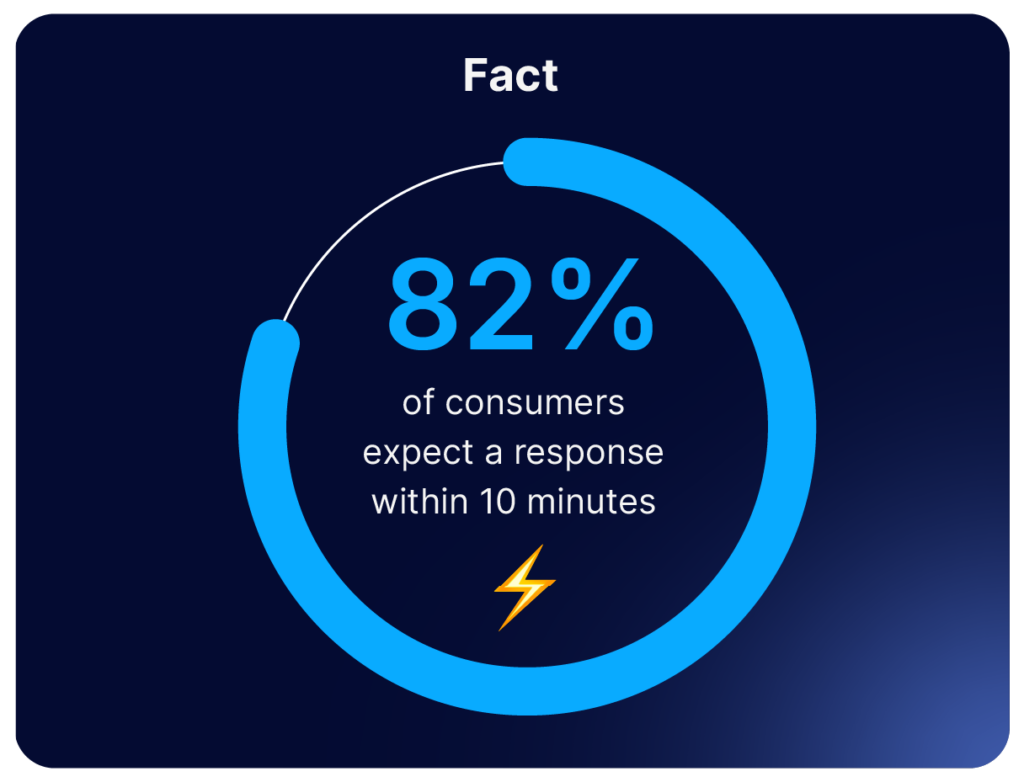
Long and unnecessary delays kill a lead’s interest level  – but it’s likely not your marketing or sales team’s fault!
It may be taking your team too long to contact leads simply because it is taking your team too long to receive leads.
To fix this, leads need to be assigned to the right salesperson the moment they arrive from any lead source.
The good news is that you can easily achieve automatic, instant lead assignment with Privyr. This way, your team will never miss a hot lead because it took too long to know they existed! 
2. Tedious manual data entering and copy-pasting
Why waste time on manual tasks when you can automate them, freeing up your time for tasks that really require a human’s touch? 
Privyr makes it easy to communicate with leads via the channel they prefer – WhatsApp, text, call, and more – and will even auto-personalise your message for you.
No more copy-pasting texts or saving each contact to your phonebook manually!
3. Follow-ups take way too long
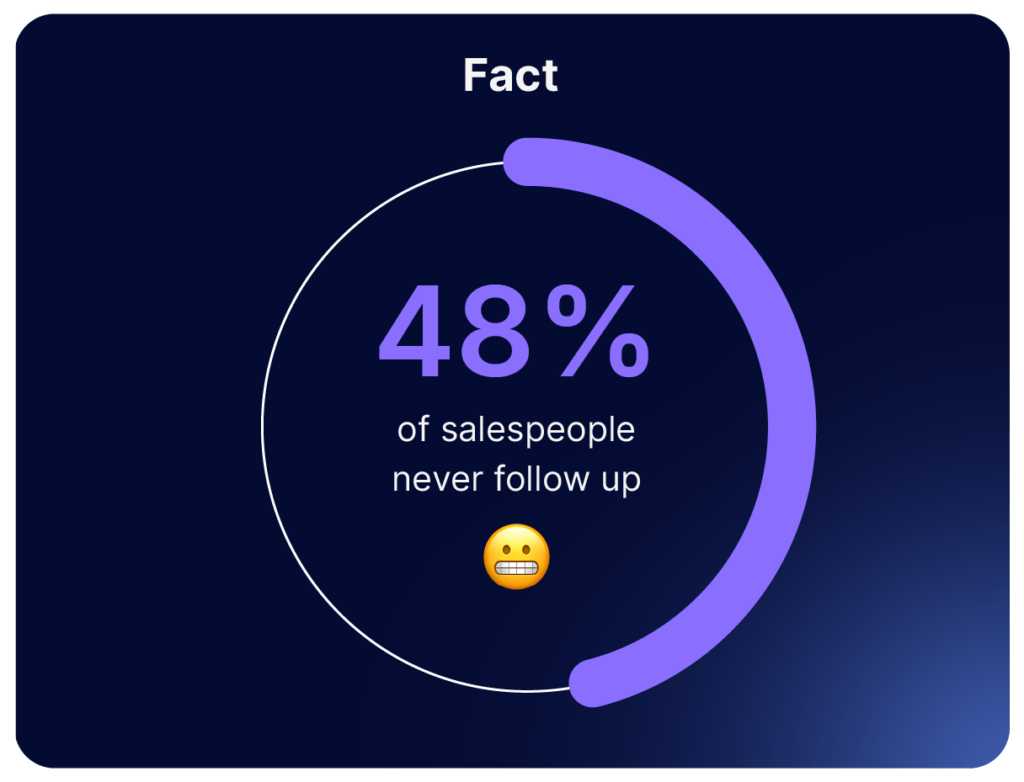
Research shows that 48% of reps don’t follow up after the first contact, but 80% of sales are made after the fourth contact with a lead?
So, be persistent! Make follow-ups easy to remember and send, using relevant information that will capture your lead’s attention.
Privyr’s Activity Timeline helps you keep track of your leads and details of your interactions with them, while automated follow-up reminders help you remember exactly when to reach out next.
4. Teams don’t prioritise their clients in a way that works
You may not be able to tell if a lead is qualified off of what they tell you. Their actions speak louder than words.
To help, Privyr allows you to track your prospect’s interest in real time, with data about who is viewing your team’s sales content, how long they’ve viewed it, and how many times they’ve viewed it.
All of these are indicators of interest!
5. A disorganised approach to work
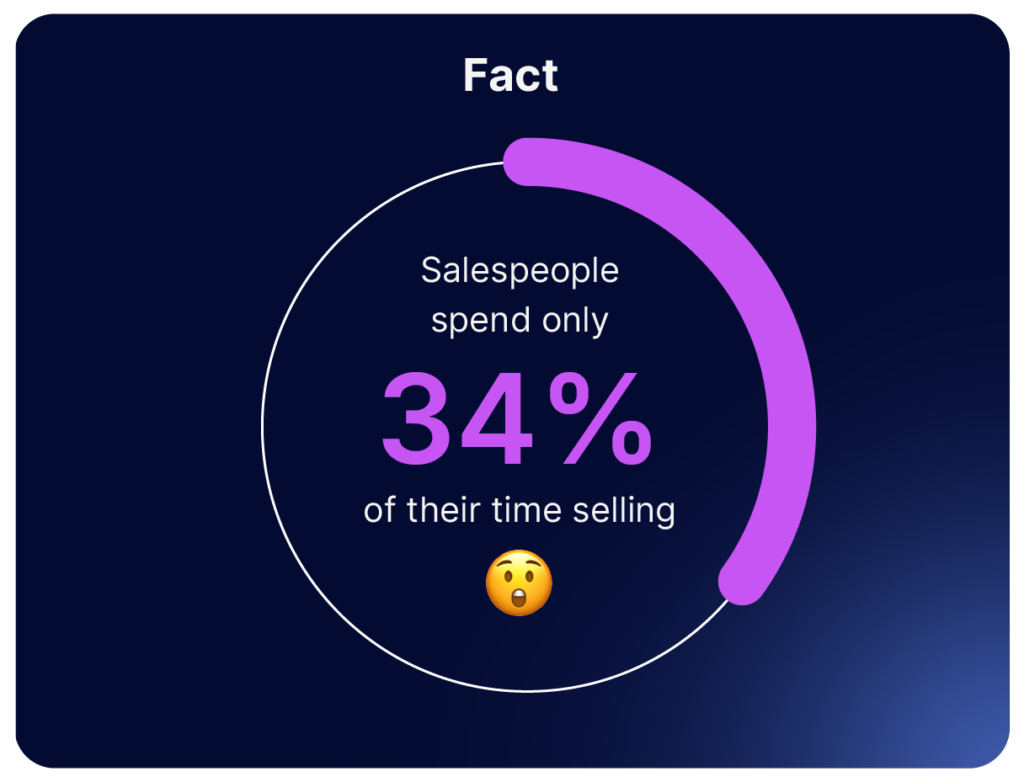
Did you know that the average salesperson only spends 34% of their time selling?
What takes up so much of their time is busy admin work which keeps them from doing more.
So, let’s fix that! Privyr’s Team Dashboard offers a centralised view of the team’s progress, including high performers and team members who need extra guidance.
Then, you’ll have help dealing with busy admin work! And you and your team can do what you do best: sales.
Ready to level up your sales team?
Now you know the most common mistakes holding your sales team back. The good news is that you’re not alone in facing these. There’s help available for you!
Get in touch with us for a personalised demo of Privyr, and see firsthand how it can help skyrocket your team’s results by 300%.
The post How to fix these 5 sales team issues ASAP ‼️ appeared first on Privyr Blog.
]]>The post How to manage sales content for your team effectively appeared first on Privyr Blog.
]]> But wait, there are some things you can’t see…
 John might be using the outdated version of a brochure, because it’s the version he found in another WhatsApp chat. He might even just forward it to his clients, who can see that the content was ‘Forwarded’.
When responding to new enquiries, Brenda always manually goes through her folders to find the right file. So she usually sends the information to a lead late, and sometimes she may even accidentally send the wrong version.
The result? Your team might win some sales here and there, but they actually lose a lot of opportunities too. The lack of coordination on shared sales resources snowballs into poor outreach and follow-up quality.
So what’s the fix? As a team lead or manager, you may feel desperate for solutions that make it easier for your sales reps to do their job.
Let’s start with a more effective way to manage and share sales content with your team. We’ll show you a method that is super simple and doesn’t require complex setup. Plus, you can also help your sales reps auto-personalise the shared content with their own branding and details.
 The problems with sharing sales content…
First, you need to know what needs fixing in your current content sharing process. With one simple change, you can knock down all of these problems in one go:
- The sales collateral for your team tends to be all over the place. Maybe it’s in a shared Google Drive, or someone’s folder, or a WhatsApp group chat. Since there is no single source of reference, you can’t always be sure that people are accessing and using the best version of a file. The best version is usually the most recently updated file.
Your salespeople spend too much time searching for the right content to send each lead, because the information is scattered across different locations. The brochure files may be in their phone folders, but the sales scripts are in their note-taking apps. Responding to enquiries quickly becomes a tedious chore. So they wait until they have time to reply, which is usually too late for the lead.
Put these all together and you might find that your team’s sales processes are suffering from late responses, generic-looking messages, wrong files sent, files sent without scripts (because it’s faster). 
Every salesperson on your team may have their own way of using shared sales resources. Even if you provide them with proven, high-performing sales content, success isn’t guaranteed when they don’t have an efficient system to organise, access, and send things out. It’s like you’ve given them all the tools but not the toolbox to carry everything easily with them on the job.
3 tips to better manage content for your team
As the team manager, you’re in the best position to improve how your team uses the content created to help them. Better team coordination and sales growth can start from how you yourself provide access to those resources.

Here are three simple changes you can start doing today, and you can achieve all of them in the Privyr app:
 Share all sales scripts, files, and content from a central location.
Start storing and sharing all sales resources in one place. Most importantly, make sure your team knows where to access this content, and make it incredibly easy for them to do so. Some teams do this through Google Drive or a WhatsApp group, but we’ll talk about the downsides and look at an alternative later. Ideally, nobody should need to download those files into their personal folders or phone storage.
- If you make changes to a piece of content, centrally update the shared copy instead of re-sending a new file.
This ensures no one uses the older version by mistake. Even with changes, you should simply update the “main” copy of a file that everyone accesses and uses.
 Make sure each sales rep can quickly customise the sales content for their own clients, and with their personal branding.
Even the best sales content can fall flat and look spammy if it’s not tailored to a lead. Clients today are used to having everything being personalised for them, like their social media feed and marketing emails. Hence, personalised content is something they expect, the bare minimum even. Ideally, your sales reps can quickly personalise the sales content you give them, so their prospects feel good about the level of service.
Now you may be thinking how can they even do that without taking the file away from the central location? Won’t everyone have their own versions stored in scattered locations again? This might sound like a tricky one, but it’s absolutely doable in the Privyr app.
Why use Privyr to manage sales content for your team
Here are six reasons 

(1) It’s better than a shared Cloud Drive.
You can use Privyr as a central location to store your sales scripts, files, and other types of content. Better yet, save them into folders and set different permissions for each salesperson. This gives them access to those templates from their own Privyr accounts.
They can then directly send the content to their own leads via WhatsApp, text message, email, and more – without having to look for the right files stored in different locations. They can access AND send the content from the same app within seconds.
(2) You can create and store a variety of content under one roof.
In Privyr, you can create, manage, and share your follow-up scripts, brochures, promotions, and other sales materials. You can even create new brochures and promotional materials within the same app.
Your content in Privyr is neatly organised into three main categories: Messages, Files, and Pages. They cover everything your sales team will need in their lead nurturing process.
- Messages: Follow-up scripts your team can send to their clients via WhatsApp, text message, and more.
- Files: Have existing sales content? You can upload directly to Privyr. The individual sales rep’s branding and contact details will be automatically applied when you share access with them.
- Pages: Want to create engaging and interactive sales content? Try creating a new Page under the Content tab in your Privyr app. You can upload your descriptions, photos, videos, links, maps, and many more to create an e-brochure, an e-flyer, or an e-presentation for your team – the possibilities are endless.
Learn more about how to quickly create, share, and track content from your phone.
(3) You’ll help your team personalise their communications – with far less manual work.
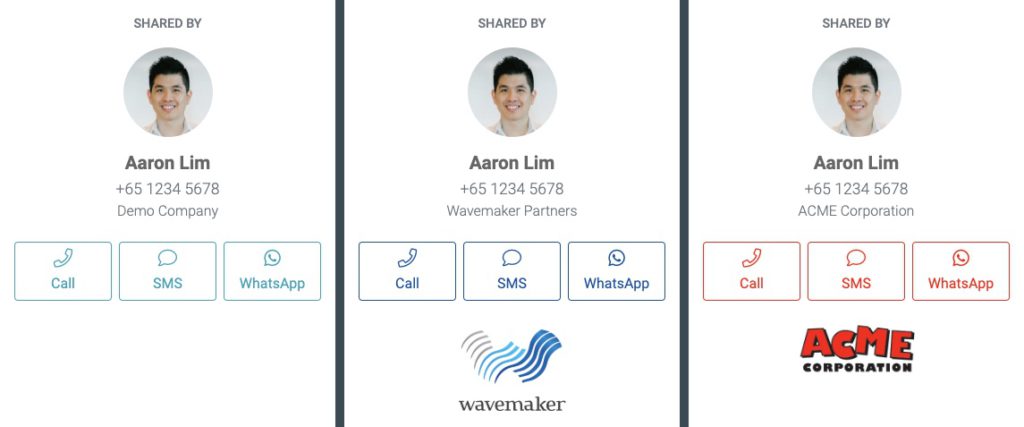
When your salespeople share content through Privyr, it can be auto-personalised to each lead in just one tap.
Whether they’re messaging leads on WhatsApp, text, or email, you can ensure they don’t send generic, spammy-looking messages that don’t win them any hearts (or sales).
- At the most basic level: You want your team to use the tried-and-tested follow-up templates you provided.
- To gear them up for success: You want them to at least address the lead by name when using the scripts. This will create a much better experience for the receiver. Privyr helps them do that – no typing required.
This extends to brochures, flyers, and other marketing materials too…
- At the most basic level: You want your team to utilise the brochures, flyers, and other sales materials already created for them.
To gear them up for success, you want: You want each salesperson to add their own branding and contact details to the materials. That way, they’ll look more professional and less generic. And if the content gets forwarded, people know who to contact. Privyr does that for them, so they won’t need to download and edit the shared file themselves.
(4) Centrally update the content for all sales reps, even if they’ve shared it with their clients.
If you make changes to the original content template, everyone else’s version will also be automatically updated as well. You won’t need to keep resending the new version to everyone, which increases the risk of people downloading and using the outdated version.
(5) You’ll help your team track client interest through content.
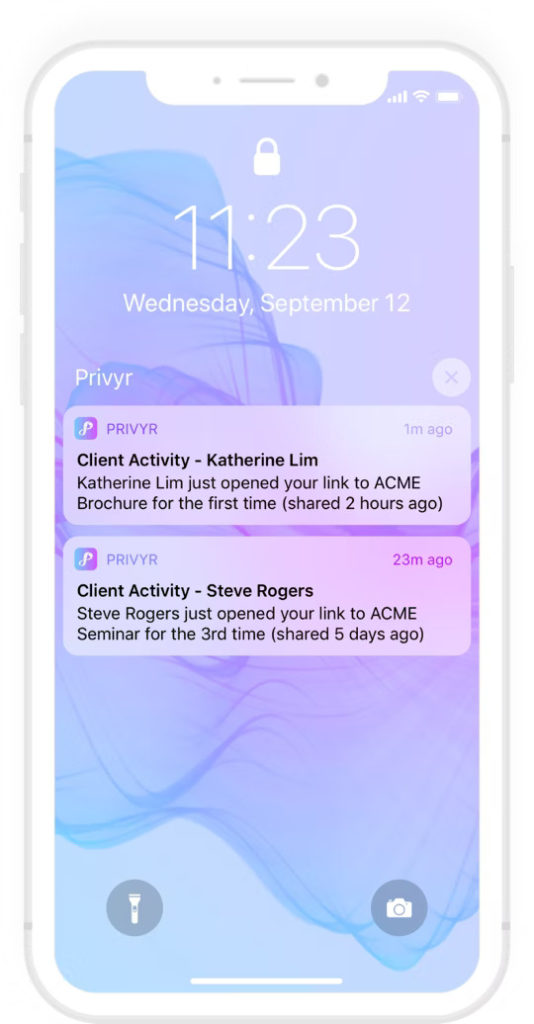
Your salespeople can also start tracking their client interest through the content they send from their Privyr app. Even if a lead doesn’t respond to their messages, they may still be quietly looking through the sales and marketing materials.
Privyr gives your team instant insights into when leads view their Files and Pages, what they viewed, and how long they spent viewing it. This helps them understand a lead better and plan their next follow-up.
(6) Use other Team features for overall better coordination on content, leads, and more.
As the team lead, managing and distributing sales content is just one of your many jobs.
You may also be the person who generates leads and assigns them to the right sales rep. Or you’re responsible for training the entire team to reach their targets. This typically requires you to understand how they’re doing sales and making sure it’s aligned with best practices.
Privyr for Teams gives you better control and visibility over your team’s activities and lead assignments (for any lead generation channels you use). You can also set different permissions for your team members, pertaining to which sales content or new leads they can view and use.
Here are 5 reasons why you should use Privyr for Teams.
Table: Comparing different content sharing methods
| Manage and share content manually via email or chat groups | Manage and share content via Cloud Drive | Manage and share content via Privyr Teams | |
| Managers can create AND share sales content from the same place |  | | |
| Centrally update content for everyone | | | |
| Ensure everyone always uses the updated version of a file | |  Provided they don’t download the file off the drive, and use their own copy. Provided they don’t download the file off the drive, and use their own copy. | |
| Let others automatically add their contact details and branding to content | | | |
| One-tap auto-personalisation with lead’s names on your shared content | | | |
| Organise and access all types of sales content in once place | | | |
| Integrate your sales content with your CRM | | Possible but may require complex setup with third-party tools like Zapier | |
| Track your team’s progress with leads, and what they send | | | |
| Set different access permissions for different people in your team | | | |
| Revoke access to sales content, if necessary | | | |
Summary
Want to coordinate on content more efficiently with your salespeople? Create your team on Privyr today and start sharing!
If you don’t have any content in your Privyr app, just copy our message templates or sales content templates.
As the Team Manager, you can do more than help your team follow up using the right content and message. You’ll also have immediate insights into your team’s performance and sales activities with the leads assigned to them.
With their own Privyr accounts, your salespeople can focus more on the work that matters – having high-quality conversations with prospects.
Sales teams on Privyr collaborate better and sell more! Try it today!
The post How to manage sales content for your team effectively appeared first on Privyr Blog.
]]>The post 4 ways to automatically assign leads to your team appeared first on Privyr Blog.
]]>But lead assignment doesn’t look the same for everyone. We’ll show you four options you have to automatically assign leads, so that you can make the choice that’s best for your team.
Did you know that, for sales teams, lead assignment is often a make-or-break point in the sales process? A common mistake many sales teams make is taking hours or even days to assign leads. That’s a surefire way to lose sales!
Plus, it takes away precious time from the sales manager or team head. That’s time that they could spend helping the team in other ways.
If you’re worried about automating the way you assign leads, don’t worry! You have options.  Since there are so many different kinds of teams, there are also many different ways to assign leads to your team.
You know your business and sales process best. We’ll show you some options and suggest which kinds of situations they fit best. Then, you can decide which one fits your team.
One solution for all your lead assignment needs
The good news? Lead assignment in Privyr for Teams supports all of these options! With Privyr for Teams, you can set up rules in just a few seconds, so that incoming leads go to the right person at the right time every time. In fact, it takes 0 seconds from the time the lead submits their details to the time the salesperson receives the lead in their Privyr app.
So, you know that if you’re using Privyr for Teams, you’re managing your team members and sales process better. Plus, all your leads, clients, and content will be organised and visible in a central place!

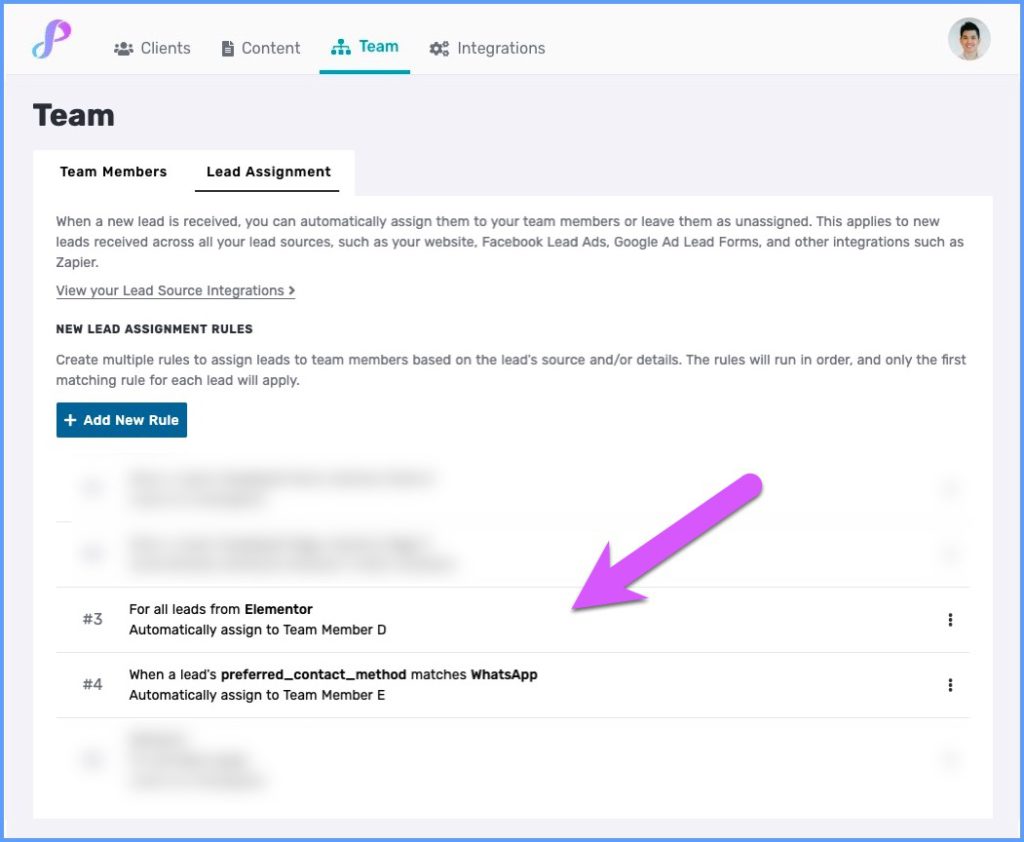
1. All leads matching a rule go to a specific person
Best For: Teams with Clear and Specific Responsibilities
With this lead assignment style, all leads matching a certain criteria (leads from a certain lead source, city, etc) go directly to a specific salesperson. This is great if you have specialists on your team who deal with certain kinds of leads and is the most specific type of lead assignment you can use.
2. Automatically Assign Leads via Round Robin
Best For: Fairness, Teams Equally Distributing Responsibilities
When assigning leads using Round Robin, leads will be distributed to a set number of team members equally. For example, if you’re distributing leads among three team members:
- Lead 1 will go to Person A
- Lead 2 will go to Person B
- Lead 3 will go to Person C
- Lead 4 will go to Person A
- And so on!
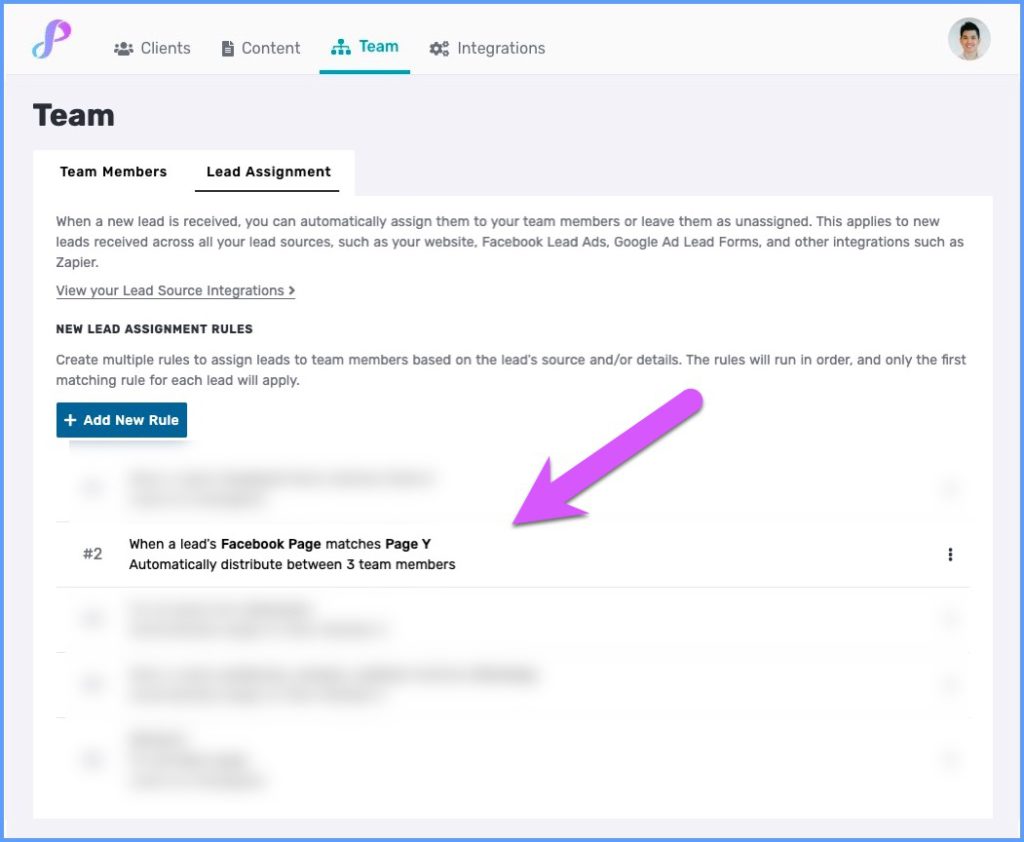
This lead assignment style benefits teams with multiple people who cover all leads or a segment of leads.
Privyr even allows you to customise further by letting you set limits for the number of leads per person. For example, maybe you have three team members. Person A is experienced and very productive, Person B is a junior member still learning the ropes, and Person C is a part timer.
In this case, per round, maybe you’ll allow Person A to cover five leads, Person B to cover one lead at a time, and Person C to cover a maximum of two leads. So, your lead assignment process would look like this:
- Lead 1 will go to Person A
- Lead 2 will go to Person B
- Lead 3 will go to Person C
- Lead 4 will go to Person A
- Lead 5 will go to Person C
- Leads 6, 7, and 8 go to Person A
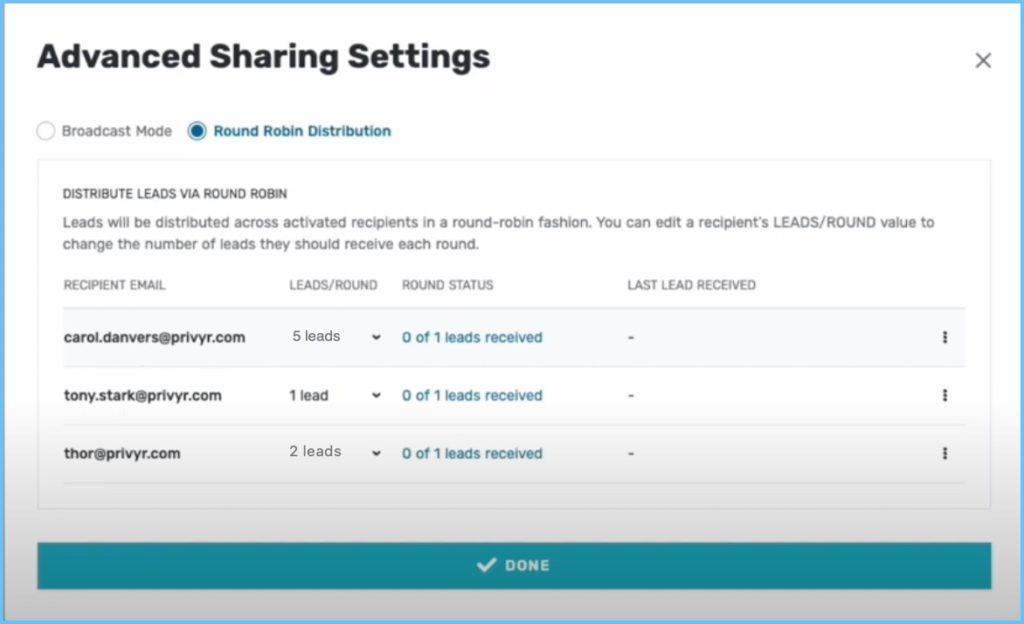
With this flexibility, Privyr gives you more opportunities to make your lead assignment style fit the style of your team.
3. Leave Leads as Unassigned
Best For: Emphasising a Quick Response, Creating Healthy Competition
Maybe you work on a team where many people can handle leads, and your focus is reaching out to those leads as fast as possible. It doesn’t matter which salesperson does it!
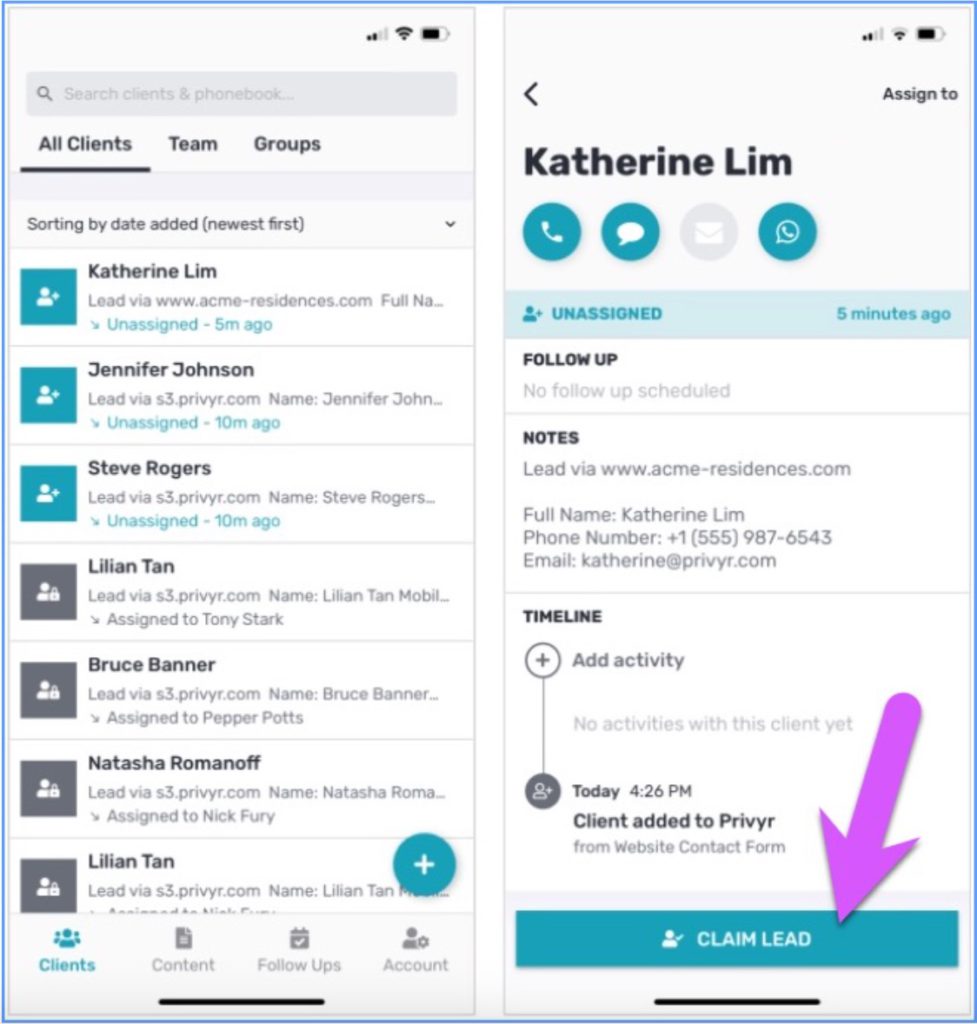
In this case, you can tell Privyr to leave your leads Unassigned. This means that new leads go into a general pool on Privyr, and the entire team gets a notification about the new lead. Then, the person who claims the lead the fastest gets the lead.
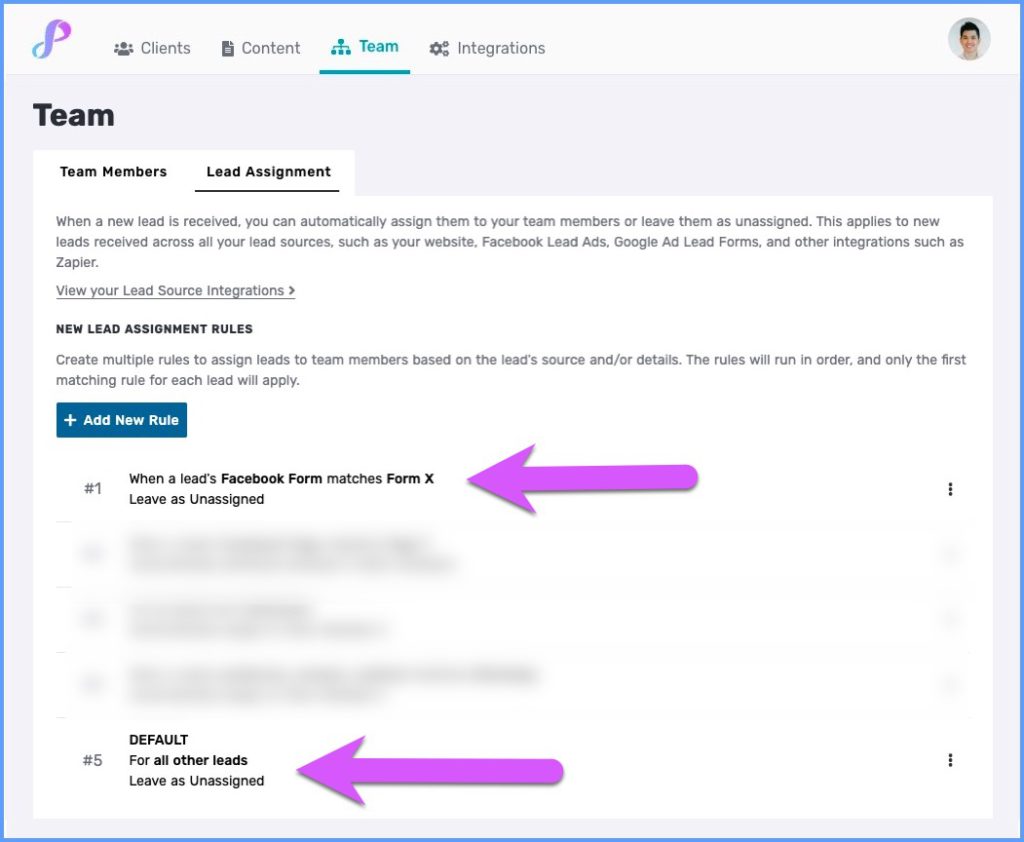
To claim the lead, the salesperson simply needs to tap the lead and click Claim Lead.
4. Automatically Assign Leads to Someone Who Reassigns the Lead
Best For: Teams with Many Managers or a Lead Qualifier, Teams with More Flexible Rules around Responsibility
Many sales teams send leads to an intermediary before they reach the final salesperson. This person may be a manager overseeing a smaller team within the sales team, or a person meant to call and qualify the lead before passing them on.
In Privyr for Teams, you can set up a rule to send leads to a certain person or group of people, then grant that person permission to send the lead forward to an individual on their team.
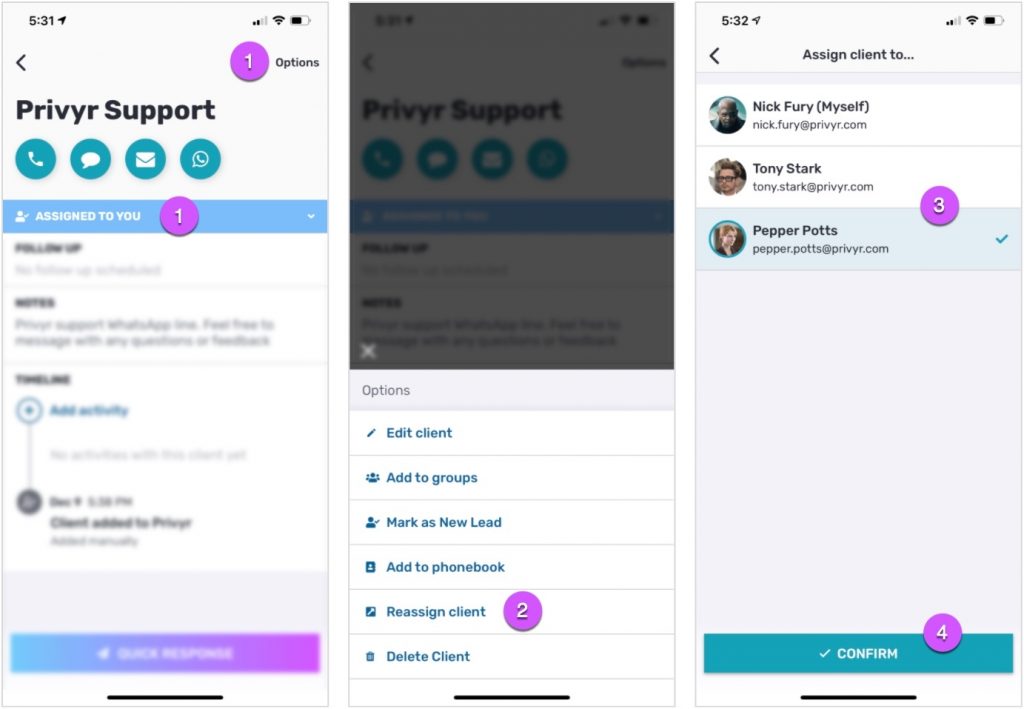
This way, the lead gets automatically assigned to someone who can act on it quickly before sending it on. However, they can take additional steps to make sure the person who finally receives the lead is best positioned to take that lead forward.
How to automatically assign leads to your team with Privyr for Teams
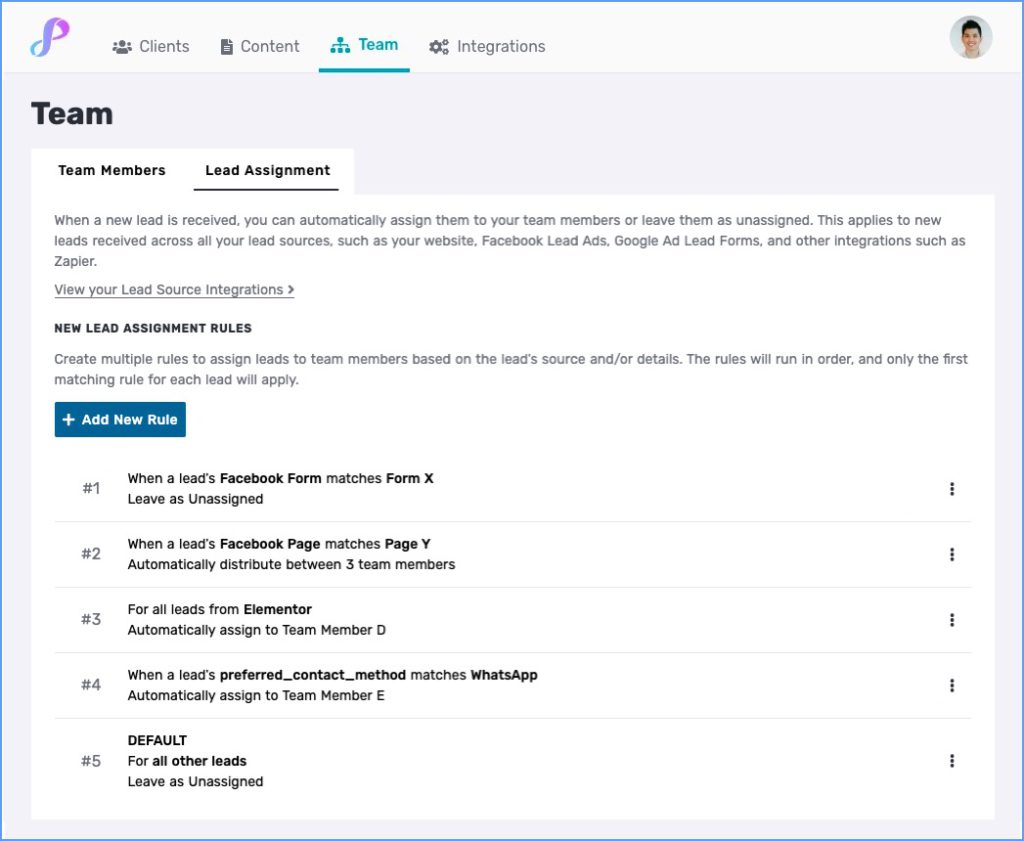
The best part about using Privyr for Teams to automatically assign leads? You don’t need to pick a single style. In fact, you can mix and match lead assignment rules to create a truly customised experience for your team – and one that fits.
Privyr for Teams allows you to create a truly customised experience for your team – one that is as unique as they are.
It’s easy to set or change multiple lead assignment rules under your Team Tab in Privyr. This way, Privyr can grow with your team. Also, you know that you can always set rules or make changes quickly, from a single, neat, and centralised location.
Ready to set up the ‘best fit’ experience for your team?
Automatic lead assignment is just one of several features Privyr for Teams has to offer.
Privyr for Teams is designed to help sales managers better oversee their team members and sales process. By using it, sales managers can take care of menial, manual tasks like assigning leads. That means that they’re free to better support their team on their way to success!
With Privyr for Teams, all leads, clients, and content are accessible in a single place, so sales managers can quickly tell if there is a problem – and step in to fix it. And their teams will start seeing more results in their day-to-day interactions with leads!
Invite one or more team members to join your team on Privyr, and watch how much time you can save knowing that your leads are being assigned quickly and efficiently.

For information on all Teams features, check out our help guide or read five reasons why you should use Privyr for Teams.
Make managing your team, their leads, and your sales content a super smooth and easy experience. Start using Privyr with your team today!
The post 4 ways to automatically assign leads to your team appeared first on Privyr Blog.
]]>