Contents

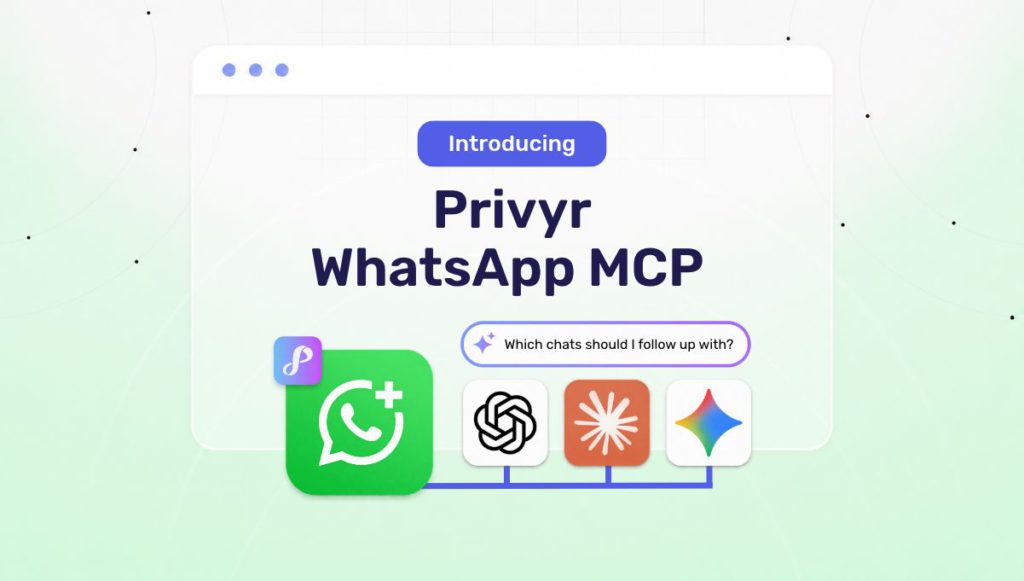
Ever wished ChatGPT could access your WhatsApp chats, so you could ask it questions about your conversations?
Now it can. And it’s FREE! 🎉
Introducing Privyr’s official WhatsApp MCP — one of the most powerful ways to connect your WhatsApp Business to AI assistants like ChatGPT and Claude. And it’s currently free!
Imagine asking ChatGPT:
- 💬 “Which WhatsApp conversations need my attention today?”
- 🔍 “Find all the leads who enquired about properties in Storybrook, New York.”
- ✍️ “Draft a personalised follow-up for these leads about the ACME Residences new launch.”
- 📋 “Summarise my latest WhatsApp conversation with Sarah.”
- ⏰ “Which clients are still waiting for my reply?”
And getting answers based on your actual WhatsApp conversations, without manually searching through chats or copying-and-pasting messages.
You can even ask your AI assistant to help you draft personalised WhatsApp messages, all within the same conversation.
It’s like having a personal AI assistant for your WhatsApp Business.
With Privyr’s official WhatsApp integration, you can connect your existing WhatsApp Business number, keep using the app as usual, and unlock a whole new way to manage your conversations with AI.
And soon, you’ll also be able to do all of this directly in the Privyr app with our very own built-in AI chat interface. Stay tuned!
What is a WhatsApp MCP Server?
A WhatsApp MCP (Model Context Protocol) server is a connector that allows AI assistants like ChatGPT and Claude to access your WhatsApp conversations and perform actions, such as searching chats, summarising messages, and sending replies on your behalf.
Think about it this way: You can already connect AI assistants like ChatGPT and Claude to apps like Gmail and Google Calendar. Once connected, you can ask the AI to help you draft emails, manage your schedule, or any find information you want — without leaving the AI chat.
Now, with Privyr’s WhatsApp MCP, you can do the same with your WhatsApp Business conversations too!
Normally, ChatGPT can’t see your WhatsApp messages. If you want help with specific conversations, you’d need to copy and paste the messages into the AI chat yourself.
WhatsApp MCP changes that.
It acts as a bridge between your WhatsApp Business and your AI assistant, allowing them to work together.
Privyr lets you securely connect your WhatsApp Business account to your preferred AI assistant, whether it’s ChatGPT, Claude, Gemini, or another supported platform.
Then, simply start asking the AI anything you want to know about your WhatsApp chats. No coding. No complex setup.

5 things Privyr’s WhatsApp MCP can help you do
Your WhatsApp conversations are full of valuable information like client preferences, timelines, pending follow-ups, and even personal details like birthdays and anniversaries.
With Privyr’s WhatsApp MCP, you can finally put that information to work without manually digging through the chats yourself.
(1) Instantly find WhatsApp messages that need your attention 🔔
Managing dozens of WhatsApp chats? Important messages may accidentally get buried.
Instead of checking every conversation yourself, just ask ChatGPT: “Which WhatsApp conversations need my attention today?”
Your AI assistant can help identify unanswered enquiries, pending requests, and conversations that may need your response.
You’ll know where to focus your attention without spending hours scrolling through WhatsApp manually.
(2) Summarise any WhatsApp conversation in seconds 📋
Can’t remember what you discussed with a client last week?
Ask Claude: “Summarise my conversation with John and highlight any next steps.”
Your AI assistant can pull together important details from the accessible chat history, including questions asked, requirements, decisions made, and follow-up actions.
It’s a much faster way to catch up, especially when you’re handling multiple clients at once and don’t want to miss any details.
(3) Search across your WhatsApp conversations with AI 🔍
Your WhatsApp chats, both old and new, hold valuable information you can use to plan your next steps.
But finding them feels like searching for a needle in a haystack.
Now you can simply ask AI:
- “Which leads asked about a 3-bedroom apartment this past 3 months?”
- “Find the clients who requested a quotation but haven’t confirmed yet.”
- “Find all the leads who enquired about properties in Storybrook, New York.”
Instead of searching through individual chats, you can use AI to find relevant conversations and organise the information for you.
Perfect for salespeople and teams handling large numbers of customer enquiries.
It also gives you the opportunity to re-engage old leads you might have forgotten about, especially when you have a new offer that’s highly relevant to them.
(4) Draft WhatsApp messages, personalised for every lead ✍️
Your AI assistant can do more than finding information. It can also help you draft follow-ups so you can take action quickly.
Try telling ChatGPT to:
- “Draft a friendly follow-up message to Sarah about the quotation I sent last week.”
- “Find all the leads that stopped responding last month, and draft a personalised follow-up for each one. Keep it short and sweet.”
Your AI assistant will look up the relevant conversations through Privyr MCP and draft the messages for you — all ready to send in seconds.
(5) Turn your WhatsApp conversations into useful business insights 📊
Ever wondered what your leads are asking about most often? What time they’re more likely to respond?
Now you can have these insights and more, right at your fingertips.
Instead of manually reviewing every conversation, ask Claude:
- “What are the most common questions my leads asked this week?”
- “Summarise this week’s WhatsApp sales enquiries and highlight the most promising leads.”
- “What time are my leads usually most responsive on WhatsApp?”
Your AI assistant can analyse all the available conversations and help you spot patterns, identify potential opportunities, and understand what clients need.
It’s like having a personal business analyst who can help you make sense of your WhatsApp conversations.
How to connect WhatsApp to ChatGPT or Claude using Privyr MCP
It’s easy to set up Privyr’s WhatsApp MCP for ChatGPT, Claude, Gemini, and more.
Step 1: Open the Privyr app on desktop
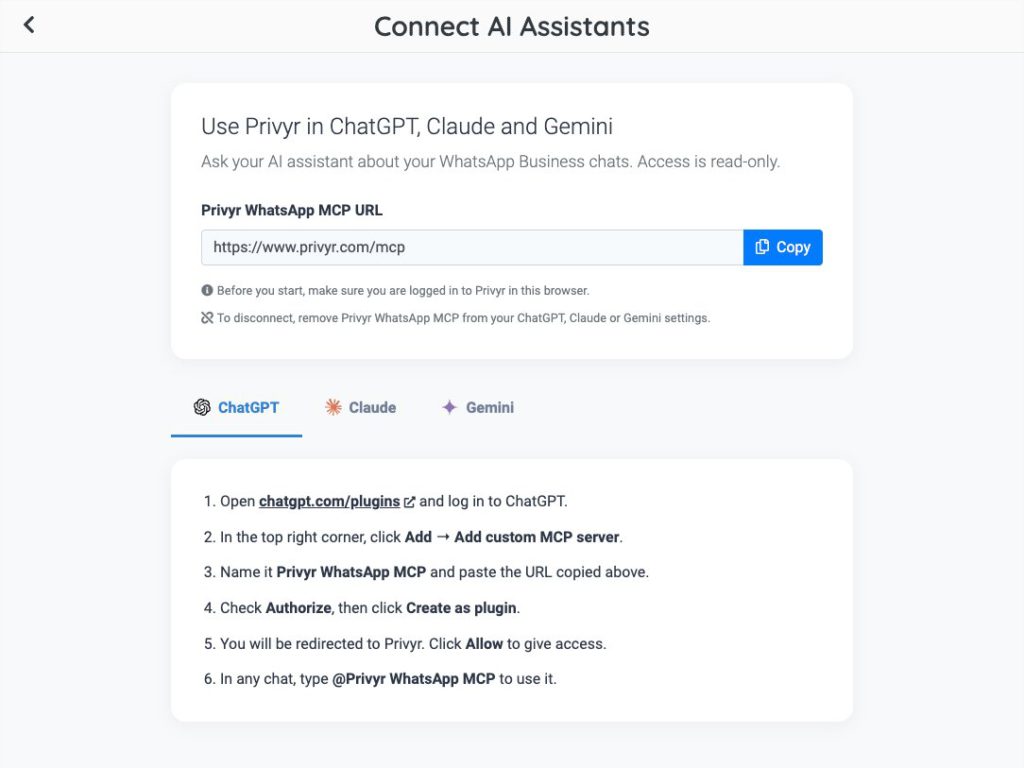
Go to your Automations tab on Privyr web. Under WhatsApp Automations, click on WhatsApp MCP.
Step 2: Connect your WhatsApp Business account to Privyr
If you haven’t already done so, connect your existing WhatsApp Business number through Privyr’s official WhatsApp integration.
Step 3: Connect Privyr WhatsApp MCP to the AI assistant of your choice
Copy the Privyr WhatsApp MCP URL provided. Then, go to your selected platform and follow their instructions to authorise the connection.
Supported AI Assistants include ChatGPT, Claude, and Gemini.
Step 4: Once connected, start talking to your WhatsApp through AI chat!
In the AI chat you’ve connected, try asking: “Show me all the WhatsApp conversations I should follow up on.”
The AI assistant will use Privyr’s WhatsApp MCP to retrieve the relevant information and help you take the next step.
That’s it! You can now manage your WhatsApp conversations in a whole new way, without needing to write a single line of code.
Coming soon: Chat with AI about your WhatsApp directly in Privyr
What if you could do all of the above without even opening ChatGPT or Claude?
We’re also bringing a built-in AI chat directly into the Privyr app!
Once you’ve connected your WhatsApp Business number to Privyr, you’ll soon be able to ask questions about your conversations and perform actions, without leaving the Privyr app.
Simply open Privyr’s AI chat and ask things like:
- “Which leads should I follow up with today?”
- “Find all the clients interested in properties above $2 million.”
- “Draft a follow-up sequence for these leads.”
And just like with ChatGPT or Claude, you’ll get answers based on your real WhatsApp conversations.
No need to connect to another AI platform or switch between apps.
Whether you prefer using ChatGPT, Claude, Gemini, or Privyr’s own AI chat, you’ll have the flexibility to manage your WhatsApp conversations with AI, your way.
Privyr’s built-in AI chat is coming soon. Stay tuned!
Why choose Privyr WhatsApp MCP?
There are different ways to connect WhatsApp to AI, but not every WhatsApp MCP is designed for everyday business use.
Some solutions require technical setup, while others rely on unofficial WhatsApp Web connections.
Privyr brings together a powerful WhatsApp MCP, an official WhatsApp Business integration, and a complete CRM platform for managing leads and automating follow-ups.
Here’s why it’s a great choice:
✅ FREE WhatsApp MCP
Get started with Privyr WhatsApp MCP for free and unlock the power of plugging your WhatsApp conversations, safely and directly, into AI chats.
✅ Official WhatsApp integration
Privyr is a verified Meta Business Partner that uses official WhatsApp integrations. You can safely connect your WhatsApp number without impacting your existing chats or contacts.
✅ Keep using your existing WhatsApp Business number
No need to change your number or switch to a completely different inbox. Nothing changes with how you use WhatsApp – you simply get to do more with AI now.
✅ Works with AI assistants like ChatGPT, Claude, and Gemini
Bring your WhatsApp conversations into supported AI assistants and manage information directly through natural-language questions and instructions.
✅ Built-in AI chat coming soon
Don’t want to use a separate AI assistant? Privyr will soon have its own built-in AI chat interface, so you can ask questions about your WhatsApp conversations and perform actions directly from the Privyr app.
✅ No coding required
You don’t need to build, host, or maintain your own MCP server. Privyr handles the WhatsApp connection for you.
✅ More than just a WhatsApp MCP
Privyr is built to help businesses capture, engage, and convert leads.
Beyond connecting WhatsApp to AI assistants, Privyr also offers powerful tools like WhatsApp Auto-Responders, AI Lead Qualification, automated follow-up sequences, WhatsApp Campaigns, and more.
Whether you’re a salesperson, business owner, or managing a sales team, Privyr helps you automate your WhatsApp follow-ups.
Frequently Asked Questions (FAQs)
Is Privyr WhatsApp MCP server free?
Yes! Privyr offers a FREE WhatsApp MCP server that lets you connect your WhatsApp Business account to supported AI assistants.
Do note that the AI Assistant you choose, like ChatGPT, Claude, or Gemini, may require a separate subscription.
Can ChatGPT read my WhatsApp messages?
Yes. By connecting to Privyr’s WhatsApp MCP, ChatGPT can access your authorised WhatsApp Business conversations, helping you find messages, summarise chats, and answer questions about your clients.
As a verified Meta Business Partner, Privyr WhatsApp MCP offers a secure integration to keep your account and data safe.
Can Claude connect to WhatsApp?
Yes. You can securely connect Claude to your WhatsApp Business account using Privyr’s WhatsApp MCP. This allows Claude to analyse your WhatsApp conversations and perform supported actions.
Can ChatGPT send WhatsApp messages for me?
Yes. WhatsApp MCP servers that support messaging actions allow ChatGPT to draft and send messages through your connected WhatsApp Business account.
However, Privyr’s WhatsApp MCP currently offers read-only access. We’re working on adding the ability to send WhatsApp messages directly through AI chat in a future update. Stay tuned!
In the meantime, you can use Privyr’s Automated WhatsApp Sequences to automatically send multiple follow-ups to your leads over time.
Do I need technical knowledge to set up WhatsApp MCP?
No. Privyr provides a hosted WhatsApp MCP connection, so you don’t need to install or manage your own server. You’ll just need to connect your accounts and configure the connector on your preferred AI platform.
Can I use WhatsApp MCP with my existing WhatsApp Business number?
Yes. Privyr supports WhatsApp Business Coexistence, which allows you to connect your existing WhatsApp Business number through the official API while continuing to use the regular WhatsApp Business app.
Is WhatsApp MCP safe?
Yes, when using a secure, official integration like Privyr’s WhatsApp MCP. As a verified Meta Business Partner, Privyr connects to WhatsApp through official APIs rather than unofficial WhatsApp web automation.
You also have control over which AI assistants you authorise to access your conversations. As with any AI integration, always review the data and permissions you’re granting before connecting.
What’s the difference between WhatsApp MCP server and a WhatsApp AI chatbot?
A WhatsApp MCP server connects a third-party AI assistant like ChatGPT or Claude to your WhatsApp conversations, so you can ask questions and perform tasks.
On the other hand, a WhatsApp AI chatbot or auto-responder, automatically replies to leads who message you on WhatsApp.
Privyr offers both capabilities:
- Privyr’s WhatsApp MCP lets you connect to third-party AI assistants to search and analyse your WhatsApp conversations.
- Privyr’s WhatsApp Assistant automatically responds to inbound enquiries you receive and chats with new leads to qualify them on your behalf.
Coming soon: Privyr’s built-in AI chat lets you ask questions about your WhatsApp conversations and perform supported actions, all directly from the Privyr app. No third-party AI tools needed.
AI for WhatsApp is getting better – and you can now experience it for free 🚀
You’ve probably already used ChatGPT or Claude to write emails, summarise documents, or get things done faster.
Now imagine doing all of that with your WhatsApp conversations too.
With Privyr’s WhatsApp MCP, your AI assistant can finally help you read, search, understand, and act on your WhatsApp Business conversations.
No more manually scrolling through endless chats. No more copying and pasting messages into AI.
Just connect your WhatsApp Business to Privyr, open your favourite AI assistant, and ask away.
And the best part?
Privyr’s WhatsApp MCP is FREE for a limited time! 🎉