Contents
A few verified Meta Business Partners like Privyr and some unofficial tools offer free WhatsApp autoresponders. Having a WhatsApp autoresponder shouldn’t be simply about whether it’s free. You need a reliable system that lets you manage your inbound WhatsApp enquiries safely as your business scales.
If you’re losing leads because you can’t respond instantly to enquiries that come in outside of business hours or when your team is busy, you need a WhatsApp autoresponder. An autoresponder can help you manage your incoming queries by automatically responding to them, ensuring your leads aren’t left waiting when you’re unavailable.
If you’re looking for free WhatsApp autoresponders to automate your WhatsApp replies, you’re in the right place. In this article, we’ll list 5 free WhatsApp autoresponders, explain how each works, and help you understand which option best fits your needs.
What makes a good WhatsApp autoresponder
A WhatsApp autoresponder shouldn’t just just acknowledge an inbound enquiry but also help you move your conversations forward without making them feel awkward or robotic. Managing each enquiry correctly is important because a relevant personalised response is crucial to keep leads engaged rather than a generic acknowledgement.
Here are some important features that make a WhatsApp autoresponder ideal:
- Correct response in all situations: Good autoresponders send the right response based on the enquiry rather than responding to every incoming message with the same reply or misinterpreting the messaging and sending a totally irrelevant reply.
- Relevant and personalised replies: Automatic reply should address the enquiry based on the context, such as campaign, enquiry type, etc. so the conversation feels useful rather than automated for the sake of it.
- Scalability: An autoresponder should be able to manage a growing number of inbound enquiries without you needing to manually create and maintain an unmanageable set of rules.
- AI capabilities where needed: Good AI capabilities can help you handle a wider variety of questions and natural-language variations rather than stiff keyword rules. An autoresponder with such capabilities can help you process replies faster and more reliably. However, it should also be controllable enough, so a human handles crucial conversations at the right time.
- Reliable background operation: Autoresponders shouldn’t rely on your phone’s features and notifications. A good autoresponder responds to all inbound enquiries at all times regardless of your device’s settings.
- Protection against over-messaging: Duplicate and unnecessary messages can ruin your customer experience. Good autoresponders come with reply limits, delays, and exclusions, so your leads only receive the correct reply.
- Easy human handover: Autoresponders can be great for keeping leads engaged, not for handling important conversations. Once the conversation is taken over by a human, good autoresponders don’t send conflicting messages.
- Low usage risk: Unauthorised automations come with the possibility of restrictions or disruptions. This can affect your entire sales process and cause customer loss. If you’re using WhatsApp Autoresponder to manage your business communications, the tool should operate smoothly without putting your account, conversations, or customer access at risk. Choose a tool that operates through official WhatsApp channels and its automation methods follow WhatsApp’s Terms of Service.
5 free WhatsApp autoresponders: Quick overview
The table below lists 5 free WhatsApp autoresponder providers and how they work:
| Tool | API type | AI powered logic | Works with | Rule based replies | OS | Additional WhatsApp features | Risk level |
| Privyr’s Whatsapp Auto-Responder | Official WhatsApp APIs | Yes | WhatsApp Business, Official WhatsApp APIs | Yes | iOS,Android | Full CRM features for WhatsApp | 🟢 Low |
| WhatsApp Business | Native WhatsApp Business feature | Limited | WhatsApp Business App | Very Limited | iOS,Android | WhatsApp Features | 🟢 Low |
| Auto Responder for WA | Unofficial App | No | Regular WhatsApp, WhatsApp Business | Yes | Android only | Automatic message response only | 🔴 High |
| Watomatic | Unofficial App | No | Regular WhatsApp, WhatsApp Business | No | Android only | Automatic message response only | 🔴 High |
| WhatAuto | Unofficial App | No | Regular WhatsApp, other messaging apps | Not free | Android only | Automatic message response only | 🔴 High |
1. Privyr’s WhatsApp Auto-Responder
WhatsApp platform: WhatsApp Business App and official WhatsApp APIs
✅ Verified Meta Business Partner
Privyr is a mobile-first CRM and verified Meta Business Partner that runs WhatsApp automations through WhatsApp’s official APIs. Instead of handing control of your WhatsApp account to a third-party tool, you connect your existing WhatsApp Business number to Privyr through Meta.
Privyr uses WhatsApp coexistence to manage the autoresponder, allowing you to continue using the WhatsApp Business app for business conversations. Your existing chats, contacts, groups, and phone number remain in WhatsApp Business, while Privyr handles your automations in the background.
How Privyr’s Autoresponder works
Privyr’s Auto-Responder lets you set up rule-based automations that send the right response to each incoming enquiry. You can create rules for determining when an automatic reply should be sent and what that reply should contain.
Here’s how to set it up:
- On Privyr Web, go to your Automations tab.
- Select WhatsApp Automations and go to Inbound Inquiry Auto-Responder.
- Connect your existing WhatsApp Business number if you haven’t already.
- Click Create Rule.
- Set your trigger and automated response.
- Create as many rules as you need for the enquiries you commonly receive.
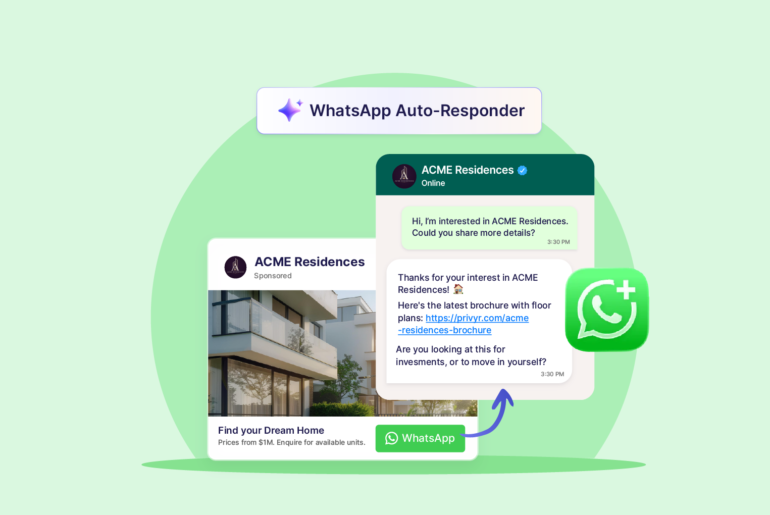
Based on the rules you set, the autoresponder can tailor replies for each inbound enquiry instead of sending everyone the same generic message. For example, if someone asks about pricing, the autoresponder automatically sends them your price list. If they ask for more information, they receive your business brochure or other relevant information based on their enquiry.
This AI-powered feature can use logic to understand and qualify queries but you absolutely control the rules and responses. Privyr’s autoresponder triggers include:
- New WhatsApp conversations
- Particular words or phrases
- AI intent matching
- Meta Click-to-WhatsApp Ads
- QR-code enquiries
You can set these up to trigger an instant reply, timed sequence, or AI lead qualification, depending on the rule you create.
If you don’t have a Privyr account, go to www.privyr.com and create a free account. Privyr’s WhatsApp Auto-Responder is free to use.
Here are some useful features of Privyr’s free WhatsApp autoresponder:
- Multiple auto-reply rules: Create as many automation rules as you need so different WhatsApp enquiries receive different responses.
- Message-based triggers: Automatically respond when an incoming message matches, contains, starts with, or ends with specific text.
- Click-to-WhatsApp Ad replies: Send tailored automatic responses to enquiries coming from specific Meta Click-to-WhatsApp Ads.
- New-conversation replies: Automatically respond when someone messages you for the first time or after a set period of inactivity.
- WhatsApp links and QR codes: Generate links or QR codes with pre-filled messages that can trigger specific automated responses when the lead sends them.
- Different responses for different enquiries: Automatically send relevant information based on the product, property, service, campaign, or question a prospect is enquiring about.
- Brochures, price lists and links: Include links to brochures, floor plans, pricing and other useful information directly in automated responses.
- Automated qualifying questions: Ask prospects questions about their budget, preferences, requirements or other qualifying information as part of the response.
- Selective automation: Choose which enquiries to automate so personal chats or conversations you prefer to handle manually remain unaffected.
- 24/7 background responses: Automatically respond while you’re busy or offline, without relying on your phone’s notification system.
- Existing WhatsApp Business number: Connect your current WhatsApp Business number and continue using the WhatsApp Business app normally while Privyr handles automated responses in the background.
Privyr’s Auto-Responder is designed to give you full control over your business communications. When selling high-ticket products, you want automation to handle the initial follow-up and keep leads warm, while your team steps in for more important conversations, personalised assistance, and negotiations.
Beyond providing WhatsApp autoresponder, Privyr is also a complete CRM that helps you manage the rest of your sales process on WhatsApp. You can set up automated follow-up sequences, connect lead sources, track and manage leads, and even trigger WhatsApp autoresponders for new leads coming from connected platforms.
WhatsApp autoresponder rating
Correct response in all situations ⭐️⭐️⭐️⭐️
Relevant and personalised replies ⭐️⭐️⭐️⭐️⭐️
Scalability ⭐️⭐️⭐️⭐️⭐️
AI capabilities where needed ⭐️⭐️⭐️⭐️
Reliable background operation ⭐️⭐️⭐️⭐️⭐️
Protection against over-messaging ⭐️⭐️⭐️⭐️⭐️
Easy human handover ⭐️⭐️⭐️⭐️⭐️
Low usage risk ⭐️⭐️⭐️⭐️
2. WhatsApp Business Auto-Reply
WhatsApp platform: WhatsApp Business App
✅ Native WhatsApp Business Feature
WhatsApp Business natively comes with a basic autoresponder feature called auto-reply. It comes with two main ways for automatically responding to incoming enquiries: Greeting Messages and Away Messages.
You can set up a Greeting Message to automatically acknowledge or greet when someone messages you for the first time or contacts you again after 14 days of inactivity. You create the message and choose which categories of contacts should receive it.
Away Messages help you stay responsive even when you’re unavailable. You can set them to automatically reply to incoming messages at specific times, such as outside business hours or during a custom schedule, while letting people know when they can expect to hear back from you.
You can configure auto-reply directly inside WhatsApp Business under its business tools. Here’s how to set up auto-reply on WhatsApp:
- Go to settings > Business Tools on WhatsApp Business.
- Select Away messages or Greeting Messages.
- Turn on Send (Away messages or Greeting Messages).
- Write the message you want customers to receive.
- Choose when it should be sent:
- always,
- during a custom period,
- outside your business hours.
- Choose which contacts should receive it.
- Save your settings.
Keep in mind that WhatsApp auto-reply only allows you to set up basic automatic messages rather than rule-based responses. The feature doesn’t analyse different enquiries and sends a different answer to each one. All enquiries will receive the same, generic response.
WhatsApp autoresponder rating
Correct response in all situations ⭐️⭐️
Relevant and personalised replies ⭐️
Scalability ⭐️
AI capabilities where needed ⭐️⭐️
Reliable background operation ⭐️⭐️⭐️⭐️⭐️
Protection against over-messaging ⭐️⭐️⭐️⭐️
Easy human handover ⭐️⭐️⭐️
Low usage risk ⭐️⭐️⭐️⭐️⭐️
3. AutoResponder for WA
WhatsApp platform: WhatsApp App, WhatsApp Business App (Android only)
⚠️ Unofficial tool
AutoResponder for WA lets you set up automatic WhatsApp replies on your android device. It works by reading incoming notifications on your phone and responding to them automatically. You can use it with both the regular WhatsApp app and WhatsApp Business.
According to the tool’s developer, AutoResponder for WA doesn’t directly access WhatsApp and instead replies through notifications. The tool is not officially approved by WhatsApp, and using it may violate WhatsApp’s Terms of Service.
The main features of Autoresponder for WA include:
- Custom auto-reply rules: Automatically reply to every incoming WhatsApp message or create different responses based on the message.
- Unlimited rule combinations: Build as many question-and-response combinations as you need.
- Multiple and random replies: Set several reasons for the same rule and rotate between them.
- Contact-specific autoresponder: Apply different auto-reply rules based on contacts, groups, and user types.
- Welcome messages: Automatically respond with a greeting to inbound enquiries.
- Delayed responses: Add a delay for automated responses instead of replying instantly.
- Time based rules: Set certain auto replies for specific times.
If you want more advanced features, the Pro plan adds advanced pattern matching, unlimited daily replies, Google Sheets, Dialogflow, web servers, delays, schedules, conditions, and statistics exporting.
Cons of Autoresponder for WA
Here are some disadvantages of Autoresponder for WA:
- Not an official WhatsApp integration: The biggest disadvantage of Autoresponder for WA is that it works through Android notifications and not WhatsApp’s official integrations. WhatsApp warns against unauthorised automated or bulk messaging. Automating for business and at scale outside WhatsApp’s official channels comes with a high risk of your account being banned.
- Not suitable for business communications: AutoResponder for WA can be an unreliable option for handling your business communications. Using it not only puts your account at risk but also poorly supports high volume of enquiries.
- Android-only: AutoResponder.ai app isn’t available for iOS devices for full WhatsApp automation.
- Notification dependency: Your phone’s WhatsApp notification flow is part of the automation. When you turn it off, WhatsApp autoresponder is disabled.
- Advanced rules can be difficult to configure: Some users report that basic matching does not behave as expected with longer sentences.
- User-reported reliability issues: Some users report that automatic replies fail to trigger even after completing the required setup.
- Device dependency: Since it isn’t a cloud responder, it fails to operate when the Android device is switched off.
- No sales features: It doesn’t provide a sales pipeline, lead ownership, follow-up reminders or lead-management workflow.
WhatsApp autoresponder rating
Correct response in all situations ⭐️⭐️⭐️
Relevant and personalised replies ⭐️⭐️⭐️⭐️
Scalability ⭐️⭐️
AI capabilities where needed ⭐️
Reliable background operation ⭐️
Protection against over-messaging ⭐️⭐️
Easy human handover ⭐️⭐️⭐️
Low usage risk ⭐️
4. Watomatic
WhatsApp platform: WhatsApp App, WhatsApp Business App (Android only)
⚠️ Unofficial tool
Watomatic is a free, open-source Android autoresponder for WhatsApp. Unlike many other free autoresponders on this list, it is not designed to send rule-based or context-specific replies to individual enquiries. Instead, it allows you to set a generic away message that is automatically sent to incoming enquiries, just to let senders know that you are currently unavailable.
Watomatic also works through Android notifications rather than the official WhatsApp API. The app has no ads or tracking and is available through F-Droid.
Watomatic is relatively simple compared to rule-based tools. You set an automatic reply, and it can send that response to incoming individual or group messages.
The primary features of Watomatic include:
- Automatic replies: Automatically send predefined responses to incoming messages.
- Multiple app support: Use the same autoresponder across WhatsApp, WhatsApp Business and other messaging apps.
- Individual and group chat controls: Choose whether automatic replies apply to private conversations, group chats, or both.
- Reply-frequency controls: Limit how often the same person receives your automatic response.
- Open source software: Watomatic’s source code is publicly available, making its functionality and privacy approach more transparent.
Cons of Watomatic
Here are some notable disadvantages of Watomatic:
- Not an official WhatsApp integration: Watomatic works through Android notifications and not WhatsApp’s official integrations. Using unauthorised automated or bulk messaging in scale comes with a high risk of your account being banned.
- Not suitable for business communications: AutoResponder for WA isn’t recommended for business communications or managing a high volume of enquiries.
- Very limited automation logic: It’s primarily an automatic away responder rather than a configurable autoresponder for inbound enquiries.
- Android-only: Its notification quick-reply architecture doesn’t work for iOS.
- Notification-dependent: Notifications are required for the responder to respond to an incoming message.
- Phone-dependent: There’s no cloud-based responder as processing happens on the Android device.
- No sales management: There are no lead stages, assignment, follow-up reminders or CRM functionality.
WhatsApp autoresponder rating
Correct response in all situations ⭐️⭐️
Relevant and personalised replies ⭐️
Scalability ⭐️
AI capabilities where needed ⭐️
Reliable background operation ⭐️
Protection against over-messaging ⭐️
Easy human handover ⭐️⭐️
Low usage risk ⭐️
5. WhatAuto
WhatsApp platform: WhatsApp App, WhatsApp Business App (Android only)
⚠️ Unofficial tool
WhatAuto is also an Android autoresponder app that lets you automatically respond to inbound WhatsApp enquiries on WhatsApp for free. You can switch auto-replies on with a single tap, choose who should receive them, and customise the responses.
The app also lets you configure a set of rules that include reply every time a message comes in, wait for a set period before replying again, send a response after a delay, or reply only once. You can also schedule the app to automatically turn its auto-reply feature on and off.
Main features of WhatAuto include:
- One-tap auto reply: Quickly switch on a general automatic response for incoming messages.
- Contact-based controls: Choose who receives automatic replies, for example, everyone, selected contacts, or everyone except certain contacts.
- Group chat support: Enable or restrict automatic replies in WhatsApp groups as well as individual chats.
- Custom keyword replies: Send different responses when incoming messages contain specific words or phrases.
- Welcome messages: Automatically greet incoming enquiries.
- Smart reply timing: Control whether replies are sent immediately, after a delay, only once, or repeatedly.
- Scheduled auto replies: Set the autoresponder to turn on or off automatically at specific times, for instance, outside business hours.
- Driving mode: Automatically activates autoresponder while you’re driving.
The tool also offers a paid tier for more advanced responses. It includes WhatsApp auto reply bot builder for chatbot-style automated conversations, email notifications, analytics, Google sheets integrations, etc.
Cons of WhatAuto
- Not an official WhatsApp integration: WhatAuto’s free autoresponder works through Android notifications rather than the official WhatsApp Business Platform. Relying on unauthorised automation or bulk messaging comes with a greater risk of account restrictions and/or other compliance issues.
- Android dependency: The standard architecture of WhatAuto is designed for Android devices, meaning you can’t use it on your iOS.
- Notification dependency: Since the tool works based on Android notifications, you can’t automate your WhatsApp messages if notifications are disabled.
- Muted chats and active chats do not get replies: WhatAuto’s own documentation acknowledges that automatic replies may not work if a conversation is muted or if you’re already viewing and chatting in it.
- User-reported reliability and subscription issues: Some users report bugs, performance slowdowns on their phones, and problems related to subscriptions or premium access.
- Battery optimisation can affect automatic replies: Your Android phone’s battery saver mode may restrict or stop WhatAuto from running in the background to save battery, resulting in automatic replies to stop working consistently.
- It’s not a CRM: WhatAuto is primarily an autoresponder. It doesn’t offer tools for managing your leads through a sales process.
WhatsApp autoresponder rating
Correct response in all situations ⭐️⭐️⭐️
Relevant and personalised replies ⭐️⭐️⭐️⭐️
Scalability ⭐️⭐️
AI capabilities where needed ⭐️⭐️
Reliable background operation ⭐️
Protection against over-messaging ⭐️⭐️
Easy human handover ⭐️⭐️⭐️
Low usage risk ⭐️
Limitations of Android notification-based autoresponders
If you’re using WhatsApp casually, the notification-based model may work fine. But using unofficial autoresponders can do more harm than good when WhatsApp is a critical part of yourl sales process.
Android notification-based autoresponders don’t come with WhatsApp Business API advantages and are mostly less reliable or responsive when sending automated replies promptly. Here’s when Android notification-based autoresponders don’t work:
When your WhatsApp notifications are disabled: Android notification-based autoresponders rely on notification access to your phone. Without a notification to detect, the standard rule can’t be triggered through its normal mechanism.
When your phone is switched off: Android notification-based autoresponders run on your Android device. AutoResponder fails to process incoming notifications immediately if your device is turned off.
When your phone has no internet connection: Since these tools work based on WhatsApp notifications, a phone with no internet connection doesn’t provide the notification it requires to trigger instant WhatsApp response.
When Android prevents the required service from operating correctly: Android notification-based autoresponders rely on a native Android API and errors cannot be ruled out.
Are free WhatsApp autoresponders safe?
Free WhatsApp autoresponders can be safe, but it depends on how they operate.
The safer options are generally features built directly into WhatsApp or tools that use the official WhatsApp Business Platform or Cloud API. Autoresponders that work through authorised Meta integrations are also a safe choice as they function within WhatsApp’s supported ecosystem.
WhatsApp autoresponders that automate messages through methods that WhatsApp does not officially support, such as accessing your phone’s notifications or interacting with WhatsApp without an authorised integration are generally unsafe.
WhatsApp’s Terms of Service prohibit using applications that interact with its services without consent. If WhatsApp detects a violation, it may restrict, suspend, or terminate your WhatsApp account. It’s best to avoid free autoresponders that rely on unofficial workarounds.
How to identify a safe free WhatsApp autoresponder
Safe WhatsApp autoresponders usually:
- Use WhatsApp’s official Business Platform or Cloud API
- Connect through Meta or an authorised integration
- Don’t require unofficial access to your WhatsApp account
- Clearly explain what permissions are needed
- Have clear privacy and data-handling policies
- Don’t ask you to hand over control of your WhatsApp app
- Don’t ask for your phone notification access
- Clearly states whether they are affiliated with or authorised by Meta or WhatsApp.
If your business depends heavily on WhatsApp for sales or customer communication, you should be especially careful about using unsupported automation methods. Choosing an official or authorised integration can reduce the risk of account restrictions.
Risks of using unauthorised WhatsApp autoresponders
If you’re using an unauthorised third-party WhatsApp autoresponder, keep in mind that WhatsApp restricts unauthorised automated and bulk messaging.
WhatsApp only supports approved automation through the WhatsApp Business Platform (WhatsApp API), including automated replies within the 24-hour customer-service window and business-initiated messages using approved templates.
The risk is higher when third-party automation tools automate the regular WhatsApp or WhatsApp Business app through unauthorised methods, especially for high-volume messaging. WhatsApp may restrict or ban accounts that violate these rules.
If WhatsApp is an important sales channel for your business and you’re looking to scale, it’s safer to use tools that operate through official WhatsApp integrations and follow WhatsApp’s messaging policies.
Technical comparison of Free WhatsApp autoresponder tools
| Technical consideration | Privyr’s WhatsApp Auto-Responder | WhatsApp Auto-Reply | AutoResponder for WA | Watomatic / Atomatic | WhatAuto |
| How it works | Uses the official WhatsApp APIs and runs automation in the cloud. | Built directly into the WhatsApp Business app as Greeting and Away Messages. | Reads incoming Android notifications and replies through Android’s notification API. | Uses Android notification and processes rules locally on the phone. | Uses Android notifications to detect and reply incoming enquiries on WhatsApp |
| Android support | ✅ | ✅ | ✅ | ✅ | ✅ |
| iOS support | ✅ | ✅ | ❌ | ❌ | ❌ |
| Phone needs to remain switched on | No | Yes | Yes | Yes | Yes |
| Works if your phone loses internet | Yes. Automation is cloud-based. | No | No | No | No |
| Can disabled notifications stop the autoresponder? | No | No | Yes | Yes | Yes |
| Can Android battery/background restrictions affect it? | No. The autoresponder doesn’t run on the phone. | No | Potentially | Potentially | Yes |
| Different replies based on message text | ✅ Matches exact text, contains, starts with or ends with specific text. | ❌ Greeting/Away Messages aren’t keyword-based rule engines. | ✅ Exact/similarity matching | ❌ Primarily one custom away-style response | ✅ Custom keyword responses |
| Schedule when replies operate | Automation rules can run continuously/cloud-side | Away Messages can run always, on a custom schedule, or outside business hours. | Specific times/delays not available for free. | Limited compared with rule-based tools | Scheduling available. Some advanced functionality is paid. |
| Official WhatsApp integration | Yes. Official Meta/WhatsApp APIs. | Yes. Native WhatsApp Business functionality | No | No | No |
| Runs independent of your mobile device | ✅ | ❌ | ❌ | ❌ | ❌ |
| CRM / lead management | Yes. Full CRM alongside autoresponder | No | No | No | No |
Frequently Asked Questions
How to automate WhatsApp messages for free?
You can automate WhatsApp messages for free using WhatsApp Business’s native greeting and away messages or official tools like Privyr’s WhatsApp Auto-Responder. There are also a few third-party autoresponder tools such as WhatAuto, Watomatic, and AutoResponder for WA.
Can I put an auto-reply on WhatsApp?
Yes, you can set automatic replies through WhatsApp Business or by using a compatible WhatsApp autoresponder tool like Privyr.
How do I set up an auto-reply on WhatsApp?
In WhatsApp Business, go to Business Tools and configure a Greeting Message or Away Message, or use an autoresponder app for more advanced rules.
What is the best WhatsApp automation tool?
The best WhatsApp automation tool depends on your needs. Simple app usage is suited for basic auto-replies whereas tools like Privyr better suit businesses that need reliable WhatsApp automation alongside lead management.
How to set auto reply in WhatsApp without business account?
Regular WhatsApp does not include built-in auto-replies, so you generally need a third-party Android autoresponder app if you do not use WhatsApp Business.
How do I create an automatic reply message?
Write a short response that acknowledges the enquiry, gives useful immediate information, and tells the person what to expect next, then add it to your auto-reply rule.
Can you set WhatsApp to auto answer?
Yes, WhatsApp can automatically respond to incoming messages using WhatsApp Business’s built-in tools or third-party tools like Privyr.
Can you set WhatsApp to automatically send messages?
Yes. You can set WhatsApp to automatically send messages via an appropriate WhatsApp Business automation or API-based tool like Privyr