Contents
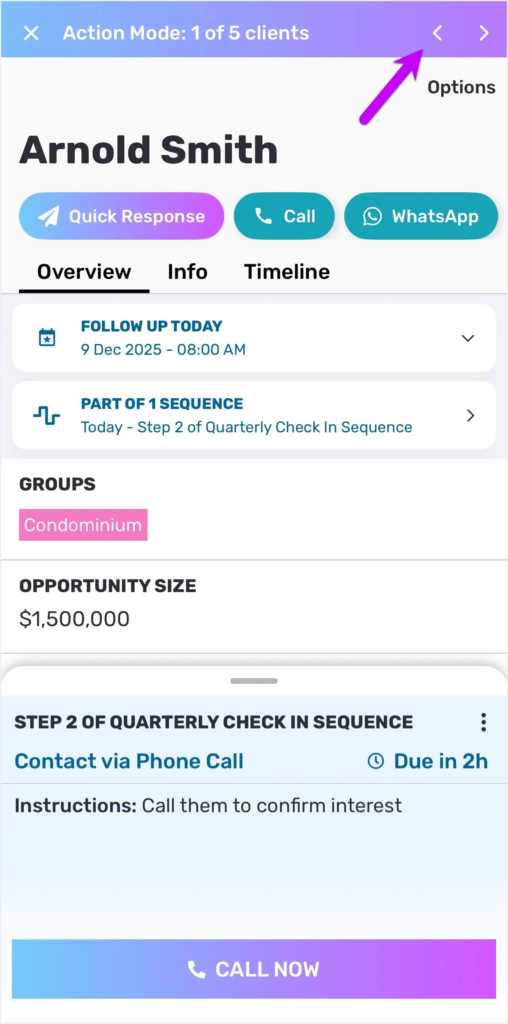
We’re excited to introduce Action Mode on the Privyr mobile app! ✨ This gives you a carousel view of all clients with pending actions today.
Now you won’t have to click in and out of each client to view and execute your next steps.
You can complete your pending actions in one smooth flow, simply by tapping left or right to go to the next client.

Why you’ll love Action Mode
✅ Effortlessly navigate between each client that needs your attention by tapping left or right – no need to manually switch screens
✅ Stay in the flow while completing your pending follow-ups, calls, or sequence steps by tapping the suggested action
✅ Focus on what matters and see only the clients you need to perform actions on
Now you can power through your daily to-dos much more efficiently!
To get started, go to your Actions tab on mobile and tap on “Start Action Mode” at the bottom of your screen.
The new Action Mode is now available on the latest Privyr mobile app. We hope you find it useful.
See you at our next update!
– Team Privyr